Participant
April 26, 2018
Answered

Indesign double spread

  • April 26, 2018
  • 4 replies
  • 832 views

Saved my double spread inDesign book. Shows up wrong in Acrobat How do I view the double spread?

    This topic has been closed for replies.
    Correct answer Kevin Stohlmeyer

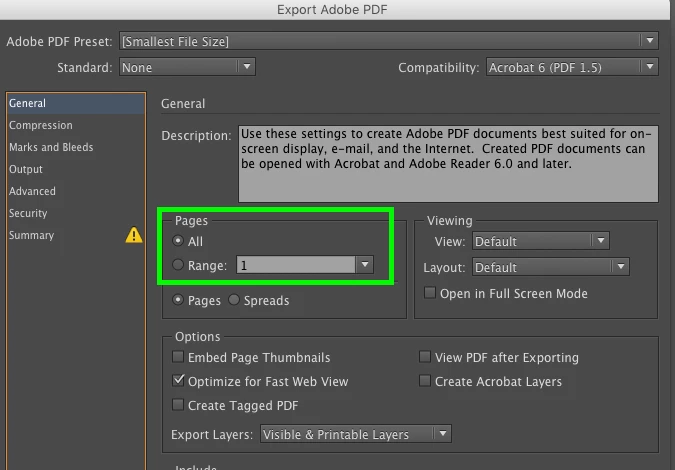
    Actually you have to set this up when exporting from InDesign. Acrobat will not honor double spreads, only single (2 up).

    Choose "Spreads" to export out as designed from InDesign.
    4 replies

    Srishti Bali
    Community Manager
    Community Manager
    May 3, 2018

    Hi Peter,

    We have been waiting for your response on this query and would like to know if the above-shared suggestions worked for you, or the issue still persists.

    Kindly update the discussion if you need further assistance with it.

    Regards,

    Srishti

    Community Expert
    April 27, 2018

    SJRiegel  wrote:

    … In newer versions of InDesign, this is available in the PDF export box as well.

    Also note, that setting Viewing > View: ( not Default ) is not compatible with PDF/X.

    Wheras Viewing > Layout: ( not Default ) is compatible with PDF/X.

    Regards,
    Uwe

    Kevin Stohlmeyer
    Community Expert
    Kevin StohlmeyerCommunity ExpertCorrect answer
    Community Expert
    April 27, 2018

    Actually you have to set this up when exporting from InDesign. Acrobat will not honor double spreads, only single (2 up).

    Choose "Spreads" to export out as designed from InDesign.

    Legend
    April 27, 2018

    In Acrobat, under file properties, you can make changes to Initial View, and afterward the file will always open that way in Acrobat.

    In newer versions of InDesign, this is available in the PDF export box as well.