

tRiv
Inspiring
October 5, 2018
Answered

InDesign file icons are generic white box

  • October 5, 2018
  • 11 replies
  • 32669 views

Yesterday I had a new profile added to my desktop (Win7) at work so that it wasn't under the old designers name but this morning I noticed that all InDesign files had been disassociated with InDesign. So, I did the whole "open with x program always" by browsing for InDesign but instead of the regular file icon, it now shows the generic white thumbnail with a tiny InDesign logo:
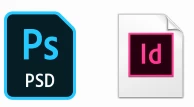
example of photoshop file with icon vs indesign file with generic icon

I've tried deleting/reinstalling InDesign and refreshing the icon cache, and checking out the other discussions on the topic. No success.

The files still work fine but it's mostly just an aesthetic issue. I need it to be fixed or it will drive me crazy.

Any help would be greatly appreciated.

This topic has been closed for replies.
Correct answer Jose M. Ramos

I think you found the problem friend. It's your user profile. Just delete your said profile and start fresh. That should do it.

11 replies

Participant
March 27, 2024

Hello, I am an IT technician and was troubleshooting this issue for one of my users. He just recently installed Adobe Indesign 2024 from Creative Cloud. After the update he began facing the blank icon issue. I attempted various registry fixes and uninstall/reinstalls but ultimately this did not work. This is on Windows 10.


What did work is:

1. Opened Default appliations in settings

2. Reset all file associations to Microsoft defaults

3. Checked file associations by file type - .INDD showed it did not have an application installed for it (weird) 

4. Right clicked an InDesign file > properties > change > selected Adobe Indesign 2024 and applied (icons still blank)

5. Checked file associations in settings again and it now showed .INDD was associated with InDesign (but icons still blank)

6. Restarted 'Windows explorer' in Task manager

7. Opened Windows explorer again and icons now showed InDesign icon normally


Hopefully this helps someone down the line

Participant
October 12, 2023

Hello, today i have updated InDesign from CC2023 to 2024 and got the same problem. Tried everything mentioned in this thread and haven't gotten my problem fixed.

Finally, I fixed it by installing CC 2023 again. I've changed file association to CC 2023, the icon was still white blank. I uninstalled 2023 and again I've changed association to 2024 and icon appeared!!!

good luck 😉

HARSHIKA_VERMA
Community Manager
Community Manager
October 12, 2023

Awesome, @tRiv. Thank you for sharing the solution that worked for you, which might help our customers experiencing a similar issue. Please feel free to reach out to us for any assistance in the future.


We would be happy to help.


Thanks,

Harshika 


Charismatic_artistry5FD4
Participant
November 8, 2022

The steps that helped me:

- make sure your computer is update (reset computer)

- make sure your apps are update and any previous versions are uninstalled

- uninstalll/reinstall app

- sign out/ sign back in to Adobe Creative Cloud profile (this last one is what did it for me but the above steps should be done as well)

Participant
October 12, 2021

Hi all,


U had similar issue with indesign 2021 and it was solved with uninstalling the InDesing then Ccleaner for cleaning the registy and without restart I reinstalled InDesign from Adobe creative cloud and then just pressed F5 to reload the folder with the problematic files and voa la 🙂 everythign works and icon shows well....


Hope it will be helpfull.


Have a nice day


John_Lambert
Inspiring
November 16, 2021

Just had this problem with Indesign 2022


None of the above solutions, such as associating the files etc. worked for me.


Uninstall and fresh reinstall solved it for me in the end - hopefully that will help somebody?

Participant
November 17, 2021

I had the same problem with Indesign 2022. Uninstall/reinstall didn't work. I finally got it to work by going to Default apps and choosing Reset to the Microsoft recommended defaults. Then I was able to choose default apps by file type or right click on the file and do open with Indesign. After resetting then I had to choose the default for Photoshop, Illustrator and Acrobat as well as Indesign, didn't take too long, very happy this finally worked.

Participant
September 12, 2021

right click on the file with the missing icon, go to properties > open with: Change...> then there will be a selection of apps to choose from - if its not in this list > more apps - if not in this list, scroll down > look for another app on this pc > then find the application location in the file explorer. Once found and selected the application icon should return

Participant
September 26, 2020

idml files associate correctly. using all recommended "association" methods, I can change indd files to any other icon except InDesign. Windows 10. InDesign install 9/26/2020

Known Participant
July 22, 2020

What a PIA between Adobe and Microsoft, but I figured it out. Right click on the blank white InDesign icon, go to Properties. Click on Change button, then select InDesign! Et voila, they change to our familiar pink icon. Same for Edge instead of Acrobat for a pdf file.

Known Participant
July 22, 2020
Now I've discovered an issue opening pdf files directly. They used to just
open when clicked on, but now there are options, so selecting Chrome which
is my browser of choice - instead of Edge, etc. - works, but it's another
step which is ridiculous. You all need to get together to get this
simplified please!

--

* carolspearls.weebly.com *
ashokk27069971
Participating Frequently
April 5, 2019

Hi,

I confirm that the problem comes from Indesign 32 bytes.

The problem is solved for me, we install Indesign CC2018 64 bytes and it's fixed.

And I install also Indesign CC2019 64 bytes everything is working fine.

Hope this could help everyone.

Ashok

Known Participant
March 8, 2019

The case of missing InDesign file icon is solved with me.

It was missing in C:\Program Files\Common Files\Adobe\Shell\CS5.5\ the file Icons.dll

But it existed in Programs(x86)\Common\Files\Adobe\Shell\CS5.5\ as icons.dll

So I copy them from here to there.

With all Adobe CS5.5 InDesign files the white box is gone and indicated again by the correct icon.

tRiv
tRivAuthor
Inspiring
March 8, 2019

I copied the file but no such luck for me. I've basically gotten used to it at this point.

Known Participant
March 9, 2019

It could be that your destination folder isn't like mine:

C:\Program Files\Common Files\Adobe\Shell\CS5.5.

Search the path to folders ... \Adobe\Shell\CS5.5.

Jose M. Ramos
Inspiring
October 5, 2018

Have you checked to see if there are any updates to the version of Windows you're running. It seems to me this is an OS issue.

J

tRiv
tRivAuthor
Inspiring
October 8, 2018

Is it still an OS issue if when I log into the administrator profile (my old profile) the icons look fine?

Jose M. Ramos
Jose M. RamosCorrect answer
Inspiring
October 8, 2018

I think you found the problem friend. It's your user profile. Just delete your said profile and start fresh. That should do it.