


- Home
- InDesign
- Discussions
- Re: InDesign Middle Eastern 2024 Bug: RTL paragrap...
- Re: InDesign Middle Eastern 2024 Bug: RTL paragrap...

Copy link to clipboard
Copied
Hello,
A bug was found:
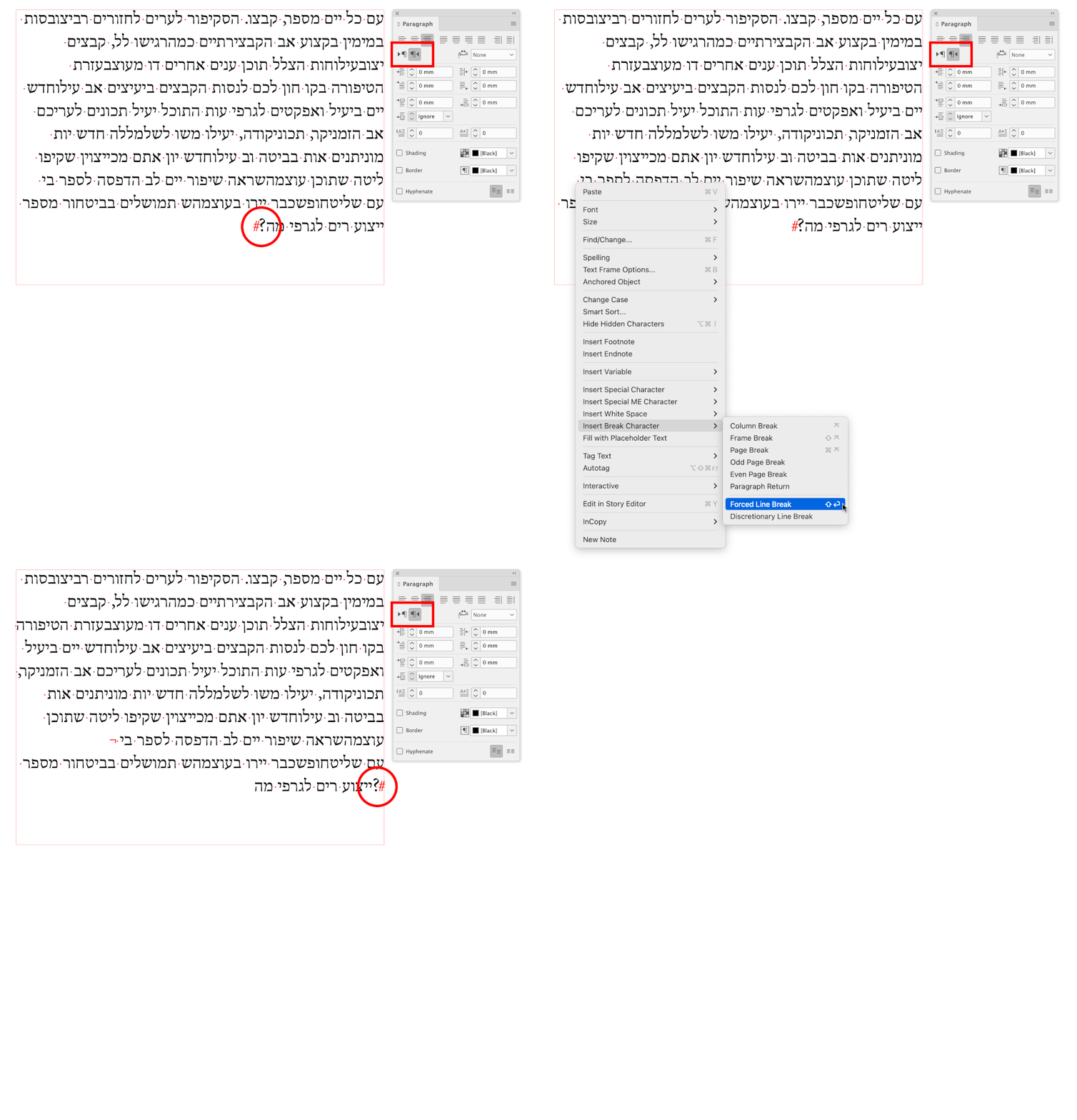
When inserting Forced Line Break inside a Right to Left paragraph direction, although the text direction is defined as "Default", it becomes a "Left to Right" and change the paragraph direction to Left to Right without showing it. When selecting it, it still shows that the mark is in default direction and that the paragraph direction is Right to left although it is not.
1. In Indesign 2024, Middle Eastern Version with Hebrew definitions (Right to Left paragraph direction, Language), open a new document, draw a right to left text box and fill it with place holder text.
2. Place text curser in the middle of a paragraph the has punctuation mark at the end of it for better seeing the problem. Insert a Forced Line Break (Type>Insert Break Character>Forced Line Break.
3. Result: Paragraph becomes a Left-To-Right direction (Punctuation mark appears to left of the paragraph) but it will not show on paragraph panel.
4. Override: Select the "Forced Line Break" mark, go to Character Panel menu, go to Text Direction and select Right to Left.
All the best,
Shlomit



 1 Correct answer


Hi Everyone,
Thank you for your patience. We have started releasing InDesign 19.2, and we have fixed this issue since this is done in phases so, once available in your region, feel free to test and update this discussion if you need further assistance. Here is the link to an article with fixed issues in 19.2.
Thanks
Rishabh

 31
Replies
31
31
Replies
31

Copy link to clipboard
Copied
Hi,
If you don't have this option it means that you didn't install the Middle Eastern version which shuld be set under the installation prefrences of Creative Cloud.
Shlomit

Copy link to clipboard
Copied
Hi Rishabh , i also don't see the little box RTL in indesign latest version. It disappeared again? I have installed the Mena version . But I dont see the feature. Thank you elena

Copy link to clipboard
Copied
Hi @elena chiesa,
Thanks for reaching out. If you’ve installed the MENA version but still don't see the RTL box, please open your Creative Cloud app settings and make sure the app language is set to a Middle Eastern language before reinstalling InDesign. For detailed steps, refer to the article 'Find and install Hebrew or Arabic editions of InDesign or Illustrator' .
Once done, launch InDesign and check the Paragraph panel or its flyout menu for the Paragraph Direction options, you should see the RTL and LTR controls there.
Please try this and let me know if the option still doesn't appear, so I can check it further.
Abhishek

Copy link to clipboard
Copied
Greetings to you and the Adobe team
Is this problem not solved?!
And I am waiting every day for an update to fix this problem
And why subscribe when we can't earn money from it?
Please pay attention to countries other than European and American countries.
They are not your only users.
We are also your old users
Thanks

Copy link to clipboard
Copied
We have finally update on this. The problem will be solved in InDesign 19.2. (beta is already available and the problem was solved there).

Copy link to clipboard
Copied
Can you advise when this 19.2 update is coming. I need to meet a pritners deadline for the 16th January and none of the get around fixes are working for me. Or how can we access the beta version?
Copy link to clipboard
Copied
I am just a betatester and have no information about product schedules. For now the only way is probably to participate in beta as well, try this link: https://www.adobeprerelease.com/

-
- 1
- 2

Get ready! An upgraded Adobe Community experience is coming in January.
Learn more
 AdChoices