


Exit
  • Global community
    • Language:
      • Deutsch
      • English
      • Español
      • Français
      • Português
  • 日本語コミュニティ
  • 한국 커뮤니티
0

InDesign Right Side Panels not opening and closing (2024)

New Here ,
Jan 24, 2024 Jan 24, 2024

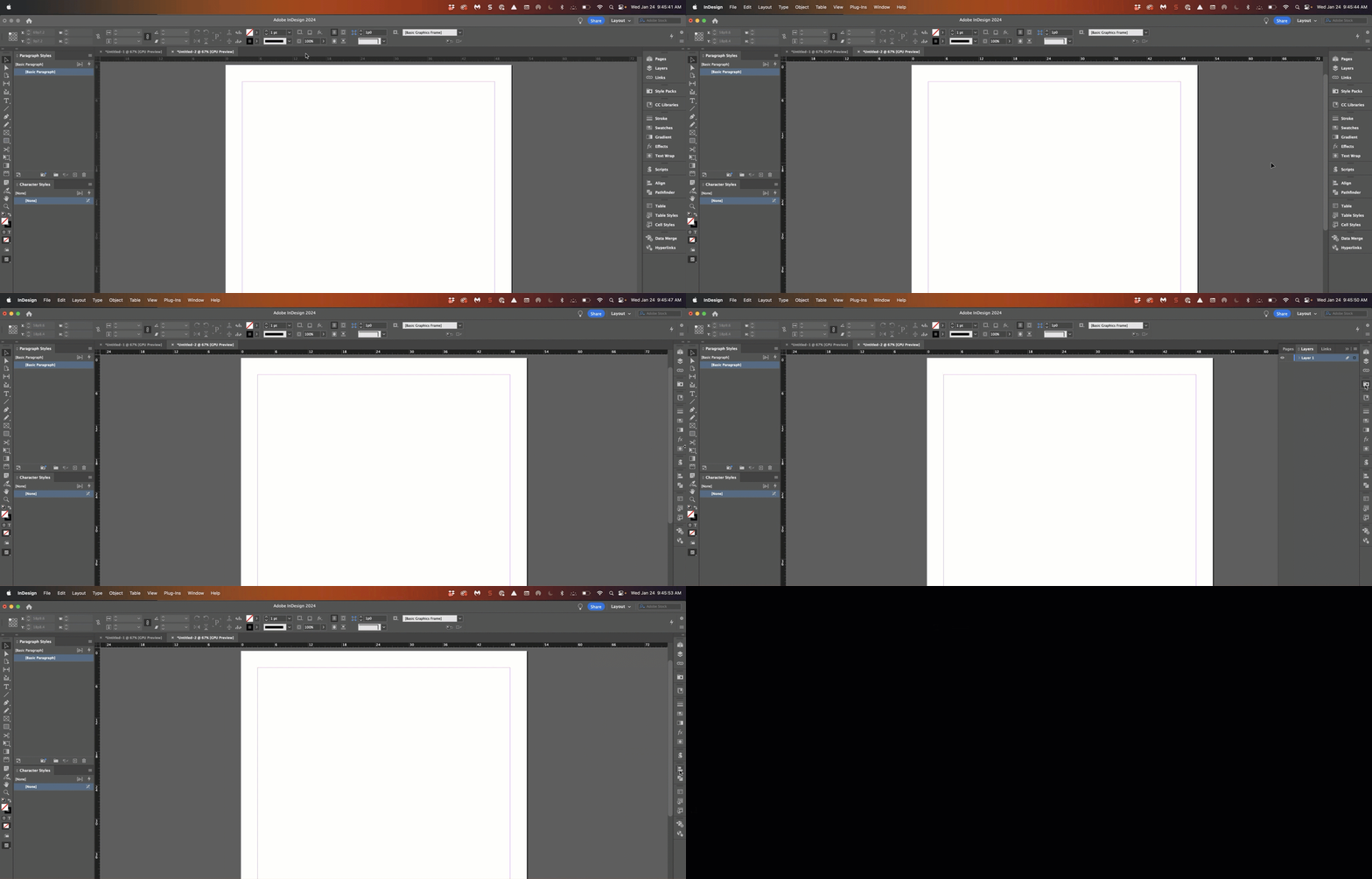
I only use InDesign 2022 as the latest updates don't allow you to open and close the right hand side icons panel when they are collapsed to just the smaller icons, when clicking.


I don't want the panels all 'open' as I find navigating in between them a nightmare, slows me right down and is very annoying.


ADOBE STOP CHANGING THINGS.
TOPICS
Performance
543
Translate
Report
Community guidelines
Be kind and respectful, give credit to the original source of content, and search for duplicates before posting. Learn more
community guidelines

correct answers 2 Correct answers

Community Expert , Jan 24, 2024 Jan 24, 2024

I don't think anything has changed in terms of how the panels interact. 

I'm not really sure what's going wrong for you. 


Reinstalling rarely fixes everything - you can do a complete reinstall using the
Creative Cloud Cleaner Tool https://helpx.adobe.com/creative-cloud/kb/cc-cleaner-tool-installation-problems.html


Translate
Community Expert , Jan 24, 2024 Jan 24, 2024

Hi @prospecth77173023:


Nothing changed for me after updating to 2024, but I don't migrate preferences, which can become corrupt between versions. Eugene and Steve gave you two different approaches: I'd say deleting preferences is faster than the CC Cleaner tool, but either should take care of this for you. 


~Barb


2024-01-24_09-45-56 (1).gif


Translate
Community Expert ,
Jan 24, 2024 Jan 24, 2024

I don't think anything has changed in terms of how the panels interact. 

I'm not really sure what's going wrong for you. 


Reinstalling rarely fixes everything - you can do a complete reinstall using the
Creative Cloud Cleaner Tool https://helpx.adobe.com/creative-cloud/kb/cc-cleaner-tool-installation-problems.html


Translate
Report
Community guidelines
Be kind and respectful, give credit to the original source of content, and search for duplicates before posting. Learn more
community guidelines
Community Expert ,
Jan 24, 2024 Jan 24, 2024

I agree with @Eugene Tyson .


There have been no changes in the way the panels work in InDesign in the past few years.


You might also try restoring your InDesign preferences and caches. Here's how:


https://www.rockymountaintraining.com/adobe-indesign-rebuilding-preferences-cache/

Translate
Report
Community guidelines
Be kind and respectful, give credit to the original source of content, and search for duplicates before posting. Learn more
community guidelines
Community Expert ,
Jan 24, 2024 Jan 24, 2024

Hi @prospecth77173023:


Nothing changed for me after updating to 2024, but I don't migrate preferences, which can become corrupt between versions. Eugene and Steve gave you two different approaches: I'd say deleting preferences is faster than the CC Cleaner tool, but either should take care of this for you. 


~Barb


2024-01-24_09-45-56 (1).gif


Translate
Report
Community guidelines
Be kind and respectful, give credit to the original source of content, and search for duplicates before posting. Learn more
community guidelines
Explorer ,
Jun 13, 2024 Jun 13, 2024

I am having the same issue. Still trying to fix it.

Translate
Report
Community guidelines
Be kind and respectful, give credit to the original source of content, and search for duplicates before posting. Learn more
community guidelines
Community Expert ,
Jun 13, 2024 Jun 13, 2024
LATEST

As we said earlier, this is not a feature change, but instead an issue with preferences. What have you done so far to rebuild them? You can start here: https://www.rockymountaintraining.com/adobe-indesign-rebuilding-preferences-cache/.


~Barb

Translate
Report
Community guidelines
Be kind and respectful, give credit to the original source of content, and search for duplicates before posting. Learn more
community guidelines