



dublove
Legend
February 15, 2025
해결됨

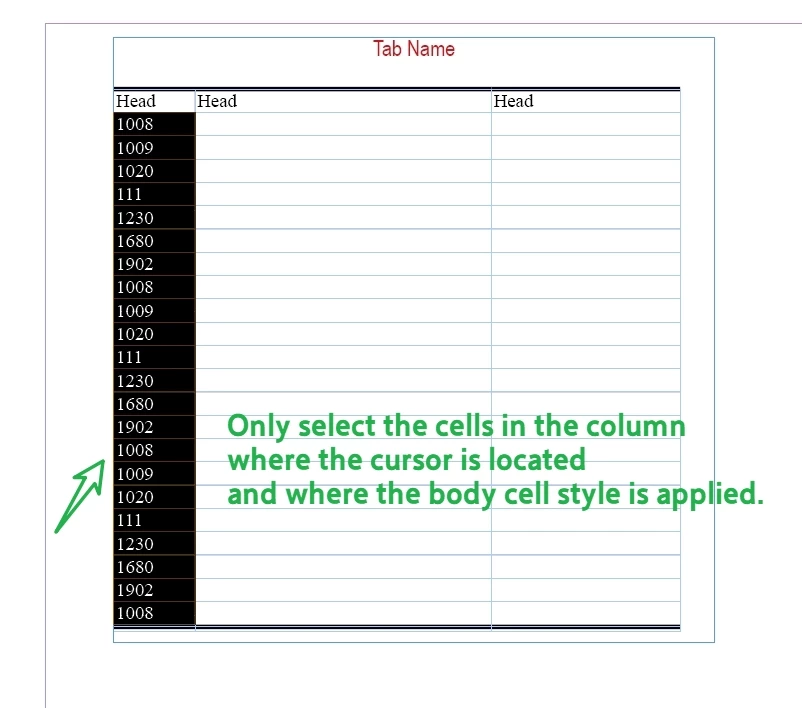
Is it possible to only select the cells in a column that have applied "body" cellstyle

  • February 15, 2025
  • 2 답변들
  • 1575 조회


Sometimes the table is too long, even several pages, you need to exclude the header, continuation, and end of the table, dragging and selecting may be your best way, but it is still a bit cumbersome and troublesome.

What's the best way to do this?
Or a script that selects only the cells in the columns that have the body style applied to them.

After selecting a column, you can perform many operations, and then selecting a row is faster!


Thank you very much.

(Attachments available)
 

최고의 답변: Robert at ID-Tasker

@dublove 


This should work:


app.doScript("main()", ScriptLanguage.javascript, undefined, UndoModes.ENTIRE_SCRIPT, "To Layout! …");

function main() {

    // Place the Cursor in any Cell:
    var myCell = app.selection[0].parent;
    var myCellStyle = myCell.appliedCellStyle;
    var myColumnCells = myCell.parentColumn.cells;
    var C = myColumnCells.length,  c;
    var myCounter = 0;
    var StartRow = 0;
    var EndRow = 0;
    for ( c = 0; c < C; c++ ) 
    {
//        alert(c);
        if ( myColumnCells[c].appliedCellStyle === myCellStyle ) 
        {
            if (StartRow)
            {
            }
            else
            {
                StartRow = c;
            };
        }
        else
        {
            if (StartRow)
            {
                EndRow = c;
                break;
            };
        };
    };
    if (StartRow > 0 && EndRow == 0)
    {
        EndRow = c;
    };
    if (StartRow>0 && EndRow > 0)
    {
     
   app.select(myCell);
   app.select(myCell.parent.cells.itemByRange(myColumnCells[StartRow], myColumnCells[EndRow]));
    };
};


Of course you can convert it to a function.


2 답변

FRIdNGE
February 15, 2025

Basically, something like that:


/*
    _FRIdNGE-0799_ColumnCellsSelectionBasedOnActiveCell.jsx
    Script written by FRIdNGE, Michel Allio [15/02/25]

    See: https://community.adobe.com/t5/indesign-discussions/is-it-possible-to-only-select-the-cells-in-a-column-that-have-applied-quot-body-quot-cellstyle/td-p/15155765
*/

app.doScript("main()", ScriptLanguage.javascript, undefined, UndoModes.ENTIRE_SCRIPT, "To Layout! …");

function main() {

    // Place the Cursor in any Cell:
    var myCell = app.selection[0].parent;
    var myCellStyle = myCell.appliedCellStyle;
    var myColumnCells = myCell.parentColumn.cells;
    var C = myColumnCells.length,  c;
    var myCounter = 0;
    for ( c = 0; c < C; c++ ) if ( myColumnCells[c].appliedCellStyle === myCellStyle ) {
        // Treatment To Be Done:
        myColumnCells[c].fillColor = "red";
        myCounter++
    }

    alert( "On Column " + Number(myCell.parentColumn.index+1) + ": " + myCounter + " Cells")

}


This Script will apply a "red" color to all the right cells of a column.


(^/)  The Jedi

dublove
dublove작성자
Legend
February 15, 2025

HI FRIdNGE!

Thank you very much

This script of yours is running fine.

Learning.......


var cell = app.activeDocument.selection[0].parent;
function selectColumn() {
	cell.parentColumn.select();
}
selectColumn();


That's all I know
It can select current column.


myColumnCells[c].select();
How does this sentence transform to select all eligible Cells
Robert at ID-Tasker
Legend
February 15, 2025

@dublove 


This should work:


app.doScript("main()", ScriptLanguage.javascript, undefined, UndoModes.ENTIRE_SCRIPT, "To Layout! …");

function main() {

    // Place the Cursor in any Cell:
    var myCell = app.selection[0].parent;
    var myCellStyle = myCell.appliedCellStyle;
    var myColumnCells = myCell.parentColumn.cells;
    var C = myColumnCells.length,  c;
    var myCounter = 0;
    var StartRow = 0;
    var EndRow = 0;
    for ( c = 0; c < C; c++ ) 
    {
//        alert(c);
        if ( myColumnCells[c].appliedCellStyle === myCellStyle ) 
        {
            if (StartRow)
            {
            }
            else
            {
                StartRow = c;
            };
        }
        else
        {
            if (StartRow)
            {
                EndRow = c;
                break;
            };
        };
    };
    if (StartRow > 0 && EndRow == 0)
    {
        EndRow = c;
    };
    if (StartRow>0 && EndRow > 0)
    {
     
   app.select(myCell);
   app.select(myCell.parent.cells.itemByRange(myColumnCells[StartRow], myColumnCells[EndRow]));
    };
};


Of course you can convert it to a function.


Robert at ID-Tasker
Legend
February 15, 2025

It all depends on the structure of your table. 


If you've it configured "properly" - defined number of header and footer rows - you can use this info to calculate range to select - in script. 


If you want to select rows that have specific ParaStyle / CellStyle applied - you need to check every cell in the range you want to select.