
Known Participant
February 12, 2024
Answered

nested styles indesign ....

  • February 12, 2024
  • 2 replies
  • 1401 views

What could be the reason that the styles are not working, I have text for example


Text1: afdfsgsdfsdafasdfsdafsda
Text2: fsdfsadfasdfasfsdafsdafsdafsd

Text3: fsdfsadfasdfasfsdafsdafsdafsd


And for the colons to be bold, I used nested styles, but they do not work at all I did everything according to the youtube tutorial. Someone suggest what could be the cause?

 

https://www.youtube.com/watch?v=lgkyEBmb7dk 

This topic has been closed for replies.
Correct answer rob day

look this video  i did it  like that  https://drive.google.com/file/d/1o_11zvAkUORDJ9d9iURDoxmfVDLBMIVW/view?usp=sharing 


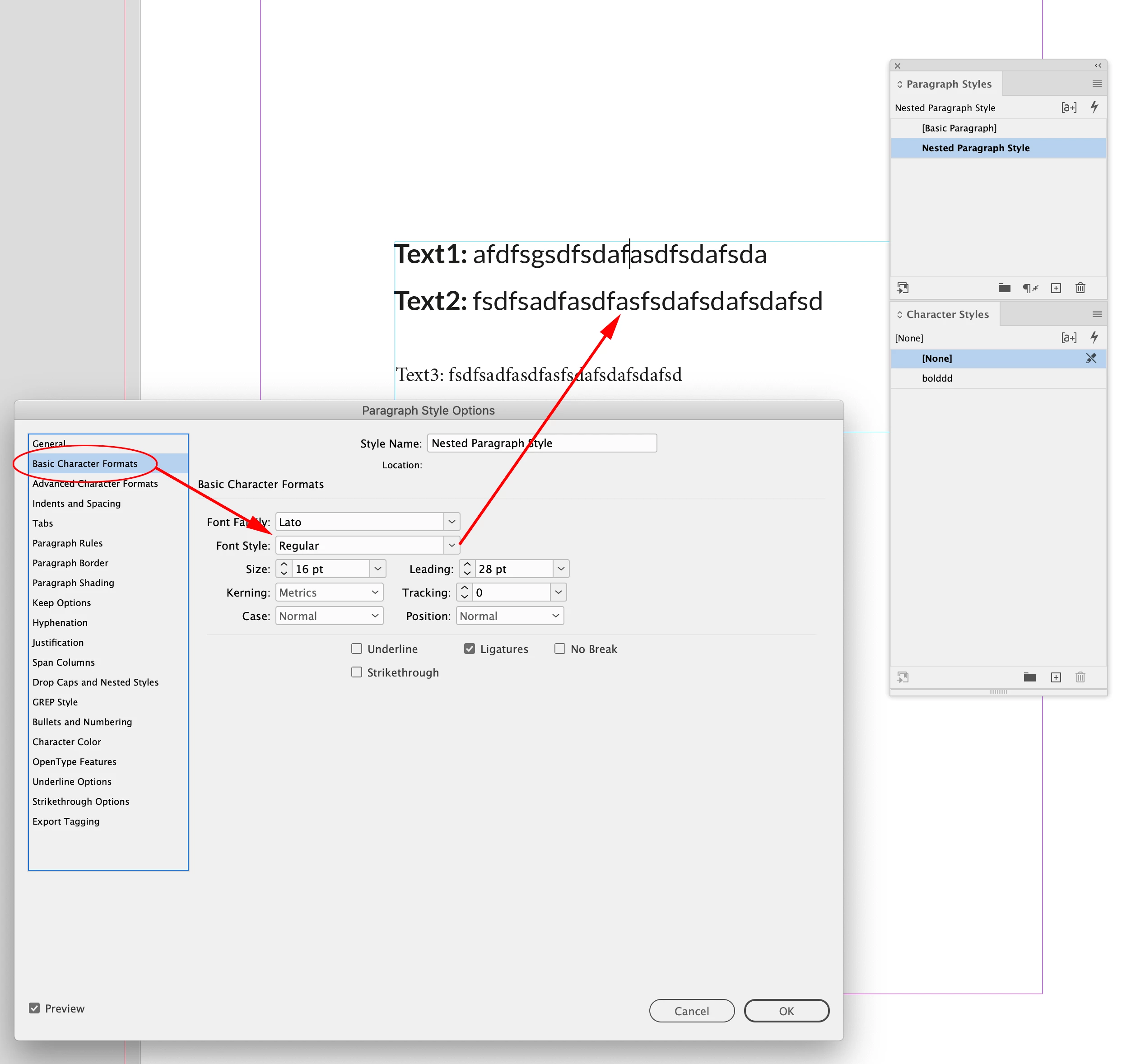
You’ve set the entire paragraph’s Font Style to Bold


You want the Paragraph’s Font Style to be Regular, and let the nested element up to a : get the bold Character Style:


2 replies

James Gifford—NitroPress
Legend
February 12, 2024

In this case, the character styule is somewhat secondary and the actual GREP string is what you need to examine.


I thought at first that a colon might need to be 'escaped' in a GREP string, but it can simply be entered for a match.


The string (.+): (or (\w+): may be more selective) should match any sentence-leading word ended with a colon, and apply the designated Character Style to those characters.


ETA: I am not an expert with GREP, so I can't define a string that will skip words followed by a colon in the text. The closest I can come to forcing it to apply only to the sentence-leading words up to the colon is ((\u\w+): ) ...


ETA2: (^(\w+): ) should apply the style only to the leading word or words in each paragraph.

Known Participant
February 12, 2024

i did it , not working 

rob day
Community Expert
rob dayCommunity ExpertCorrect answer
Community Expert
February 12, 2024

look this video  i did it  like that  https://drive.google.com/file/d/1o_11zvAkUORDJ9d9iURDoxmfVDLBMIVW/view?usp=sharing 


You’ve set the entire paragraph’s Font Style to Bold


You want the Paragraph’s Font Style to be Regular, and let the nested element up to a : get the bold Character Style:


Willi Adelberger
Community Expert
Community Expert
February 12, 2024
  • Did you appy a character style to the paragraph?
  • Did you apply a GREP style?
Known Participant
February 12, 2024

This is how I applied, I made paragraph style and character style. Then I went to nested style and there I selected character style. Of course, I selected the option that I want where the word-colon is bold, but nothing like that happened. See screen