Participating Frequently
December 7, 2016
Question

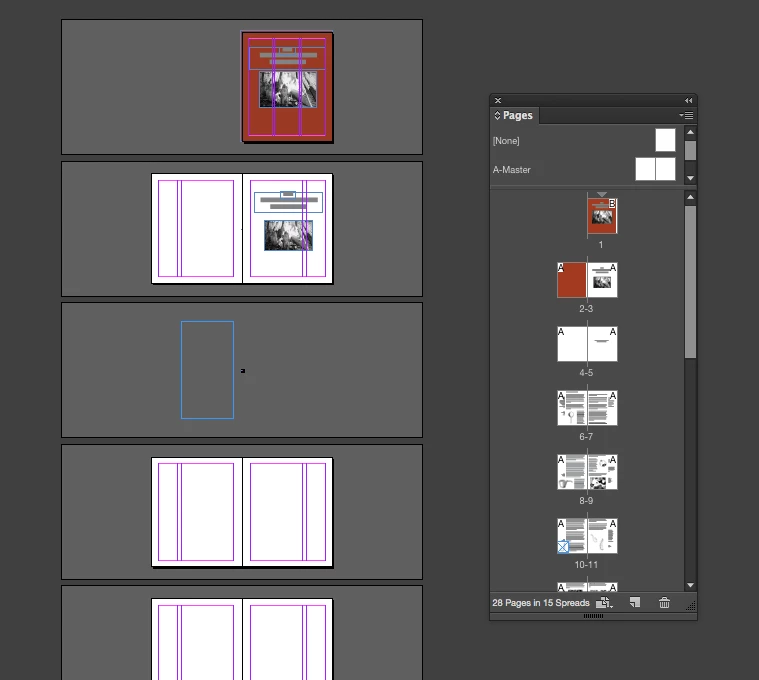
Pages suddenly went blank

  • December 7, 2016
  • 4 replies
  • 2053 views

So frustrating - !!!

I can see all of the content in the Pages sidebar, but nothing appears on the actual pages.

Any ideas? I'm using InDesign CC
This topic has been closed for replies.

4 replies

samoboh
Participant
September 15, 2023

This happened to me and I right clicked on the file to select version history to restore the file to some few hours before I lost the pages and it worked.

Community Expert
September 15, 2023

Hi @samoboh ,

what also could work in this situation:

Export the document to IDML, open the IDML file as document in InDesign, save to a new name.


Trashing InDesign Cache and/or Preferences will not mend a broken document.


Regards,
Uwe Laubender
( Adobe Community Expert )

Participating Frequently
December 12, 2016

No, I've tried recreating the files and it keeps happening. Now I've made the fatal error of upgrading to InDesign CC 2017, and the program crashes immediately after opening. InDesign is unusable on both my laptop and desktop. I can't believe I am paying for this

Participating Frequently
December 12, 2016

Is there any other software that you recommend I try as a workaround for a simple 36 page booklet? I can't waste any more time fussing around trying to open InDesign CC 2017.

Participating Frequently
December 11, 2016

Hi, thanks for checking back - BarbBinderamaarora

So this happened again, and was able to reset the prefs. However, it didn't seem to affect the pages, some of which are blank, and some missing all together. I'll see if I can figure out the other method.

Barb Binder
Community Expert
Community Expert
December 11, 2016
~Barb at Rocky Mountain Training
Participating Frequently
December 12, 2016

BarbBinder​ Update: Thank you so much for this link. I upgraded to the 2017 version last night and it wouldn't open(application not responding) or getting unexpected crash reports until about 30 minutes ago. Once it finally stayed open long enough for me to resave as an .idml file, it seems to be working again(fingers crossed).

amaarora
Inspiring
December 7, 2016

Hi,

I request you to try restoring your InDesign preferences.

Trash, Replace, Reset, or Restore the application Preferences

let me know if this solves your issue.

Regards,

Aman

Participating Frequently
December 7, 2016

I'm having trouble getting this method to work.

Trying the quick method, but there is no dialog box appearing to reset the prefs. I must be too late?

Thanks for the suggestion - will keep this in mind.

- E

Barb Binder
Community Expert
Community Expert
December 7, 2016

Here's the trick, emmietsumura​:

  • Place the fingers of one hand over the three keys so that you are ready to go
  • As soon as you start InDesign, press and hold the keys until you see the Reset Prefs message
  • Then you can let go and click on OK.

It often takes my students about 3 three tries to get the timing right.

~Barb at Rocky Mountain Training
