

Chris Tammar
Participating Frequently
January 23, 2024
Answered

Persistent Error in Adobe InDesign: ‘There Was an Error Updating the Artifact

  • January 23, 2024
  • 34 replies
  • 26011 views

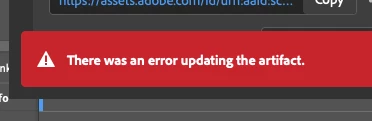
When I go to update a review link in InDesign, I keep getting this error message "there was an error updating the artifact". After that, the link does not work for most people. I am signed in to Adobe. Everything is up-to-date.... But this issue still persists. Can Adobe please fix this issue? It's emarassing when I go to send the review link to my leaders and they just get an error message when they try opening it.
 

<Title renamed by moderator>

Correct answer NOcreationsBE

@Rishabh_Tiwari They originally opened with Chrome. Which did not work. But they just refreshed the link, and it now works. So i think what is happening, is that there's some sort of lag or delay with the file updating, creating an error message. It must be some sort of Adobe server issue. Other's have noticed this too.... The link won't work right away, but when they try again, it works.


I would like to add that my clients usually do not experience any problems opening the file with the link (even if I get the error message), but sometimes they do. Refreshing the page does do the trick in most cases if that happens. Now usually they are 'slow' in reacting on my update messages, so it is possible that they only experience problems opening the file when they react right away. I will keep an eye on that now, to be sure. So I support the idea of a lag/delay in the update process.

34 replies

Good Venture
Known Participant
May 2, 2024

Hi, 


Is anyone else having the same issue with Adobe review in InDesign? 

I never had problems with the older version, but with new updates, this error just keeps coming up again and again, causing a massive disruption to the workflow. 


leo.r
Community Expert
May 2, 2024
Good Venture
Known Participant
May 2, 2024

Thanks, I can see the problem is an ongoing issue that Adobe isn't able to fix. 


NOcreationsBE
Inspiring
February 9, 2024

I have been experiencing the same problem for a while. Using InDesign 19.1 at the moment (but have been experiencing this with an earlier version too) on Windows 11. Experiencing this with multiple files (if not all), but not all the time. Every once in a while I do not get the error message (with the same file that does give that error message).

Chris Tammar
Participating Frequently
February 9, 2024

@NOcreationsBE Same! it has a mind of it's own. Sometimes it works.... sometimes it doesn't. It's gotta be some Adobe server issues.

NOcreationsBE
Inspiring
February 12, 2024

Yes, I think so too. Updated to InDesign 19.2 by now, but still getting the error message. 🙄

Participating Frequently
January 25, 2024

It is not new problem. When I was researching for solution, I found posts from 2020 about same problem. Please fix it. The only thing that works is create new link, but the problem is, that all comments are lost, also I need to resend new link to everyone every time some changes are made. 

I use InDesign 19.1 Window 10

Chris Tammar
Participating Frequently
January 31, 2024

@Dovile23072679iixd Right?! They really need to fix this issue...

Rishabh_Tiwari
Community Manager
Community Manager
January 24, 2024

Hi,


Sorry to hear about the trouble. Please try the suggestions shared in this discussion and let us know if this helps or if you need further assistance.


Thanks

Rishabh

Chris Tammar
Participating Frequently
January 24, 2024

Thanks for reply Rishabh!


Yes I considered all those things in that discussion you shared. I also make sure to save all the time. I think it's an Adobe server error because sometimes the link doesn't open. But then 10 minutes later, it opens for them. Below is the error message people get....


Chris Tammar
Participating Frequently
January 31, 2024

@Rishabh_Tiwari Can you help escalate this? It keeps happening.