


Participant
March 24, 2024
질문

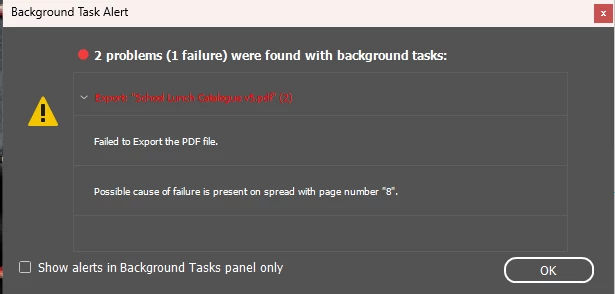
Possible cause of failure is present on spread with page number 8 - InDesign

  • March 24, 2024
  • 1 답변
  • 14834 조회

Having trouble exporting indesign document to PDF. Says 'possible cause of failure is on page 8' but when I remove elements from page 8 is says the failure is on another page? There are no errors or missing links/fonts
 

1 답변

Robert at ID-Tasker
Legend
March 25, 2024

Is text reflowing to other pages - the next problematic one?


If not - is the index of the next problematic page higher or lower than "8"? If higher than you have more problems.


Links might be not missing - but might be corrupted.


Or your INDD file is corrupted - how often do you do SAVE AS with a new name - or only CTRL+S?


Try IDMLing - export as IDML, open, save WITH A NEW NAME - do not owerwrite your original file!!


Inspiring
April 29, 2024

I was having this problem all morning and was troubleshooting all of my images / fonts etc. Turns out your final suggestion to export as IML and then Save with a new name fixed it. Thank you!

Robert at ID-Tasker
Legend
April 29, 2024

I saved as IDML with a new name and then just exported from the new IDML file and it all worked fine.


quote

I saved as IDML with a new name and then just exported from the new IDML file and it all worked fine.


By @judyb5270468


No, I mean when you work on your file - how often are you doing Save As with a new name? 


Because, if you only do Save - then sooner or later your file could get corrupted again.