Participant
Jan 17, 2022 9:41 PM UTC
Answered

Problem with Indesign: creating text outline on a circled path

Here is a clip from before and after outlining my text. You can see indicated by blue arrows, the text gets messed up (before & after). I cant, for the life of me, figure out what is happening. Version 17.0.1




This topic is closed to new replies. Start a new post to keep the conversation going.
LaubenderCorrect answer
Community Expert
Jan 18, 2022 12:29 PM UTC

Hi BridgeviewInvestments,

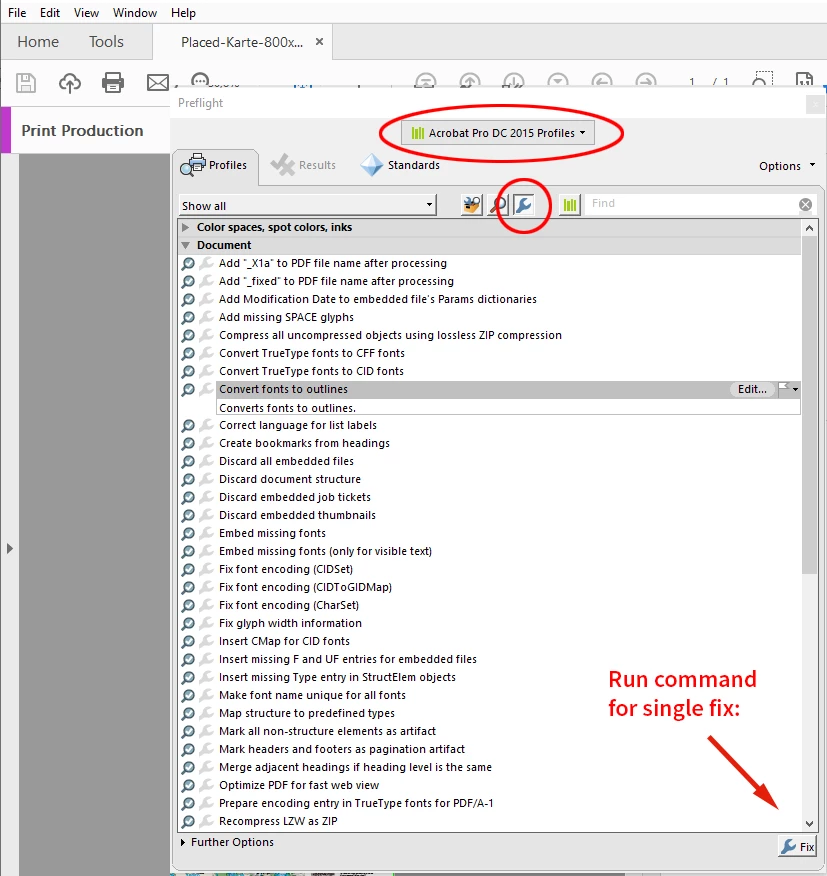
if you want outlined text, text converted to vector paths, best do that after you exported the page to PDF.

Acrobat Pro has a function for this.


Category Print Production > Preflight > Acrobat Pro DC 2015 Profiles > Single Fix Icon > Document > Convert fonts to outlines


You could report your issue at Adobe InDesign User Voice:

https://indesign.uservoice.com/forums/601180-adobe-indesign-bugs

Provide a sample InDesign document where you see the problem.


Regards,
Uwe Laubender

( ACP )

2 replies

Community Expert
Jan 19, 2022 10:13 AM UTC

Also see into this discussion with a similar problem that could not be resolved in InDesign:


Strange skewing of type on a path when outlining text
hebegebestudio, Nov 24, 2021
https://community.adobe.com/t5/indesign-discussions/strange-skewing-of-type-on-a-path-when-outlining-text/m-p/12548788#M455119


Same workaround: outline the text with Acrobat DC Pro's preflight function.


Regards,
Uwe Laubender

( ACP )

Translate
LaubenderCommunity ExpertCorrect answer
Community Expert
Jan 18, 2022 12:29 PM UTC

Hi BridgeviewInvestments,

if you want outlined text, text converted to vector paths, best do that after you exported the page to PDF.

Acrobat Pro has a function for this.


Category Print Production > Preflight > Acrobat Pro DC 2015 Profiles > Single Fix Icon > Document > Convert fonts to outlines


You could report your issue at Adobe InDesign User Voice:

https://indesign.uservoice.com/forums/601180-adobe-indesign-bugs

Provide a sample InDesign document where you see the problem.


Regards,
Uwe Laubender

( ACP )

Translate