lfcorullon13651490
Legend
July 9, 2024
해결됨

[SCRIPT] Split spread of 2 pages into 2 spreads of 1 page

  • July 9, 2024
  • 4 답변들
  • 2678 조회

Hello, how can I accomplish the same I'm doing mnually (in the link below), using javascript?

https://youtu.be/afsloq5D_RU


I tried the following code, but the right pages doesn't move.

var doc = app.activeDocument;
var sp = app.activeWindow.activeSpread;
var p1 = sp.pages[0];
var p2 = sp.pages[1];
sp.allowPageShuffle = false;
p2.move(LocationOptions.AFTER , sp , BindingOptions.RIGHT_ALIGN);

Thanks in advance.

이 주제는 답변이 닫혔습니다.
최고의 답변: m1b

Hi @lfcorullon13651490, yes it could definitely be easier. But here is some code that works, at least in the basic case. Let me know if it is what you were thinking.

- Mark

/**
 * @file Split Spread.js
 * Split a double facing-page spread into two spreads, preserving sided-ness.
 * 
 * CAUTION: not tested beyond the basic case!
 * 
 * @author m1b
 * @discussion https://community.adobe.com/t5/indesign-discussions/script-split-spread-of-2-pages-into-2-spreads-of-1-page/m-p/14729224
 */
function main() {

    splitDoublePageSpread(app.activeDocument.layoutWindows[0].activeSpread);

};
app.doScript(main, ScriptLanguage.JAVASCRIPT, undefined, UndoModes.ENTIRE_SCRIPT, 'Split Spread');

/**
 * Split a double facing-page spread
 * into two spreads, preserving sided-ness.
 * @author m1b
 * @version 2024-07-10
 * @param {Spread} spread - an Indesign Spread.
 */
function splitDoublePageSpread(spread) {

    if (
        'Spread' !== spread.constructor.name
        || !spread.isValid
    )
        throw Error('splitDoublePageSpread: bad `spread` supplied.');

    if (2 !== spread.pages.length)
        throw Error('splitDoublePageSpread: expected 2 pages per spread.');

    // the right-hand page
    var page = spread.pages.lastItem();

    spread.allowPageShuffle = false;

    // add the new spread (note: it will also add two unwanted pages)
    var newSpread = spread.parent.spreads.add(LocationOptions.AFTER, spread, { allowPageShuffle: false });

    // slot the page in between the two unwanted pages
    page.move(LocationOptions.AFTER, newSpread.pages.firstItem());

    // remove the unwanted pages
    newSpread.pages.lastItem().remove();
    newSpread.pages.firstItem().remove();

};
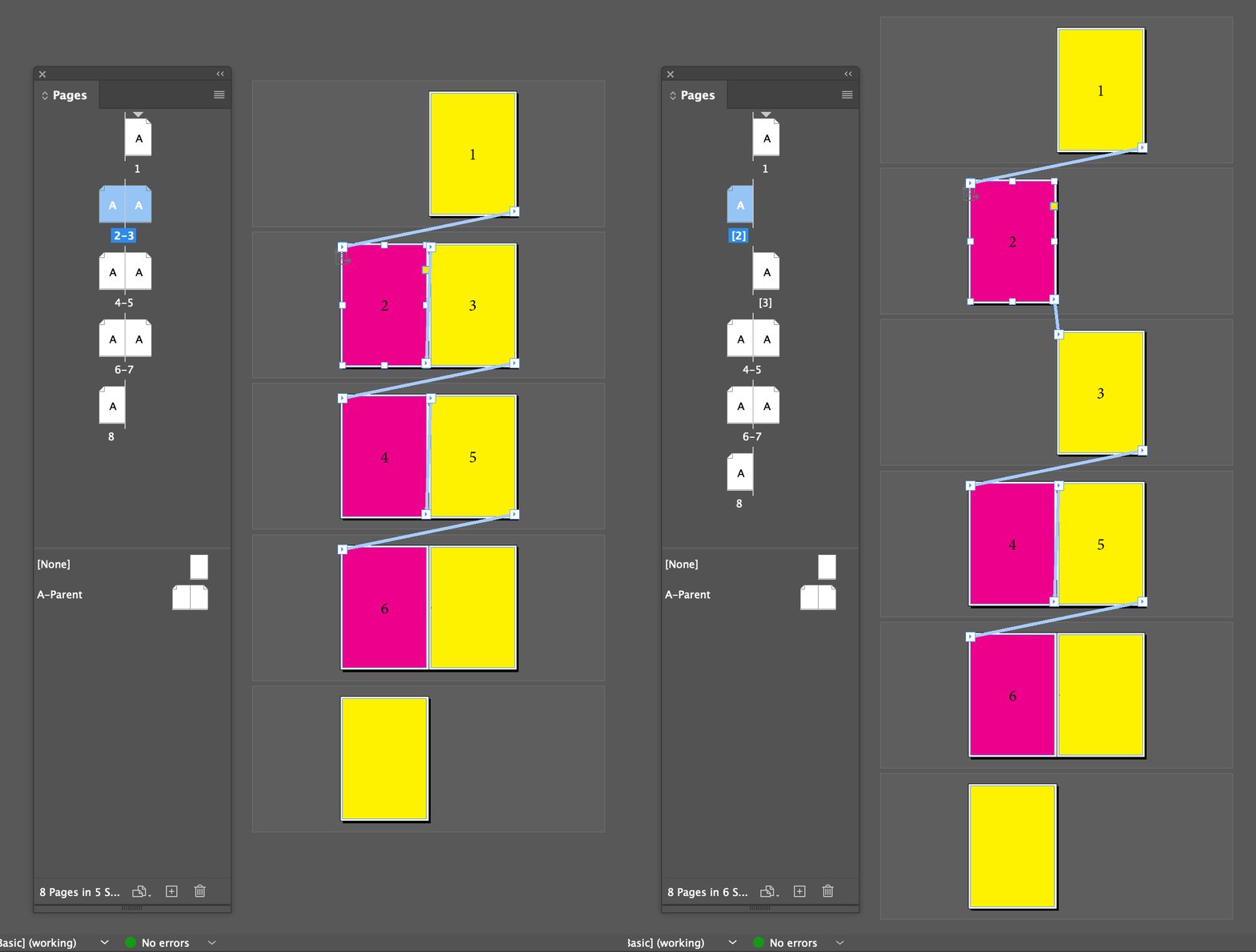



4 답변

rob day
Community Expert
Community Expert
July 10, 2024

Hi @lfcorullon13651490 , Also, this works for me:


var doc = app.activeDocument;
var sp = app.activeWindow.activeSpread;
var np = doc.spreads[sp.index+1].pages[0]
var p1 = sp.pages[1];
sp.allowPageShuffle = false;
p1.move(LocationOptions.BEFORE , np);


m1b
Community Expert
Community Expert
July 10, 2024

Very nice @rob day! I really tried to do a simpler way, but didn't quite manage it. 🙂

- Mark

Robert at ID-Tasker
Legend
July 10, 2024

@lfcorullon13651490


Why? 


rob day
Community Expert
Community Expert
July 10, 2024

Why?


If you are doing it from the UI, it would usually be to add an extended inside bleed for binding methods where the inside edge is trimmed and visible, not folded. Something like Wire-o.

rob day
Community Expert
Community Expert
July 10, 2024

@rob day


I think I know how bleed works for folded 😉 


So the yellow + cyan is rather obvious. 


But if you take pages apart - and move to separate spreads... 


But if you take pages apart - and move to separate spreads...


This is a non facing page document set up as spreads. With non facing pages you have the option to move the spread pages apart for an extended bleed or leave them connected. You can’t do what I’m showing with a facing page document, and because the spread pages can be pulled apart, there is no need to move the pages to separate spreads:


Community Expert
July 10, 2024

Hi @lfcorullon13651490 ,

in case you need this for adding bleed to the spine I have another suggestion:


[1] Make sure that the pasteboard below and above the pages is at least double the height of the page plus some extra space.

[2] Move one of the pages plus its contents down so that the right edge of the left page does not touch the left edge of the right page in the spread.


Both pages still share the same spread.


To accomplish this without scripting is relatively easy by using the Page tool to select a page and the Transform panel to move the selection.


From my German InDesign, where I checked the option "Move objects with page" from the Control panel.

The page is selected with the Page tool, the Transform panel's Y value is set to 305 mm (page height in my case is 297 mm):


After the transformation there is plenty of space on all sides of the pages to apply bleed:


In case you need to do this for more pages in a document, simply select the Page tool first, then open the Pages panel and cmd select (Ctrl select on Windows) all pages you want to move before using the Transform panel.


Regards,
Uwe Laubender
( Adobe Community Expert )

m1b
Community Expert
Community Expert
July 10, 2024

Hi @Laubender, I never would have thought of that! What is a case where it would be worth having the pages offset like this on the same spread versus on separate spreads? It seems a bit awkward.

- Mark

Community Expert
July 10, 2024

@m1b said: "What is a case where it would be worth having the pages offset like this on the same spread versus on separate spreads? It seems a bit awkward."


Not awkward at all, I think. It's a matter of personal workflow if you like to see both pages in one spread or in two different ones when doing changes in the layout.


Regards,
Uwe Laubender
( Adobe Community Expert )


m1b
Community Expert
m1bCommunity Expert답변
Community Expert
July 10, 2024

Hi @lfcorullon13651490, yes it could definitely be easier. But here is some code that works, at least in the basic case. Let me know if it is what you were thinking.

- Mark

/**
 * @file Split Spread.js
 * Split a double facing-page spread into two spreads, preserving sided-ness.
 * 
 * CAUTION: not tested beyond the basic case!
 * 
 * @author m1b
 * @discussion https://community.adobe.com/t5/indesign-discussions/script-split-spread-of-2-pages-into-2-spreads-of-1-page/m-p/14729224
 */
function main() {

    splitDoublePageSpread(app.activeDocument.layoutWindows[0].activeSpread);

};
app.doScript(main, ScriptLanguage.JAVASCRIPT, undefined, UndoModes.ENTIRE_SCRIPT, 'Split Spread');

/**
 * Split a double facing-page spread
 * into two spreads, preserving sided-ness.
 * @author m1b
 * @version 2024-07-10
 * @param {Spread} spread - an Indesign Spread.
 */
function splitDoublePageSpread(spread) {

    if (
        'Spread' !== spread.constructor.name
        || !spread.isValid
    )
        throw Error('splitDoublePageSpread: bad `spread` supplied.');

    if (2 !== spread.pages.length)
        throw Error('splitDoublePageSpread: expected 2 pages per spread.');

    // the right-hand page
    var page = spread.pages.lastItem();

    spread.allowPageShuffle = false;

    // add the new spread (note: it will also add two unwanted pages)
    var newSpread = spread.parent.spreads.add(LocationOptions.AFTER, spread, { allowPageShuffle: false });

    // slot the page in between the two unwanted pages
    page.move(LocationOptions.AFTER, newSpread.pages.firstItem());

    // remove the unwanted pages
    newSpread.pages.lastItem().remove();
    newSpread.pages.firstItem().remove();

};