Inspiring
January 30, 2023
해결됨

Script/utility to build a list of styles in document?

  • January 30, 2023
  • 3 답변들
  • 2571 조회

Hi everyone,

I've been searching for a little while to find a script or utility of some sort that will, essentially, create a style guide - of all styles present in a document - resulting in an InDesign document with a list of all styles applied, in the styles they represent.
I see a few here and there, but some are pretty old (2009!) and... I'll admit, I haven't created a script for ID before, so not sure what to do with the samples I've found.

Any guidance appreciated.

이 주제는 답변이 닫혔습니다.
최고의 답변: rob day

If @Nick Passmore’s AS doesn’t work for you, have the document you want to get the list from active and try this JS:


/*
* Make a new document with a list of styled paragraph styles from the active document
* Rob Day 2020-2023
*/

app.scriptPreferences.measurementUnit = MeasurementUnits.INCHES;
var d = app.activeDocument;
var dn = d.name.replace(/\.[^\.]+$/, '') + " Paragraph Styles";
var currdate = new Date
var ct =  "Temp-" + currdate.getTime();

//makes the style list document
var dp = makeDocPreset(ct);
dp.properties = {facingPages:true, pageHeight:11, pageWidth:8.5, pageOrientation:PageOrientation.PORTRAIT, top:.75, bottom:1, left:.75, right:.75, createPrimaryTextFrame:true}
var sdoc = app.documents.add(true, dp);
sdoc.name = dn;

//enable smart textflow for long lists
sdoc.textPreferences.properties = {smartTextReflow:true, smartTextReflowSync:true, limitToMasterTextFrames:true, deleteEmptyPages:true};
dp.remove();

//imports the sytles into the new doc
var spDoc =app.documents[1];
var fp = spDoc.fullName
sdoc.importStyles(ImportFormat.PARAGRAPH_STYLES_FORMAT, File(fp));

//make the list
var ts = sdoc.pages[0].textFrames[0].parentStory;
var ps = sdoc.allParagraphStyles;
var sn
for (var i = 0; i < ps.length; i++){
    sn = ps[i].name;
    ts.insertionPoints[-1].contents = sn +"\r\r"
    ts.paragraphs[ts.paragraphs.length-2].appliedParagraphStyle = ps[i];
};   
app.scriptPreferences.measurementUnit = AutoEnum.AUTO_VALUE;


/**
* Makes a new document preset 
* @ param preset name name 
* @ return the new preset 
*/
function makeDocPreset(n){
    if (app.documentPresets.itemByName(n).isValid) {
        return app.documentPresets.itemByName(n);
    } else {
        return app.documentPresets.add({name:n});
    }
}
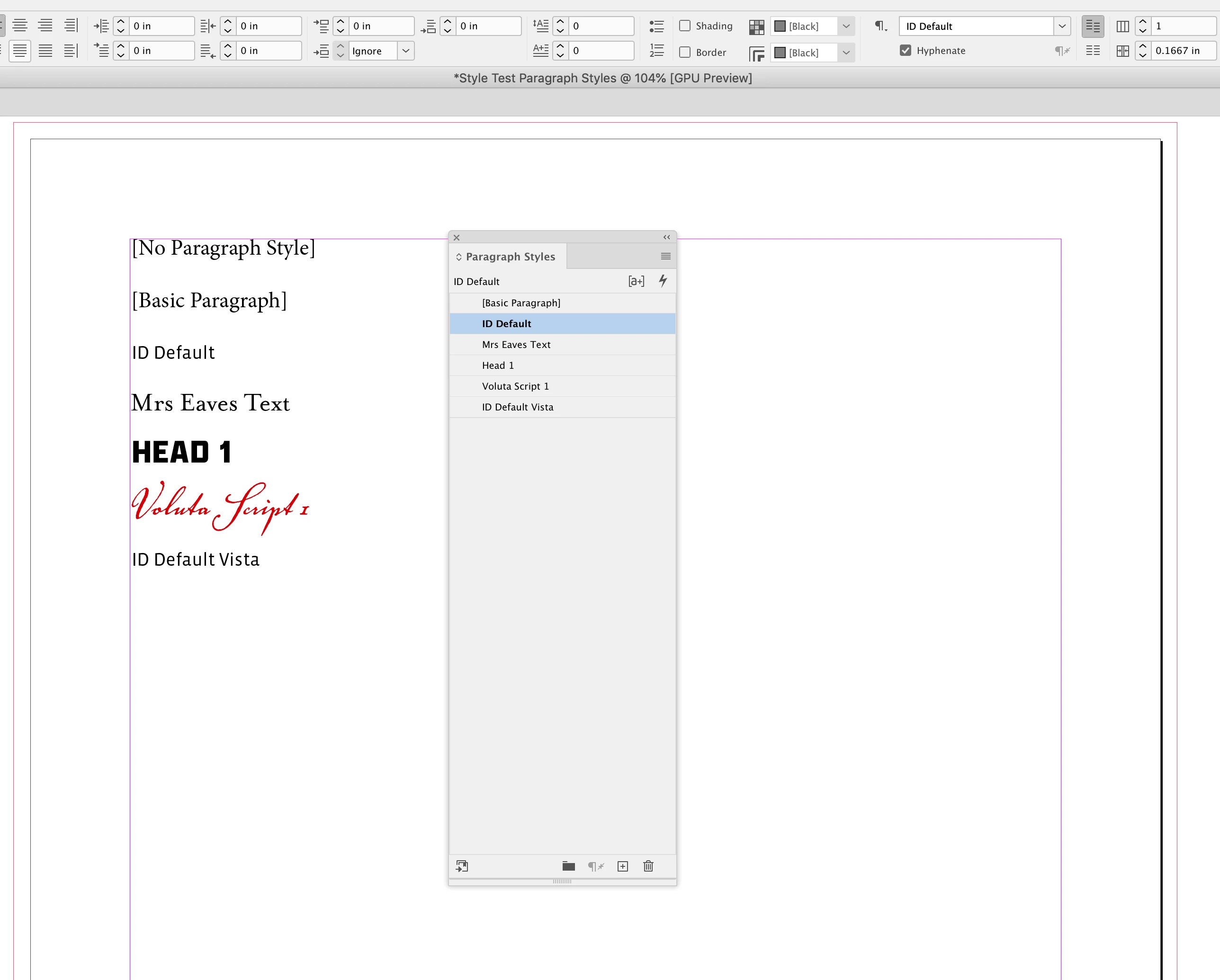



3 답변

Participating Frequently
January 31, 2023
This is very crude but it may do what you want (if you are able to use AppleScript on a Mac).
Copy and paste into a Script Editor file and save in the InDesign scripts folder then run it with the document whose styles you want to list open. It will make a new text frame and fill it with examples of all the paragraph styles it finds.
 
 
use AppleScript version "2.4" -- Yosemite (10.10) or later
use scripting additions
tell application id "com.adobe.InDesign"
tell document 1
set ParStyles to (every paragraph style of every paragraph style group)
set PSNames to (name of every paragraph style of every paragraph style group)
set TF to make new text frame
tell TF
set geometric bounds to {50, 50, 500, 500}
end tell
repeat with s from 3 to count of items of PSNames
set Temptext to item s of PSNames
tell TF
tell contents
set last insertion point to (Temptext as string) & return
set applied paragraph style of paragraph -1 to (item s of ParStyles)
end tell
end tell
end repeat
end tell
end tell
Robert at ID-Tasker
Legend
January 31, 2023

Are you looking for a Tree View based on BasedOn? 


turner111작성자
Inspiring
February 9, 2023

Thanks Robert - just did a search for that - didn't find anything.

Don't know what BasedOn is.

I'm just trying to create a style sheet.

Robert at ID-Tasker
Legend
February 9, 2023

BasedOn property is a reference to the "parent" style that current style inherits everything from - but changes only some properties - so when you build your structure of the styles properly - and you need to change a font - you just need to change the first style in the chain - not every style on the list. 


rob day
Community Expert
Community Expert
January 30, 2023

Hi @turner111 , You can try this, which exports a .csv file with the style properties. In the current InDesign there are over 300 paragraph style properties:


https://shared-assets.adobe.com/link/a29d2554-8e5e-4e13-7bd1-8b3ec8e3e3ba


At the top of the script there is an array of properties to skip, which can be edited if you want to reduce the number of columns in the .csv. These are the properties that I’m omitting, but you could add more


var exceptions = ["styleUniqueId","emitCss","includeClass","paragraphKashidaWidth","designAxes","previewColor","rotateSingleByteCharacters","leadingModel","id","isValid","index","label","properties","styleExportTagMaps","parent","tabList","bulletChar","gridGyoudori","otfHVKana","leadingAki","tsume","kashidas","trailingAki","jidori","shataiMagnification","shataiDegreeAngle","shataiAdjustRotation","shataiAdjustTsume","tatechuyoko","tatechuyokoXOffset","tatechuyokoYOffset","kentenFillColor","kentenFont","kentenStrokeColor","kentenTint","kentenStrokeTint","kentenWeight","kentenOverprintFill","kentenOverprintStroke","kentenKind","kentenPlacement","kentenAlignment","kentenPosition","kentenFontStyle","kentenFontSize","kentenXScale","kentenYScale","kentenCustomCharacter","kentenCharacterSet","rubyFill","rubyFont","rubyStroke","rubyTint","rubyWeight","rubyOverprintFill","rubyOverprintStroke","rubyStrokeTint","rubyFontStyle","rubyFontSize","rubyOpenTypePro","rubyXScale","rubyYScale","rubyType","rubyAlignment","rubyPosition","rubyXOffset","rubyYOffset","rubyParentSpacing","rubyAutoAlign","rubyOverhang","rubyAutoScaling","rubyParentScalingPercent","rubyParentOverhangAmount","warichu","warichuSize","warichuLines","warichuLineSpacing","warichuAlignment","warichuCharsAfterBreak","warichuCharsBeforeBreak","cjkGridTracking","glyphForm","gridAlignFirstLineOnly","gridAlignment","autoTcy","autoTcyIncludeRoman","kinsokuSet","kinsokuType","kinsokuHangType","bunriKinshi","mojikumi","rensuuji","rubyAutoTcyDigit","rubyAutoTcyIncludeRoman","rubyAutoTcyAutoScale","treatIdeographicSpaceAsSpace","allowArbitraryHyphenation","paragraphGyoudori"]


turner111작성자
Inspiring
January 30, 2023

Thanks Rob - really interesting! That said, I have to apologize - I should have been clearer in noting that I'm hoping to be able to generate the results within ID, using the styles being referenced. I've edited my original note.

rob day
Community Expert
rob dayCommunity Expert답변
Community Expert
January 31, 2023

If @Nick Passmore’s AS doesn’t work for you, have the document you want to get the list from active and try this JS:


/*
* Make a new document with a list of styled paragraph styles from the active document
* Rob Day 2020-2023
*/

app.scriptPreferences.measurementUnit = MeasurementUnits.INCHES;
var d = app.activeDocument;
var dn = d.name.replace(/\.[^\.]+$/, '') + " Paragraph Styles";
var currdate = new Date
var ct =  "Temp-" + currdate.getTime();

//makes the style list document
var dp = makeDocPreset(ct);
dp.properties = {facingPages:true, pageHeight:11, pageWidth:8.5, pageOrientation:PageOrientation.PORTRAIT, top:.75, bottom:1, left:.75, right:.75, createPrimaryTextFrame:true}
var sdoc = app.documents.add(true, dp);
sdoc.name = dn;

//enable smart textflow for long lists
sdoc.textPreferences.properties = {smartTextReflow:true, smartTextReflowSync:true, limitToMasterTextFrames:true, deleteEmptyPages:true};
dp.remove();

//imports the sytles into the new doc
var spDoc =app.documents[1];
var fp = spDoc.fullName
sdoc.importStyles(ImportFormat.PARAGRAPH_STYLES_FORMAT, File(fp));

//make the list
var ts = sdoc.pages[0].textFrames[0].parentStory;
var ps = sdoc.allParagraphStyles;
var sn
for (var i = 0; i < ps.length; i++){
    sn = ps[i].name;
    ts.insertionPoints[-1].contents = sn +"\r\r"
    ts.paragraphs[ts.paragraphs.length-2].appliedParagraphStyle = ps[i];
};   
app.scriptPreferences.measurementUnit = AutoEnum.AUTO_VALUE;


/**
* Makes a new document preset 
* @ param preset name name 
* @ return the new preset 
*/
function makeDocPreset(n){
    if (app.documentPresets.itemByName(n).isValid) {
        return app.documentPresets.itemByName(n);
    } else {
        return app.documentPresets.add({name:n});
    }
}