- Accueil
- InDesign
- Discussions
- Re: Spacing before and after images in book functi...
- Re: Spacing before and after images in book functi...

Copier le lien dans le Presse-papiers
Copié
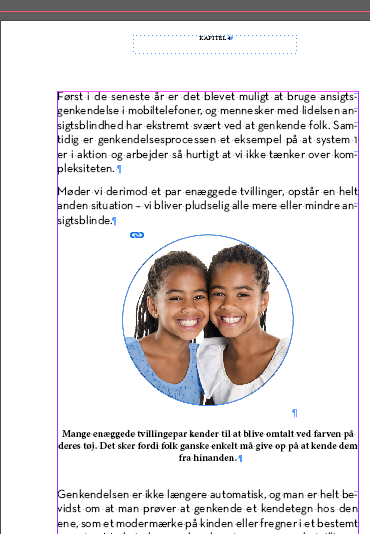
I'm trying to get space before and after my images in a way that will let me easily standardize throughout the book. My idea was to set up a paragraph style specifically for images/graphics and use that for all images. I have tried this and adjusted the "space before" and "space after" to several millimeters.
Unfortunately the image then immediately jumps to the top of the page. I'm aware this is probably very basic, but I think I have the right approach but with some detail missing.
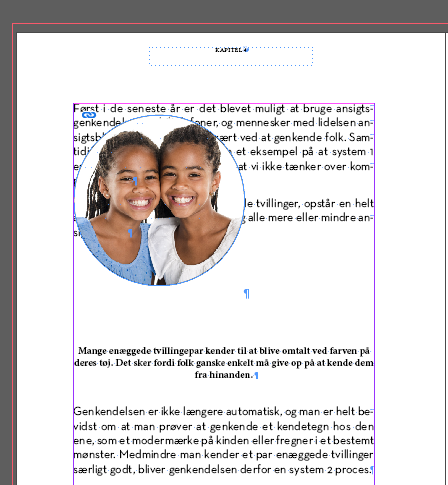
First a screenshot with the image set to the same paragraph style as the text on the rest of the page and then one with the new paragraph style:


 1 bonne réponse

This is a known bug in InDesign. Been there since the beginning.
The anchor must always be before/above the actual graphic with the text wrap.
You can help get this bug fixed by voting for the feature at https://indesign.uservoice.com/forums/601021-adobe-indesign-feature-requests/suggestions/34501540-anchored-objects-need-be-able-to-apply-a-text-wrap
VOTE VOTE VOTE!
Tell all your InDesign colleagues to vote for it.
Tell you mom to vote for it. The cat, dog, pet parakeet.
We need hundreds more
...
 11
Réponses
11
11
Réponses
11


Copier le lien dans le Presse-papiers
Copié
You're need to add to the image some text wrap (CTRL+ALT+W) and then paste as anchored object and then play with anchored object settings to set as you need.
See the video about anchored objects -
Copier le lien dans le Presse-papiers
Copié
I have now gone through the text wrap options quite a few times and have not found a solution. What I'm looking for is simply to have a standardized space before and after all images looking similar to having a blank line in a textbook.
When I use the "wrap around bounding box" setting the images are not removed further from the text since the frame goes on top of the text.
The essential thing for me here is to set a standard so I can apply it throughout the book. That's why I was trying to do it with a paragraph style. If I can somehow make it work with Text Wrap, can those settings be saved?
Copier le lien dans le Presse-papiers
Copié
Did you watch a video-link in my previous post?
Copier le lien dans le Presse-papiers
Copié
Yes
Copier le lien dans le Presse-papiers
Copié
Ok, and what stops you to play with anchored object preferences and set image behavior as anchored object with needed settings?
Copier le lien dans le Presse-papiers
Copié
I have tried playing around with the settings and have not succeeded with it. That's what I tried describing in my comments to my thread here.
Therefore I'm looking answers to:
1) creating the needed space between image and text
2) setting up a solution that can be saved as a default and applied to images instead of setting the distance for each image.
Copier le lien dans le Presse-papiers
Copié
So to your question @Geоrge "Ok, and what stops you to play with anchored object preferences and set image behavior as anchored object with needed settings?"
Apparently, a known issue in Indesign is what's stopping me. A shame that it took so long to figure out, but on we go.
Copier le lien dans le Presse-papiers
Copié
>> The anchor must always be before/above the actual graphic with the text wrap.
@simon5CD0 Please, pardon me. I don't found that you're try to use it anchor object not as in this quote. For me this thing was in mind automatically. And you won't never find this without "play".
Copier le lien dans le Presse-papiers
Copié
Copier le lien dans le Presse-papiers
Copié
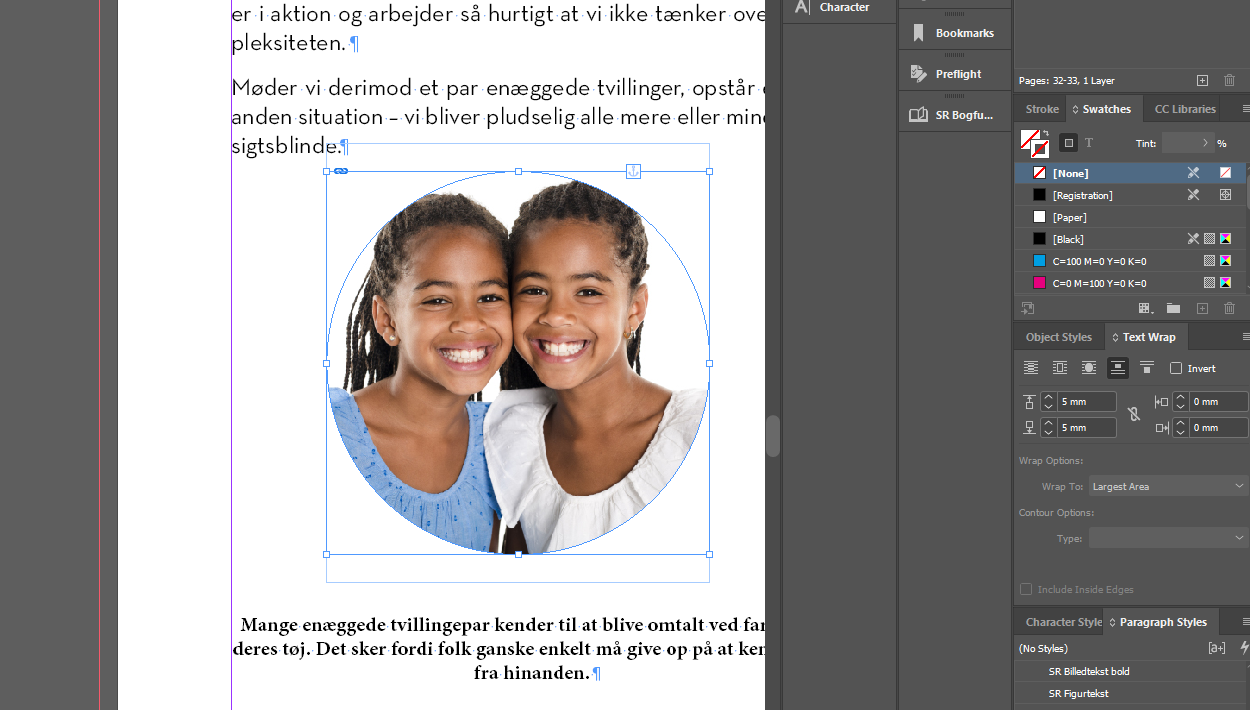
I have now anchored my image in the text and the text wrap is working below the image but not above.
As can be seen in this screenshot, the wrap setting/box below the image is pushing the text down, but above the image, the wrap setting/box goes on top of the text.
Could anyone explain what setting I have wrong here?
I wanted to change the "wrap to" setting but it is greyed out.
Copier le lien dans le Presse-papiers
Copié
This is a known bug in InDesign. Been there since the beginning.
The anchor must always be before/above the actual graphic with the text wrap.
You can help get this bug fixed by voting for the feature at https://indesign.uservoice.com/forums/601021-adobe-indesign-feature-requests/suggestions/34501540-an...
VOTE VOTE VOTE!
Tell all your InDesign colleagues to vote for it.
Tell you mom to vote for it. The cat, dog, pet parakeet.
We need hundreds more votes for Adobe to take notice and put this fix on their to-do list.
| PubCom | Classes & Books for Accessible InDesign, PDFs & MS Office |


Préparez-vous ! Une expérience Adobe Community améliorée arrive en janvier.
En savoir plus
 AdChoices