
Known Participant
February 1, 2019
Answered

Spell Check does not work after installing InDesign 15.0.2

  • February 1, 2019
  • 19 replies
  • 16424 views

re: InDesign CC 2019


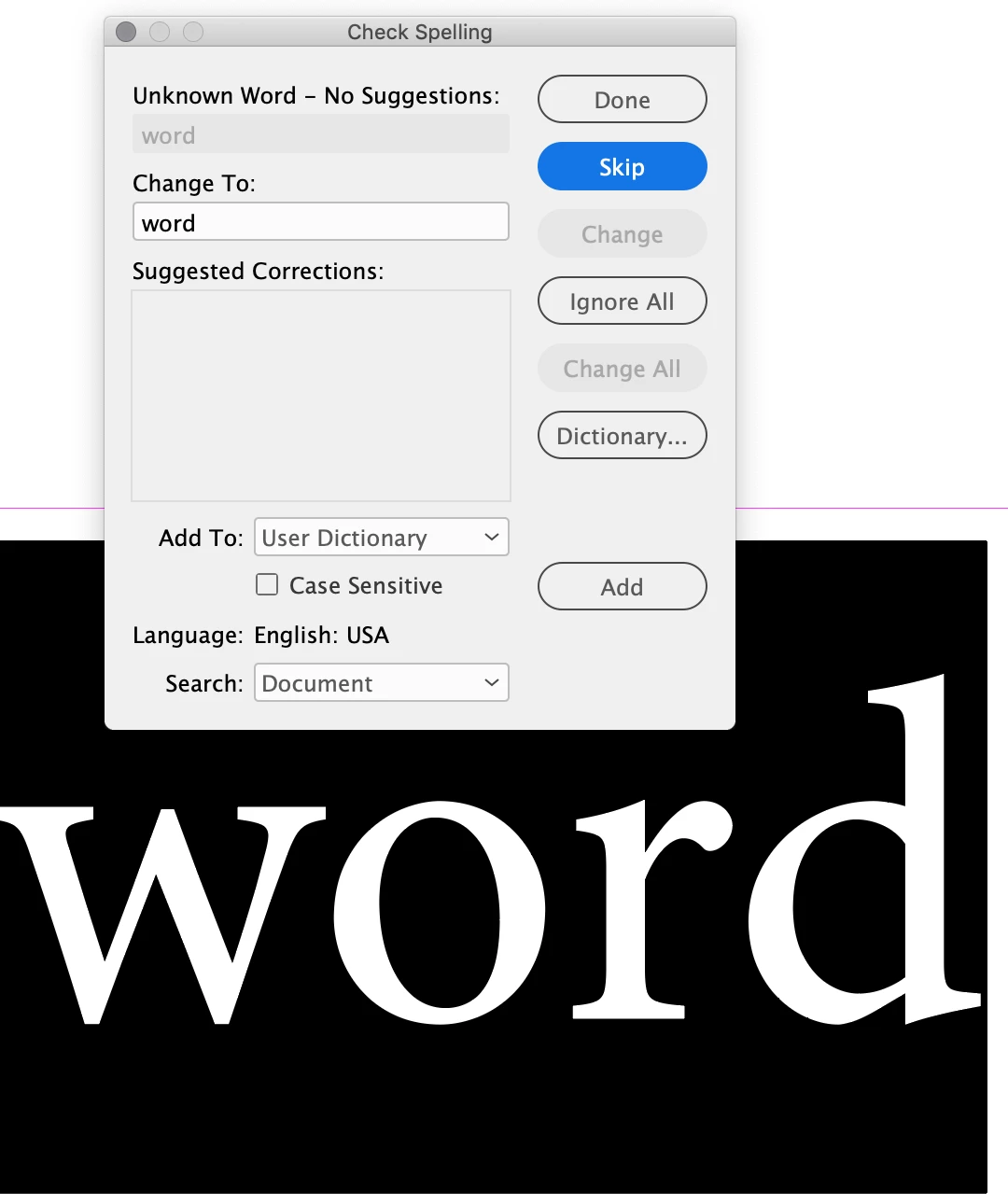
Spell check is not working. I have read numerous forum posts and this appears to have been an issue for many for years. I don't know what else to check. I do think a picture is worth a thousand words … or in this case a single "word"


As you can see below, "word" is an unknown word with no suggestions.


{Renamed by MOD}

This topic has been closed for replies.
Correct answer Srishti Bali

Hi All,


Sorry about the trouble this issue has caused. We've fixed this in the latest release. Please update your InDesign to v15.0.3 to get this fixed.

Here's a link with more details: https://indesign.uservoice.com/forums/601180/suggestions/39843622


Regards,

Srishti

19 replies

Participant
March 10, 2020

I have one document that the spell check will not work with.  I have tried all the obvious stuff - dynamic spelling is on, press 'w' key for preview mode, languarge set to english.


Other ID documents still work with spellcheck but this document does not.  PLEASE HELP 

Ashutosh_Mishra
Inspiring
March 10, 2020

Hi Charlie,


Thanks for reaching out. It could be a document specific issue if it is happening with just one document. Try converting document to IDML and then see if spellcheck works for you. Let us know how it goes.


Regards,

Ashutosh

Participant
March 11, 2020

Hi Ashutosh,

Thanks for the reply. I just tried that and still the same thing is happening.

I’ve just had a look and it is in fact doing it with all documents.

I have attached a couple of screen shots; when I open an existing document, dynamic spellcheck appears to be working but if I modify the incorrect words in any way the red zigzag line immediately disappears.

I tried uninstalling and reinstalling indesign via the CC app on Mac and it has not fixed the problem.

Kind regards, Charlie.

Participating Frequently
March 10, 2020

'check spelling' not working in ID?

Legend
March 10, 2020

Is there a language assigned to your text? If so, try quiting InDesign and reopening it. (I have had spell check fail to check anything once in a while, and this has always fixed it)

jmlevy
Community Expert
Community Expert
March 10, 2020
Known Participant
March 6, 2020

I just updated to indesign 15.0.2 and when trying to spell check a docuement created in an older version it doesnt pick up anything. It works in a new document, but not the files created previously. ANy ideas?

Barb Binder
Community Expert
Community Expert
March 6, 2020

This was just acknowledged as a bug in 15.0.2.


Take a minute to follow this link and vote up the bug: https://community.adobe.com/t5/indesign/indesign-cc-spell-check-not-working/td-p/10965448. By voting, you will also get updates on the progress Adobe makes on this bug.


~Barb

~Barb at Rocky Mountain Training
andyo33492961
Participating Frequently
March 6, 2020

My Indesign spellcheck has suddenly stopped working. A panel comes up but it just says 'Done' and if you click start goes straight to 'Complete'. All updates done and all was fine until a couple of days ago. Done restarts etc. Can anyone help please. I need to spellcheck documents. Thanks


{Renamed by MOD}

Bill Silbert
Community Expert
Community Expert
March 6, 2020

This is normal for documents that have no suspect words. If you don't think that this is the case then try trashing your InDesign preferences. Hopefully, setting the program back to its defaults will fix the problem.

To do so:

For Macintosh Users: The User Library folder in which InDesign’s preferences are stored is hidden by default on most Macintoshes. To access it make sure that InDesign is closed and click on the desktop to launch a Finder Window (Command-N). With this window in column view follow the path User>Home folder (it’s the folder with an icon that looks like a house—it may have the user’s name rather than “Home”) and click on the Home folder. With the Option Key pressed choose Library from the Finder Go Menu. “Library” will now appear within the Home folder. Within the Library folder find the folder called Preferences and within it find the folder called “Adobe InDesign” and the file called “com.adobe.InDesign.plist” and delete both that folder and that file. When InDesign is next launched it will create new preference files and the program will be restored to its defaults.

For Windows Users: You can try the quick way of resetting on a PC which is to hold down Ctrl + Alt + Shift when launching InDesign and respond affirmatively when asked if you want to reset. There have been some recent reports that the window asking if you want to reset is not popping up but that the prefs are being reset anyway. If this works great but if it doesn’t you may have to manually delete them.

To do so: On Windows 7 and above the preference files are hidden. To find them go to the Control Panel and open Folder Options and then click the View tab. Then select “Show hidden files and folders” or “Show hidden files, folders or drive options” in Advanced Settings. Then delete (or rename) the folder at the end of this path: C:\Users\<USER>\AppData\Roaming\Adobe\InDesign\<Version #>\<Language>. Make sure that InDesign is closed when you do this. When you relaunch the program it will create new preference files and the program will be at its default settings.

The advantage of manually deleting preference files is that after you’ve reset up the program (make sure that no document window is open) to your liking, you can create copies of your personalized “mint” preference files (make sure that you quit the program before copying them—that finalizes your customization) and use them in the future to replace any corrupt versions you may need to delete.


EDIT: Before following the above suggestion check in the Spelling section of your InDesign preferences that "Mispelled Words" is checked as shown in the screen shot. If it isn't try checking it and see if that fixes the problem. Do this with no documents open and then quitting the program. When you relaunch it will be the default for the program.

andyo33492961
Participating Frequently
March 6, 2020

Thanks Bill. That will work, but I'm not sure I want to sacrifice ALL my preferences. Thanks for your help though, at least I now have options.

Participant
March 5, 2020

I am running the latest version of CC 15.0.2, and my spell check is not functioning. I've tried all suggestions while searching around (reset preferences, make sure language is set to English in Character panel, etc) with no solution. Attaching screenshots of the current settings. Help!

Mike Witherell
Community Expert
Community Expert
March 5, 2020

Hunspell is a better choice for dictionary. Do you paragraph styles call for English: USA?

Mike Witherell
Participant
March 5, 2020

Paragraph Style settings appear to be correc too:

Known Participant
March 2, 2020

Since running your update today, my spell checker has stopped working.

Any idea as to what I can do about it?

Steve Werner
Community Expert
Community Expert
March 2, 2020

Please tell us what operating system (exactly) you're running. What happens when you attempt to check spelling? Does it happen with one file or all files?

Known Participant
March 2, 2020

Hello Steve,

My macOS is Catalina – Version 10.15.3.


It dosen't seem to do it with all files... which is odd?

VBL2Author
Known Participant
February 5, 2019

hi srishtib8795206 and Mike Witherell​,

Thank you both for responding, after I posted my question, I kept digging for the answer and finally discovered that when I updated to CC 2019, the PREFERENCES–DICTIONARY–SPELLING drop-down was somehow set on USER DICTIONARY ONLY. Not sure how that happened but changing it to HUNSPELL of course resolved my issue.

I appreciate you stepping in to help.

Best,

V

Mike Witherell
Community Expert
Community Expert
February 5, 2019

In the Character panel, when the word "word" is highlighted, what language does the Character panel say is applied?

Mike Witherell
Srishti Bali
Community Manager
Community Manager
February 5, 2019

Hi there,

We are extremely sorry to hear about this issue. I would request if you can share a few more details like:

  • Operating System(Exact version of Windows/MAC)
  • Is it happening with a particular file or all the files?

Regards,

Srishti