


Exit
  • Global community
    • Language:
      • Deutsch
      • English
      • Español
      • Français
      • Português
  • 日本語コミュニティ
  • 한국 커뮤니티
0

text frame with uneven column widths

Participant ,
Jan 30, 2018 Jan 30, 2018

I hope I'm missing something. Since Adobe has decided to kill Story, I'm looking to find a way to create scripts with Indesign. I order to do that I need to create a frame with un-even column widths. I have created the correct columns on the page, however, I do not see a way to create them in a frame. When I unlock the guides and try to move the column guides, the entire frame moves. I hope I'm missing something. I guess I could set up a number of paragraph styles, but it would be easier to do in Excel if I have to do that.InDesign_ColumnWidth_01.jpg
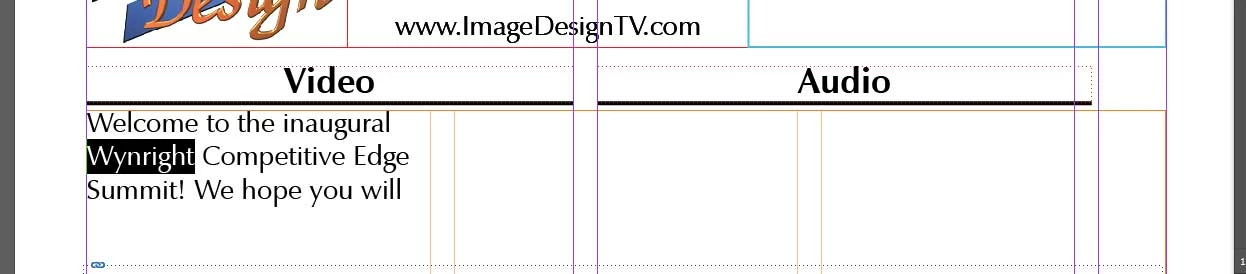
The orange guides are the frame guides and the purple are the underlying frame guides that are in the correct place.

6.2K
Translate
Report
Community guidelines
Be kind and respectful, give credit to the original source of content, and search for duplicates before posting. Learn more
community guidelines

correct answers 1 Correct answer

Enthusiast , Jan 31, 2018 Jan 31, 2018

Hello,

I wonder if tables instead of columns would not be a better solution.

Translate
Community Expert ,
Jan 30, 2018 Jan 30, 2018

Hi ImageDesign704​,

You've hit the nail on the head: you can define columns for pages and/or text frames. All begin columns begin as the same width, distributed across the available space. If you unlock the guides, you can drag the column guides on the page for unequal distribution, but you can't do that with the guides inside a text frame.

So, I can see your page guides that look something like this:

Screenshot 2018-01-30 17.12.41.png

What's that narrow column on the right going to be used for? If you can show us a more complete layout, we may be able to help you get where you want to go.

~Barb

Translate
Report
Community guidelines
Be kind and respectful, give credit to the original source of content, and search for duplicates before posting. Learn more
community guidelines
Participant ,
Jan 31, 2018 Jan 31, 2018

ScriptIssue_02.jpg

Here is what i'm going for - first column is the audio for the presentation, the second is what you'll see during the audio, the third is for the time of that scene. I would actually like an additional smaller column at the left that would have scene numbers. All the text across the columns needs to track and stay together if other scenes or text are inserted.

Translate
Report
Community guidelines
Be kind and respectful, give credit to the original source of content, and search for duplicates before posting. Learn more
community guidelines
Enthusiast ,
Jan 31, 2018 Jan 31, 2018

Hello,

I wonder if tables instead of columns would not be a better solution.

Translate
Report
Community guidelines
Be kind and respectful, give credit to the original source of content, and search for duplicates before posting. Learn more
community guidelines
Community Expert ,
Jan 31, 2018 Jan 31, 2018

+1 for a table

Translate
Report
Community guidelines
Be kind and respectful, give credit to the original source of content, and search for duplicates before posting. Learn more
community guidelines
Enthusiast ,
Jan 31, 2018 Jan 31, 2018
LATEST

That makes sense! I did this in excel at one time - should have thought of that myself!

Translate
Report
Community guidelines
Be kind and respectful, give credit to the original source of content, and search for duplicates before posting. Learn more
community guidelines