HARSHIKA_VERMA
Community Manager
Community Manager
March 5, 2024
Question

Text to Image: Use Simple Text prompts to create Photos or Art in InDesign
  • March 5, 2024
  • 13 replies
  • 7375 views

Hi Everyone,


We are happy to announce that the ability to generate images by providing a text prompt is now available in InDesign.



► Text to Image (Beta) is a beta feature in InDesign and is now available for testing and feedback

► Text to Image (Beta) is available in English.


Text to Image feature empowers users to generate images in Photo or Art format with simple text prompts, powered by Adobe Firefly in InDesign. The "Text to Image" feature can be accessed by using the "Text to Image panel" or the "Contextual Task Bar".


Generate Images using the Text to Image panel
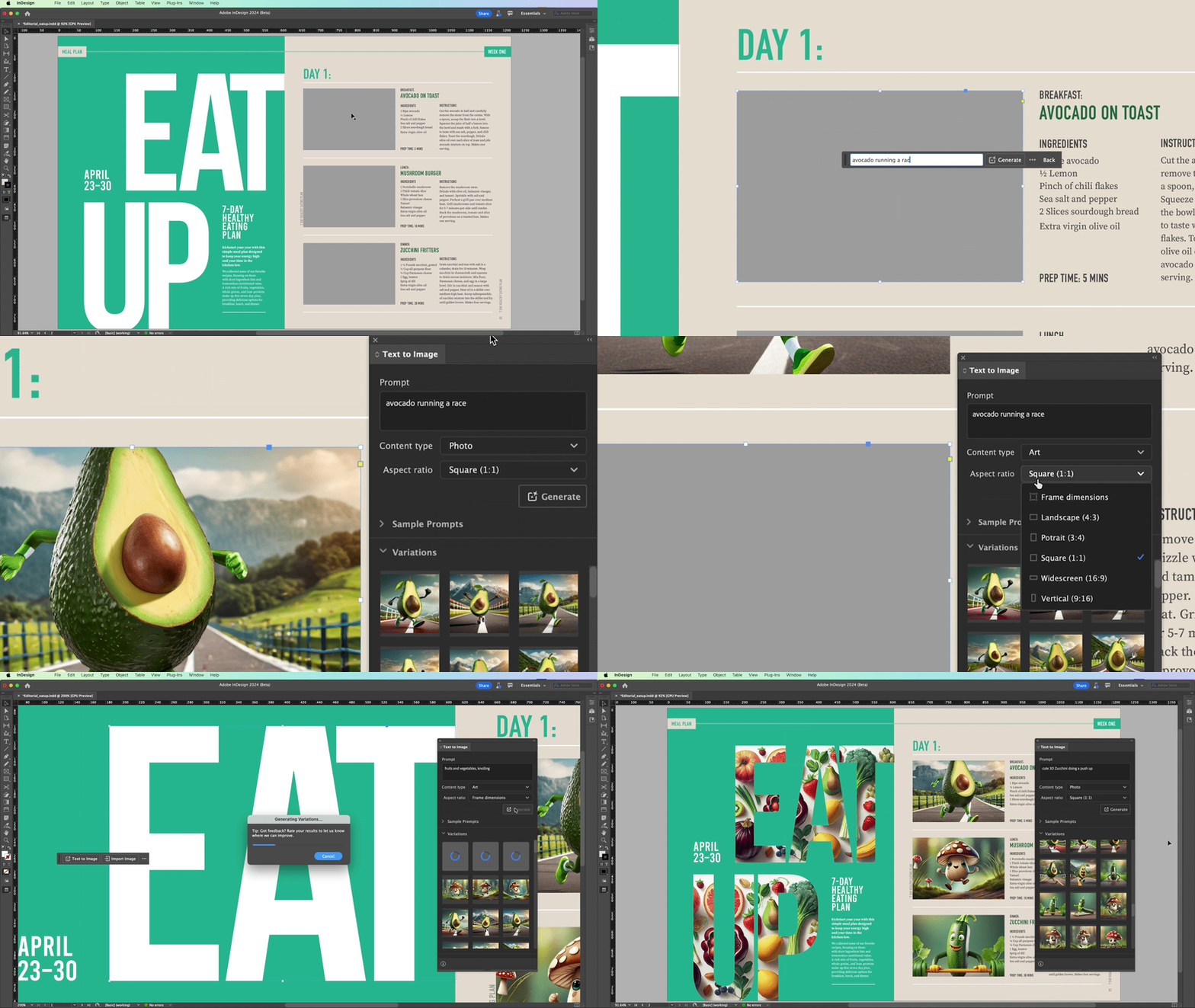


InDesign 19.4 introduces a powerful new feature: "Generating Images from Text prompts." Now, you can effortlessly create images by describing your prompt, selecting the content type and aspect ratio, and generating three variations to choose from. It's a huge time-saver and a game-changer for your workflow!

Please refer to the Text to Image article for detailed information.


Generate Images using the Contextual Task Bar
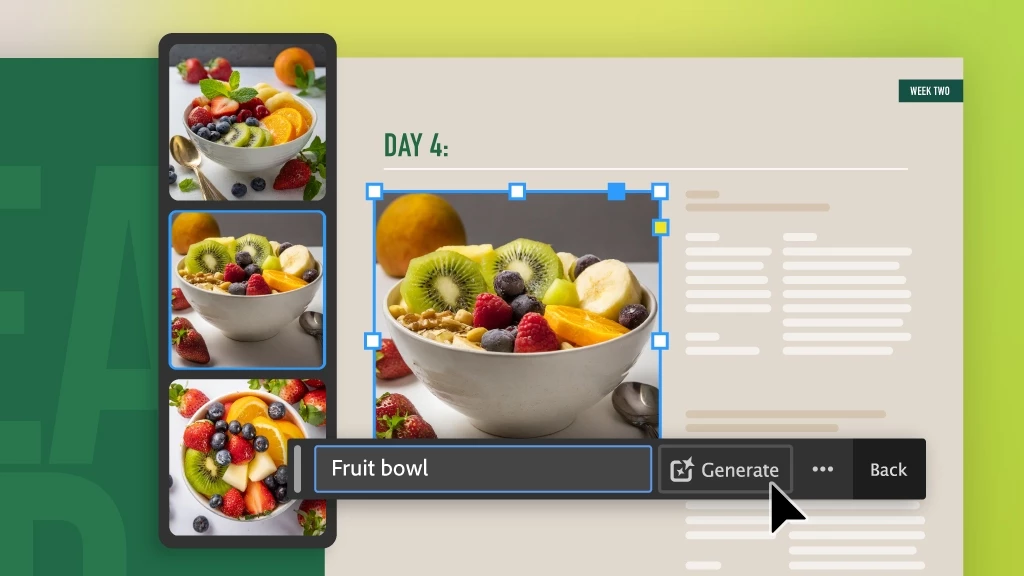


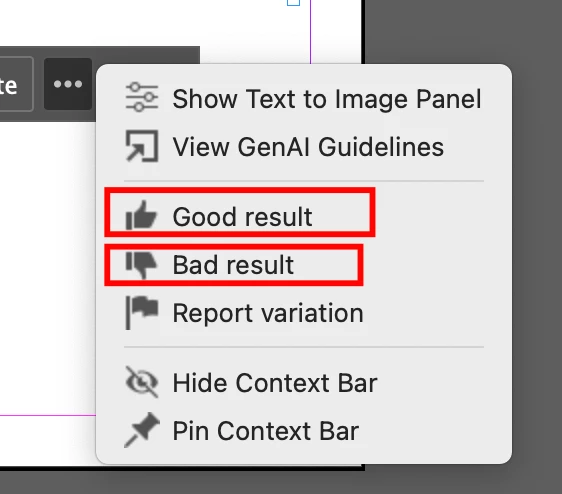
 You can access the Text-to-Image feature in InDesign through the Contextual Task Bar or the Window menu. By selecting a frame or using frame tools to create placeholders, users can streamline the process of generating images then can describe the desired output in the prompt field, generate images with a click, and rate the result as Good, Bad, or report variations.

Provide Feedback


  • Please contribute your unique insights and help shape the future of the "Text to Image" feature in InDesign by providing feedback on the Uservoice page for the Generated Images.
  • You can also rate the images as "Good Result/Bad Result" to share your feedback.


Note: The post has been edited as per the latest release changes in InDesign MAX 19.4. 


If you've found value in this post, a friendly upvote would be fantastic. Your thoughts are even more precious – share them with us in the discussion!

13 replies

Participant
July 2, 2024

When will this feature be available for the ME region? There is no 'Trace to image (Beta)' option

AlanGilbertson
Community Expert
Community Expert
August 28, 2024

@shai5EF7 I don't think any of us have information on that.

Inspiring
May 27, 2024

Hi,
what about some kind of DPI preset?
Indesign is primary for print layout and the native resolution of this AI items is 72 DPI (WEB)
Now it's almost impossible to get 300 DPI if we do a little scaling.

derekwatson
Community Expert
Community Expert
May 28, 2024

It is still in beta so this may be looked at when introduced properly. 

Derek Watson
Participating Frequently
May 23, 2024

Please, tell me what went wrong.
Is there is something I don't understand?
Did I do something wrong?
Was the prompt too simple, or too complex or was it misleading?
Do you think that the two images can remotely represent "A female druid standing in front of the minotaur people"?
My wife can't stop laughing.

Participating Frequently
May 23, 2024

This one is Bing Designer's result...

happie_97
Community Expert
Community Expert
May 14, 2024

It's so cool to have this feature inside of InDesign. I plan to add this to my lesson plan for next semester. 

Frans v.d. Geest
Community Expert
Community Expert
May 4, 2024

AI? AI is for lazy people...

Community Expert
May 5, 2024

I dunno. I gave my dog a hairstyle quite enjoyed ai doing it 


Community Expert
May 3, 2024

This is so useful. 

Community Expert
April 27, 2024

pretty neat feature and if it works well, it will save people a lot of time and money looking and paying for images!

headTrix, Inc. | Adobe Certified Training & Consulting
AlanGilbertson
Community Expert
Community Expert
May 1, 2024

I'd be interested to know what percentage of generated images you find are usable right off the bat and don't need any adjustment, compositing (genFill, for example), masking, or extension. That would give a sense of whether it wouldn't be faster and more efficient, on average, to just start off in Photoshop or Firefly. In my own work, I've yet to see this create an image that would be usable for professional production output--the kind clients pay me for.

Eric Dumas
Community Expert
Community Expert
April 25, 2024
  • Any recomendation for prompts to get a cut-out object or with transparent background to get the text to wrap around?
  • Generative text would be interesting to start a project without having to jump to ChatGPT (summarising specified content from uploaded documents) for example. A lot of my clients find it easier to edit existing content than starting from a blank page.
  • I would like to have the option to automatically save the images in a folder with the indd file in case I need to use PhotoShop to edit them.


derekwatson
Community Expert
Community Expert
April 25, 2024

They said at MAX you can ask for a transparent background... with Gen 3 you can and also remove background tool is in Express

Derek Watson
Michael Ambroise
Community Expert
Community Expert
April 24, 2024

Great !

_______Senior graphic designer | United Nations Population Fund
Community Expert
April 24, 2024

This going to cut time off projects for sure.