nealbridgens
Inspiring
December 31, 2020
해결됨

Trying to understand: "Do you want the table of contents to include items in overset text".

  • December 31, 2020
  • 2 답변들
  • 3375 조회

Just trying to decode a message I get when updating my TOC:

"Do you want the table of contents to include items in overset text".

What on earth does that mean?

So far as I can tell, my source text has no overset and the table of contents its self has not overset. 

Wish they'd include "more information" button or similar on error messages.

최고의 답변: Steve Werner

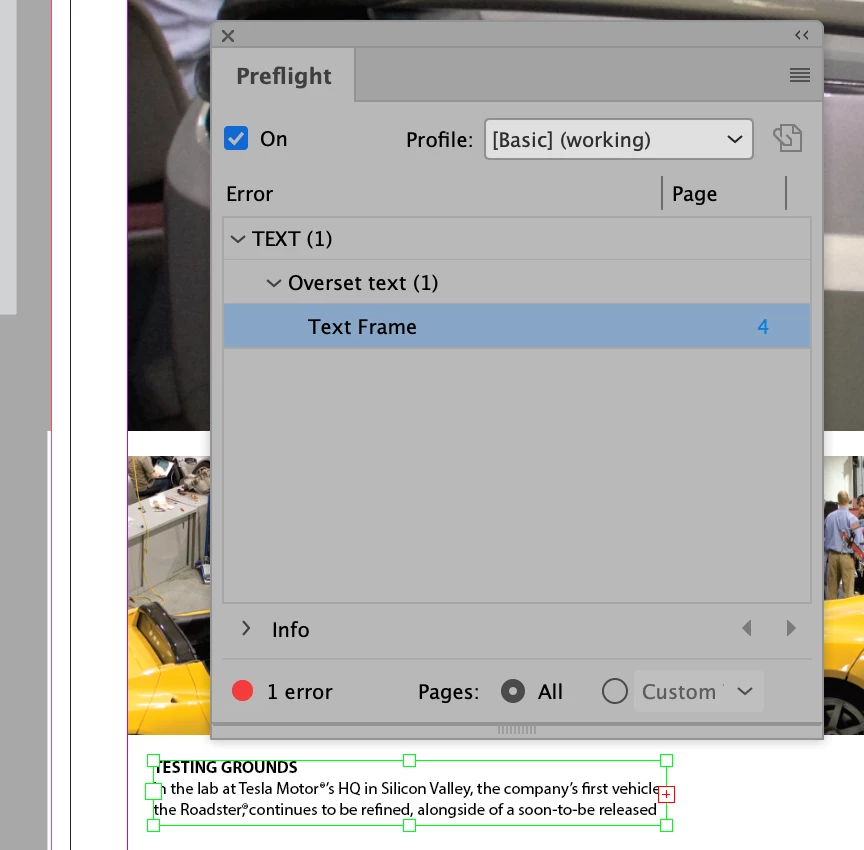
The message suggests that there is oversert text. The best way to be sure is to use Preflight. The default Preflight setting (Basic) would indicate overset text by showing a red dot at the bottom of the document like this:


If you see that, you can double-click on the error indicator. It will open up Preflight. You can navigate to show the frame that has the overset, and provide more information:


2 답변

Diane Burns
Inspiring
January 1, 2021

Just to add what Steve says, you'll want to use Preflight to find the overset. However, it may be a simple return character or something that doesn't affect the appearance of your TOC. Depending on how particular you are, if the TOC looks correct, you may or may not want to fix the overset. 🙂

Steve Werner
Community Expert
Community Expert
December 31, 2020

The message suggests that there is oversert text. The best way to be sure is to use Preflight. The default Preflight setting (Basic) would indicate overset text by showing a red dot at the bottom of the document like this:


If you see that, you can double-click on the error indicator. It will open up Preflight. You can navigate to show the frame that has the overset, and provide more information:


Participating Frequently
October 3, 2022

I have the same issue and preflight is showing no errors. My document has no overset text.

If I click yes, it repeats the TOC (but in a weird incomplete way). I don't know where it is getting this info from. I have fully wiped and recreated the TOC and I have created TOC in other documents with no issues.

Peter Spier
Community Expert
Community Expert
October 4, 2022

I RETRACT LAST POST!! Not working again now. I had to adjust the breaks on my pages and move things around  bit (one long text thread) and now I have updated the TOC and the problem has come back!!!!!!!!!!!!!!!!!!!!!!!!!!!!!!!!!!!!!!!! Same thing. TOC gets to the last page and then repeats itself from pg 11.....BACK TO SQUARE ONE!!


For what it's worrth, we do get quite a number of  posts that seem to have problems with places .png files.

After replaceing that .png, were you able to export to .IDML?