
Participant
February 8, 2018
Question

unwanted white space in text

  • February 8, 2018
  • 4 replies
  • 1422 views

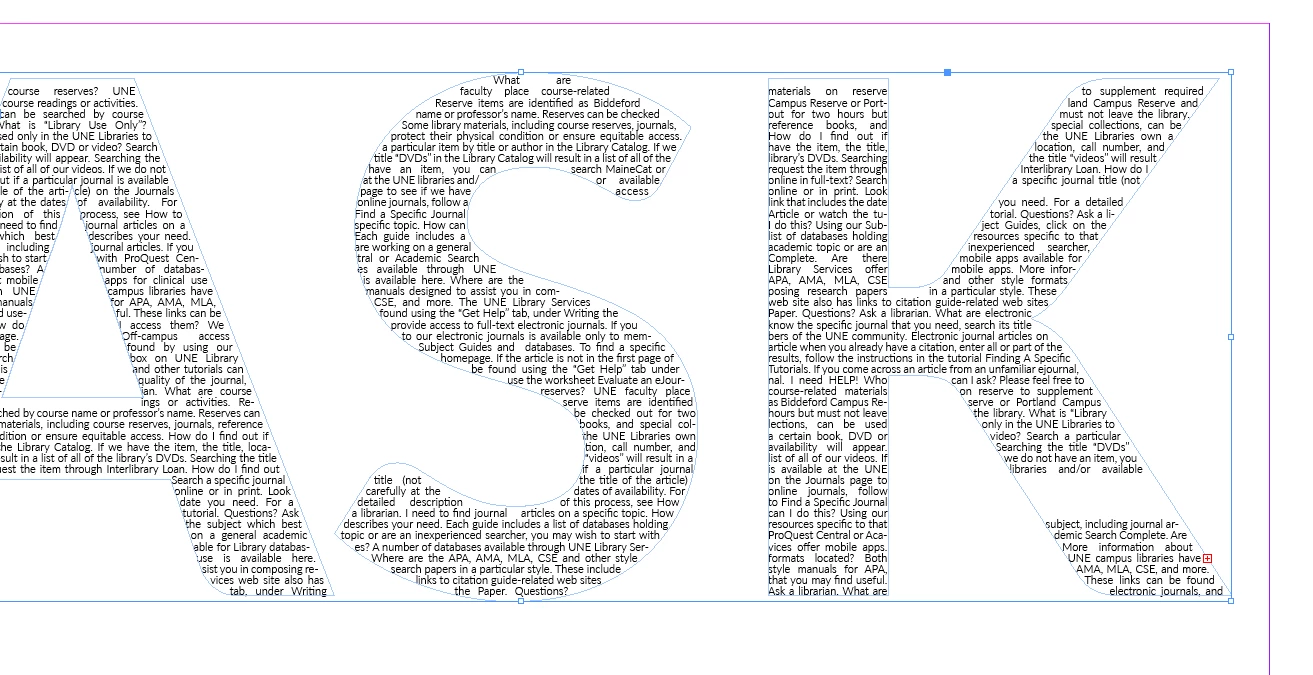
I have text in a box created from the outline of other text...but there's a part where there's what seems like a single line of white space and another much larger area of white below that and I canNOT figure out how to get rid of them. There are no spaces/line breaks/paragraph breaks or anything in the original text. It doesn't seem like the shape of the text box should be prohibiting it from flowing where it needs to be... Any ideas on how to get that to go away? I'm using InDesign CS6 on a Mac.
    This topic has been closed for replies.

    4 replies

    Community Expert
    February 12, 2018

    Hi Laura,

    if you change the shape of letter S a bit, you could work around that problem:

    Regards,

    Uwe

    BobLevine
    Community Expert
    Community Expert
    February 12, 2018

    One more, while the coffee is kicking in. Try turning of the paragraph composer and using the single line composer.

    BobLevine
    Community Expert
    Community Expert
    February 12, 2018

    BobLevine  wrote

    … Try turning of the paragraph composer and using the single line composer.

    Hi Bob,

    tried that, but that did not change the issue.

    Also tried different composers. Even the Japanese Paragraph Composer (only available by scripting).

    To no avail…

    Regards,
    Uwe


    Thanks for trying.

    vinny38
    Legend
    February 12, 2018

    Hi

    I sure can replicate this issue.

    Question is: does your text have to read horizontally?

    Otherwise, you could use each big letter as a text frame and thread them all. It's a variation of Bob's suggestion, but without the chance to have your column split your letter.

    Community Expert
    February 9, 2018

    Hi Laura,

    can we see the whole frame that is selected?

    I think, InDesign is unable to flow text through "masks" if the number of disruptions is more than 4.

    One could proof that with a test like this:
    One text frame with one column in the background.

    On top a couple of rectangles set to text wrap.

    5 rectangles with text wrap on top:

    4 rectangles with text wrap on top:

    Regards,
    Uwe

    BobLevine
    Community Expert
    Community Expert
    February 8, 2018

    I've seen this myself and for some reason, setting the text frame to multi-column fixed it. The client was okay with so I never followed up on it.