Sheena Kaul
Community Manager
Community Manager
June 16, 2020
Question

View reviewer comments – FAQ

  • June 16, 2020
  • 13 replies
  • 8776 views

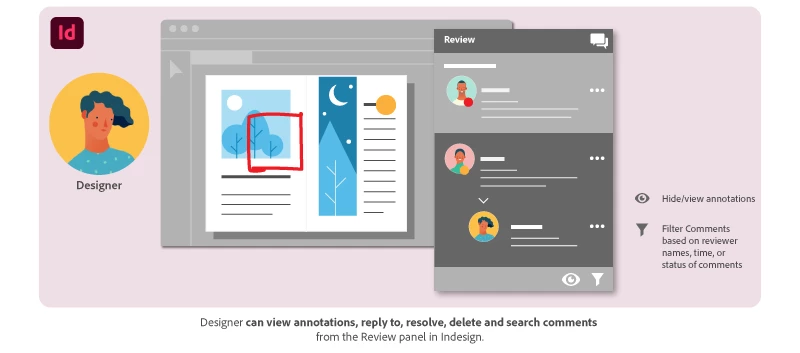
As a designer, you can access and manage feedback using the Review panel in InDesign. Check out the help document here to know how to access the Review panel 


1. Why am I not receiving notifications from stakeholders? 

After the reviewer provides feedback, you will receive a notification through the Creative Cloud application and through an email sent to you. If the email doesn’t show up, please check your junk/spam folder or refer to the best practices thread in the community. 


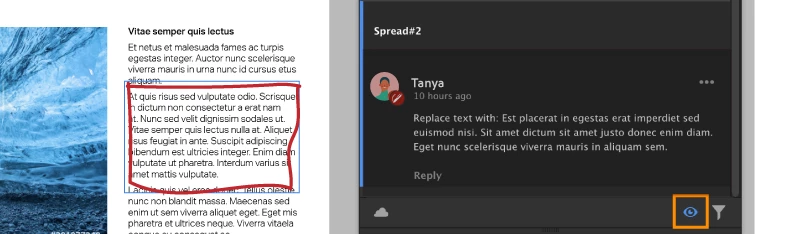
2. Can I hide annotations while working on the reviewer’s comments? 

Yes you can! Sometimes too many annotations can be confusing.  

To hide annotations on the layout, click the Hide annotations button at the lower-right bottom of the panel. To show the annotations click the button again. 
 

3. How can I filter comments by reviewers?  

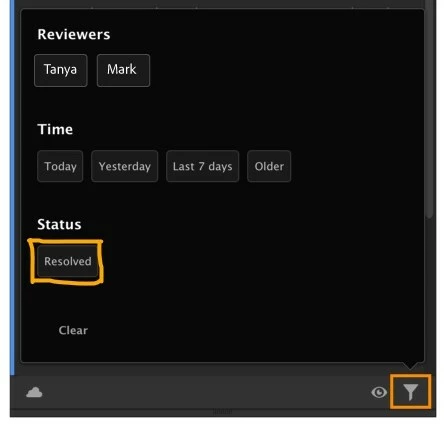
The filter option is available on the lower-right bottom corner of the review panel. You can filter the comments based on reviewer names, time, or status of comments.  

For more info, see Manage feedback. 


4. How does a reviewer know that I have worked on their feedback?  

After you have worked on the feedback from the reviewer, you can respond to that specific comment with the @mention of the reviewerStakeholders receive a separate notification for their mentions through email and through the CC desktop application. 


5. How do I resolve comments after I have worked on them?  

You can resolve comments using More options to the right of the comment.  
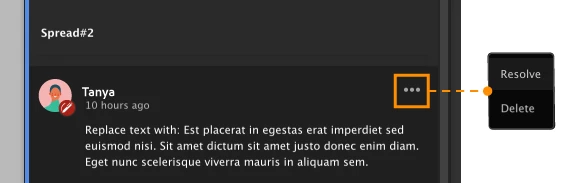
 

Learn more about managing the comments here 


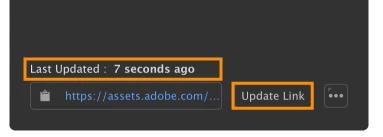
6. If the changes requested by the first reviewer are completed and sent for approval before a second reviewer responds, does this create multiple versions of the document on Creative Cloud?  

No, it doesn’t. After you have incorporated feedback from the first reviewer, make sure you update the link that has been shared. When other reviewers open the document for review, they’ll see the updated copy of the document. The link is always up to date with the latest comments.  
 

7. How do I see comments that I have previously resolved? 

Under the filter options, you can filter the comments based on the status of the comment which will help you see the comments that have been resolved.  
 

8. What’s the difference between ‘resolve’ and ‘delete’ actions for a comment?  

Marking a comment as resolved means that you’ve worked on it and it can now be hidden. Additionally, you can unhide the resolved comments using the filter options.  
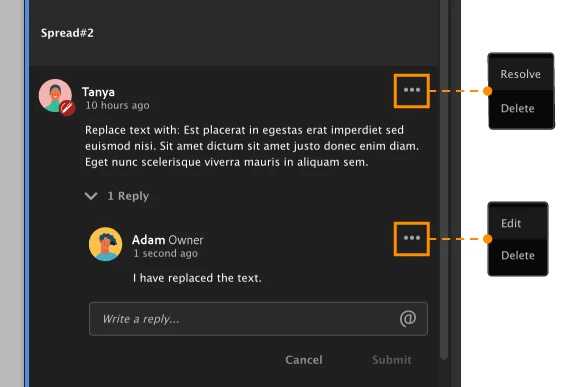
 

Deleting a comment permanently deletes it and this action cannot be undone. 


9. Can I directly accept the text comments into my InDesign document? 

No. There is no way to accept the text comments in the document. You will need to manually make the desired edits to your document. 


To view the ‘Share for Review’ FAQ, see  InDesign Share for Review - FAQ.

13 replies

New Participant
September 1, 2025

Dear all, I have two questions:

I have a link to an asset of a double-sided document, but I would like to view the single pages instead. Is there a way to switch the view?

I would like to check the layout crop. Is it possible to toggle the bleed and crop marks on and off?

Thank you in advance for your support.

New Participant
January 3, 2024

Hello, 

I have shared for review from InDesign and recieved comments. This tool is very helpful when we need multiple reviewers to comment at the same time. 


However, I'm trying to find a way to export the doucment with comments as a PDF so that I can save a record of the comments. Is there a way to export from the Adobe Cloud or Indesign with the comments and comment bubbles to a PDF (or other file format)?

Thanks

New Participant
April 13, 2021

Is there any way that the comments can travel with the indd file and not the single user? Most of the time we have a group of designers working in the indd file, if i initiate the share for review, i believe im the only one that can see the comments in indd file. 

New Participant
February 28, 2021

Product update requests ---

1. Updating the link shouldn't be a manual process - I found out the hard way that if you save the document, your reviewers won't see those updates unless you manually update the link in the Review panel.  One more thing to remember to do.

2. I can see comments but not WHERE they tagged the comments (just which spread) - super unhelpful when the comment is "add comma" or "remove comma" --- where??

Great idea, but unusable feature unless (at least the second one) can be solved.  Please help Adobe!

Thanks

Jules_0307
New Participant
November 4, 2021

2. Same problem here - this is very strange and I now have the problem to judge, which sentence, part the comments relate to - very odd. Makes my work nearly impossible!

New Participant
December 4, 2020

My team is using this tool currently, and I can see their comments and edit requests, however, I cannot see their location on the page, despite having annotations showing. I've tried restarting my computer, logging in and out of Adobe, everything is updated, etc. Is there anything you can recommend or can I get assistance troubleshooting this issue? Of course, I am on a tight deadline getting our magazine to press. 

New Participant
January 13, 2021

Same issue here, I can't see the position of any corrections inside Indesign.

It's not really helpfull if I need to open a tab with the oneline doc aside of Indesign.

How to fix this ?

crompsy
Inspiring
September 3, 2020

When we attempt to mention users via @ it doesn't work. I think it did initially when this was launched but now for some reason it doesn't. No names populate. Is there something we're missing here?

smallette
Participating Frequently
August 19, 2020

For some reason, when I click on Share for Review, the Review panel just goes blank. I've tried shutting down and restarting multiple times. Is anyone else facing this? Has anyone fixed it?


New Participant
December 5, 2020

Yes! I have the same issue. It happened to me after I exported a project to PDF. After the export the Review function just turns blank. I also tried rebooting the computer and in a new project it isnt working either. 

I have the latest version, and all seems to be fine. If I click on the menu tab in 'Review' and choose 'Go to review' it sends me to the last version I made available for reviewing. 

But, again, I cant change, or make a new Review. 


New Participant
August 10, 2020

I''m new to this feature, and so far my team mates are open to it. However, we are wondering if there's a way to compare previous interations or verisions to the new updates. Is there a history feature for the canvas that is being edited, rather than just our commens?  For us, it would be helpful to see the modular mofications through out if possble.  does anyone else have these concerns too? 

Sheena Kaul
Community Manager
Community Manager
August 17, 2020

There isn't one yet but we'd recommend you post about it in the UserVoice as the team will be able to consider it directly from there. 

Sheena Kaul
Community Manager
Community Manager
July 27, 2020

Hi All,


The issue for 'Unmapped comments on Web' has been fixed. You can now check on the web to see if the comments are appearing as you want them. 


Please note, this issue is different from the one where the comments are going unmapped in the review panel of InDesign which is still being worked upon.


Let me know if still there are issues.


Regards,

Sheena

New Participant
January 28, 2021

My reviewers' comments are still showing as unmapped (or more accurately mapped together to one specific spot on each spread - see image below. That is the marker for all comments the reviewer put on the page.). Do you have tips or suggestions? Thanks!


Maggie Baker
New Participant
July 9, 2020

I am trying to use share for review and tested it out a couple of days ago. But now when my coworker tries to comment it doesn't show or keep the pin or drawing she does and calls the comments "unmapped." I've also tried to add comments with pins and sketch to the review page and it's not keeping mine either and also calling them "unmapped." How do we fix this? We super love the concept (if it works) of share for review and think it meets a real felt need.

smallette
Participating Frequently
July 9, 2020

I'm having the same problem. I'm testing the Share for Review function using my work account and my personal account. I can see the comments, markings, and pins in the REVIEW panel in InDesign, but when I add markings and pins in the web app they disappear once I submit the comment, and the comment shows as UNMAPPED. It then shows up in the REVIEW panel, but not on the web app. How can this facilitate collaboration with multiple reviewers if only the designer can see the pins and markings that the comments are referencing?