Sheena Kaul
Community Manager
Community Manager
June 16, 2020
Answered

InDesign Share for Review - FAQ

  • June 16, 2020
  • 137 replies
  • 63436 views

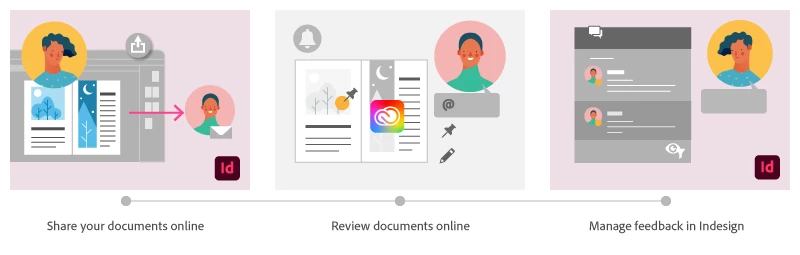
Using Share for Review in InDesign’s June 2020 release, you can share your designs for online review, and manage feedback right within the app. Stakeholders can open the shared document in a browser to provide feedback. Share for Review streamlines and simplifies the review process for both designers and their stakeholders 


The following FAQs provide clarity on common questions around Share for Review 

Share the document for review - FAQ

View reviewer comments - FAQ 

Review the document - FAQ

Best practices


How is Share for Review different from the ‘Integrated comment and review’ feature in InDesign CS5? How does it compare to the Import PDF Comments (IPC) feature?  

Adobe is investing in features and services that make creative collaboration easier and more enjoyable.  

With Share for Review, our aspiration is to make reviewing and editing InDesign creative more seamless, and address the following limitations in CS Review: 

  • Requirement for a flash plugin to use this feature 
  • Lack of support for key features such as email notifications 
  • User challenges with feature discoverability 

Compared to Import PDF Comments (IPC), Share for Review reduces time by eliminating the need to create and share PDFs and collate the resulting feedback. We will be working to enhance the reviewing features and capabilities in Share for Review, which will soon help this tool surpass the experience of IPC, from end to end.   


Does Share for Review include text commenting capabilities? 

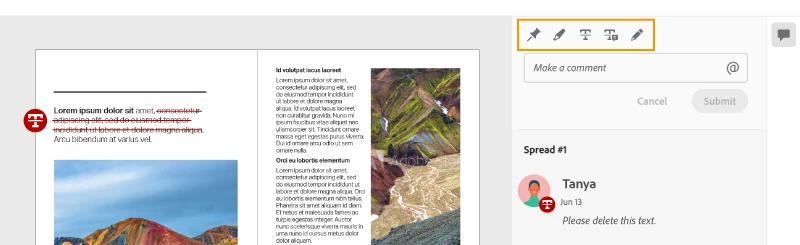
This first version of the feature allows you to provide feedback through the sticky note and pencil tools. We will continue to improve the experience, and we will soon incorporate more text commenting capabilities, including text highlight, text strikethrough, and the ability to accept text comments in a single click. 


Is this feature being introduced into InCopy?  

It is not. Instead, we’ll be making significant updates to InCopy by taking it to the Web to provide better collaboration capabilities. Stay tuned!    


What text capabilities do I have as a reviewer?  

As a reviewer, you will be able to highlight text, strikethrough text, and replace text corresponding to your comment. 


Let us know of any challenges, or questions you have for us around Share for Review and we’ll be happy to assist you. 

Correct answer Nathan Marroquin

This has worked for others:

  1. Save any work and close all open
  2. Sign out of InDesign (Help > Sign out). This will cause indesign to quit.
  3. Launch InDesign again, at which point you should be prompted to sign in again.

137 replies

Participant
March 20, 2025

Dear Sheena, 

Is there any other solution for organisations where designer could share confidential docs via Publish online without forcing them to create Adobe ID? 

Known Participant
January 29, 2025

I'm missing the third text tool "Add text".

  1. Delete text 
  2. Replace text
  3. Add text on text cursor position (klick)


And I'm missing the "play button" in InDesign to automatic make the correction/note (without copy and paste the text I have to replace.). That is already working at PDF-comments!!!


And if the note is: Delete this part of text. The comment must be still available (with the not: "deleted text:  "xyz"")

Participant
November 14, 2024

Hi,

One question please: When sharing for review from my Indesign, how can I hide those pages that I don't want to share, without deleting them? I am trying using the action 'hide sheet', but when sharing for review, in the link this seet keeps appearing.


If there were a solution to this, it would be so useful since I could present only the pages I want, without deleting anything.

Any ideas?

Thanks in advance.


Luis.

Participant
January 18, 2024

This feature is great and holds great promise, but practicality of use  from a quality assurance standpoint is low without the ability to export the review panel comments somehow, and retain markups through development of a large document and or a collection of documents.  Is anything in the works that will have the ability to export this review tab from indesign, or can this be incorportated into incopy as an additional ad on for the exporting notes? Or perhaps include a checkbox for including comments when you package an InDesign file? Any option to export the review panel would be very useful, and i am positive this would be useful to many more folks.

Bigspin
Participant
October 12, 2023

love the Feature but....in adobe InDesign, when I update the review,
The pinned notes my boss pind on the first review don't follow the pages, cuz i added 4 pages to the begining of the cattalog. So now all the notes are 4 pages behind and flowting in random space.... 
...how can adjust or fix this..

Participant
May 4, 2023

Hi, I've started using Share for Review for client proofs. Is there a formal approval feature that clients can check or indicate when the piece is approved for press? It seems like the most logical last step in the review process is a final approval. Maybe I'm missing it somehow.  Thanks!

Participant
March 23, 2023

So incredibly frustrating that it's not possible to accept changes like in when importing PDF comments. I wasn't aware of this difference and now I'm regretting ever using this. Does anyone know if there's a way that I can download a shared file for review to a pdf with comments so I'm able to accept changes instead of copying and pasting?

Participating Frequently
March 23, 2023

Use the link in incognito mode. You should be able to see comments this way.

Participating Frequently
March 16, 2023

URL not working. SOLUTION: Use the link in incognito mode. 
It may be the cache in the browser. Coz if you clean the cache it loads perfectly again. Hope Adobe can solve this from their end.

Participant
March 1, 2023

Help. My designer is using InDesign Share for Review for the first time ... and we're wondering if there's a simple way for her to accept my copy changes. I can't believe that she would have to manually type them.

Known Participant
March 1, 2023

I'm afraid the easiest way is to use copy and paste. It's far from ideal. The only other way is to use InCopy, which I've found to be a lot of hassle in my particular application. Let's hope Adobe's purchase of Figma starts to make this stuff easier soon. 

Participant
May 6, 2022

gamer girl?

THX

Participant
September 29, 2022

It would be helpful if reviews could have deadlines or a close date/time so reviewers can't add comments after the deadline.

Known Participant
September 29, 2022

I absolutely agree.