
amandat3006
Participant
July 26, 2017
Answered

Watch lines in text box move in real time as I change the size of the box

  • July 26, 2017
  • 2 replies
  • 913 views

This should be simple - I hope!

Just moved over to the Cloud from CS5.

When I click a selection point on a text frame to resize the text frame, before releasing the click, I would like to see the text adjust as I move the mouse.

Right now, when I am dragging the size of a text box, I cannot see the text/lines moving until I release my mouse.

Does this make sense?! I don't know how to phrase my question or use the correct terminology - hence why my searching for an answer came up empty. I'd like to see the text adjust in real-time as I lengthen or shorten a text box.

Thank you!
    This topic has been closed for replies.
    Correct answer Bill Silbert

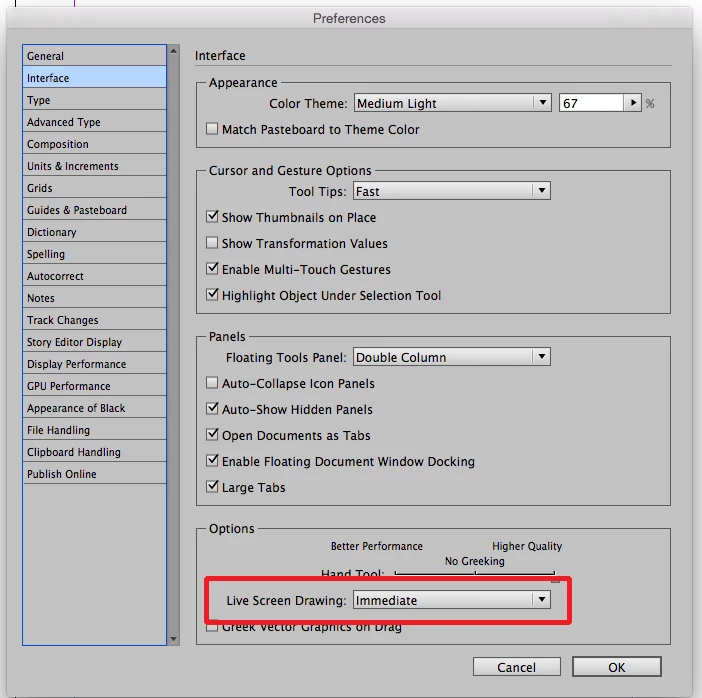
    There is also a Preference that can be set in the Interface tab of the InDesign Preferences called “Live Screen Drawing”. Set it for Immediate. Do this with no files open and it will become your default behavior once you have quit InDesign and reopened it. See screen shot:

    2 replies

    Bill Silbert
    Community Expert
    Bill SilbertCommunity ExpertCorrect answer
    Community Expert
    July 26, 2017

    There is also a Preference that can be set in the Interface tab of the InDesign Preferences called “Live Screen Drawing”. Set it for Immediate. Do this with no files open and it will become your default behavior once you have quit InDesign and reopened it. See screen shot:

    amandat3006
    Participant
    July 26, 2017

    Thank you SO much Bill!  I am doing that RIGHT now! It's such a small thing but was really bugging me.

    Bill Silbert
    Community Expert
    Community Expert
    July 26, 2017

    Happy to help.

    BobLevine
    Community Expert
    Community Expert
    July 26, 2017

    Click, hold for a second and then drag to resize the frame.

    amandat3006
    Participant
    July 26, 2017

    Thank you SO much! I will make the adjustment in my Prefs as mentioned below, but you were correct too - I was moving my mouse too quick to see the text adjust!  THank you!

    Bill Silbert
    Community Expert
    Community Expert
    July 27, 2017

    CS5, IIRC, was the only version to default to immediate for live screen redraw. It was a disaster as anything other than small documents slowed to a crawl. I would leave it at delayed and use the PUM (patient user mode) when you need it.


    BobLevine  wrote

    CS5, IIRC, was the only version to default to immediate for live screen redraw. It was a disaster as anything other than small documents slowed to a crawl. I would leave it at delayed and use the PUM (patient user mode) when you need it.

    Bob is right about the history of this feature but since CS5 is the version you're moving over from you're probably used to the speed issues. If you do find it cumbersome in CC 2017 then it is certainly simple to turn it off.