

Why do my JPEG file sizes shrink so dramatically?
This has got me completely and utterly baffled.
I have an image that I saved using Photoshop as JPEG at max quality and on disk it is 12.3mb.
After placing it at 100% in InDesign that spread when exported as a PDF with images set to max quality is a mere 2.9mb. (The spread is two pages, the image on one and the month of a calendar on the other)
The image in Photoshop is 3900px by 2650px and at 300ppi it's 33.02cm by 22.44. It is converted to CMYK and saved as JPEG at max 12
In InDesign it's frame is 330.2mm x 224.367mm on a document of 318mm x 212mm with 6mm bleed all round.
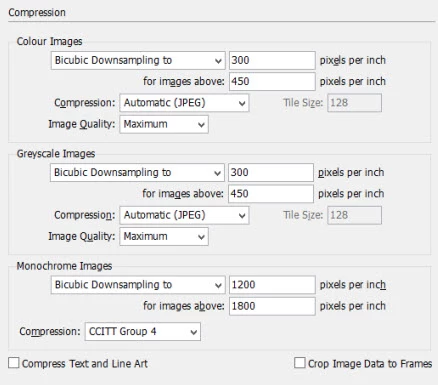
When InDesign is exporting as a PDF it must be recompressing the JPEG? Yet it seems to be throwing away 10mb even at max quality (see below) Or is it that Photoshop is saving CMYK JPEGs wrongly and producing files way too big - I've always thought PS produces huge JPEGs once you convert them to CMYK
What tests can I do? Have tried various output settings, these are current
 AdChoices