Doe Johns
Inspiring
February 12, 2022
Answered

Why InDesign hyphenate English words even when the language of a paragraph is not English?

  • February 12, 2022
  • 4 replies
  • 1107 views

I have just discovered that InDesign hypenation is both very smart and somewhat weird.


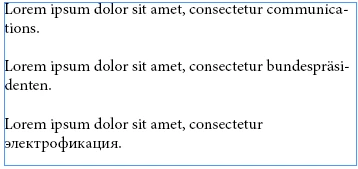
Test text:


Lorem ipsum dolor sit amet, consectetur communications.

Lorem ipsum dolor sit amet, consectetur bundespräsidenten.

Lorem ipsum dolor sit amet, consectetur электрофикация.


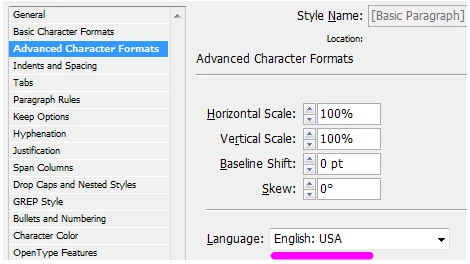
If I set the language of the Basic Paragraph style to "English: USA", it hyphenates both English "communications" and German "bundespräsidenten":
 

The text frame is 22 picas wide. The font is Minion Pro 12 pt.


The word "bundespräsidenten" is a German word, so it is not clear why it is hyphenated.


If I change the language to "German: 2006 Reform", the text is hyphenated exactly the same. The issue is ecactly the same: word "communications", as far as I know, doesn't exist in German, so it should not be hyphenated.


And if I change the language to "Russian", InDesign hyphenate the Russian word "электрофикация" and the English word "communications", but not the German word "bundespräsidenten":
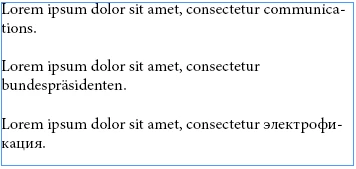


So it seems that hyphenation for English words work just always, that is, independently of the language of the paragraph. And although the observed behaviour is very useful for my own workflow, I have a few small questions:


  • Does InDesign behaves the same way for you? (I use CS6.)
  • Does the current behaviour documented somewhere or is it just a "useful bug" instead?
  • How to disable it? That it, how to disable hyphenation for English words when the language of the paragraph is not English?
This topic has been closed for replies.
Correct answer Doe Johns

I have just discovered that the word "communications" was added as "com~mu~ni~ca~ti~ons" to my user dictionary (when I tested how the hyphenation work few weeks ago). This is why it worked so strange for me today. Duh. Sorry.

4 replies

Doe Johns
Doe JohnsAuthorCorrect answer
Inspiring
February 12, 2022

I have just discovered that the word "communications" was added as "com~mu~ni~ca~ti~ons" to my user dictionary (when I tested how the hyphenation work few weeks ago). This is why it worked so strange for me today. Duh. Sorry.

Lukas Engqvist
Community Expert
Community Expert
February 12, 2022

Is there an issue or are you just musing over the way things work? Hypenation will hypenate text, best is to assign the language correctly to get the best hyphenation, but there are cases you will need to manually tweak, where the best way is to use soft (discretionary) hyphens.


If you have a word that should not be hyphenated you can either check the "no break" feature (this can be done using GREP ) or you can add a discretionary hyphen at the start of the word to tell InDesign tha this word does not hyphenate.


Discretionary hyphens will also trump any hypenation setting and can be added to show InDesign where you prefer the hyphenation to be.

Peter Spier
Community Expert
Community Expert
February 12, 2022

The only way InDesign "knows" the language for any particular word is by the language assigned to that text at the character level, which, unless you override it, will be the same as that assigned to the paragraph style. The dictionary used will be the one specified for the assigned language in your prefs.

For "known" words hyphenation will be based on the actual dictionary entry for those words. For words not in the dictionary, but assigned that language, hyphenation will be determined, presumably, by algorithmic rules appropriate for the assigned language which may or may not be correct for the actual language of the word (which, again, InDesign doesn't know becuase the wrong language is assigned at character level).

Doe Johns
Doe JohnsAuthor
Inspiring
February 12, 2022

"For words not in the dictionary, but assigned that language, hyphenation will be determined, presumably, by algorithmic rules..."


Well, but I don't see how this explain why, if I assign the Russian language, it hyphenate "communications", but not "bundespräsidenten". I don't think that dictionary-neutral algorithmic rules will ignore the word bundespräsidenten...

Peter Spier
Community Expert
Community Expert
February 12, 2022

The rules are not "dictionary neutral." They are language dependent.

For what it's worth, I just tried an experiment with the text "communications, but not bundespräsidenten" repeated a dozen or so times in a frame to make sure I could force either word to the end of a line and then narrow the frame by one character, and when English is assigned both word hyphenate, with Russian neither would hyphenate.

I tried other languages and in my test both hyphenate in languages that use latin character scripts and neither hyphenated in languesa that use non-latin scripts. The location for the hyphenation would vary depending on the language assigned, entirely as I expected.

Community Expert
February 12, 2022

The languages will have their own hypenation rules. 

So what you see in the Russian language won't apply to the English language and vice versa.

Where the English USA language split the German word, the same rule might not exist for the Russian lanaguage.


And German hyphenation is extremely strange and very different to a lot of other languages, due to the length of their words, there's often discretionary hyphens already inserted in supplied German texts that would force a word to hyphenate regardless of whether hyphenation is turned on or off. 


You can of course adjust the Hypenation 

https://helpx.adobe.com/indesign/using/text-composition.html#:~:text=Click%20in%20a%20paragraph%20or,Select%20the%20Hyphenate%20option.&text=Specify%20the%20minimum%20number%20of%20characters%20for%20hyphenated%20words.


There was updates to the Hyphenation as outlined here

https://community.adobe.com/t5/indesign-discussions/hyphenation-in-german/td-p/9561936


You might have a similar option in your version.