
Exit
  • Global community
    • Language:
      • Deutsch
      • English
      • Español
      • Français
      • Português
  • 日本語コミュニティ
  • 한국 커뮤니티
0

How to open indd from InDesign version 2.02 (version, NOT CS2!)

New Here ,
Dec 13, 2018 Dec 13, 2018

Hi,

I´m trying to transfer old indd files from InDesing version 2.02 to younger versions.

I´ve got access to an old PC with this IND-version installed. There I can open the files. But there seems to be no way to make an export to inx.

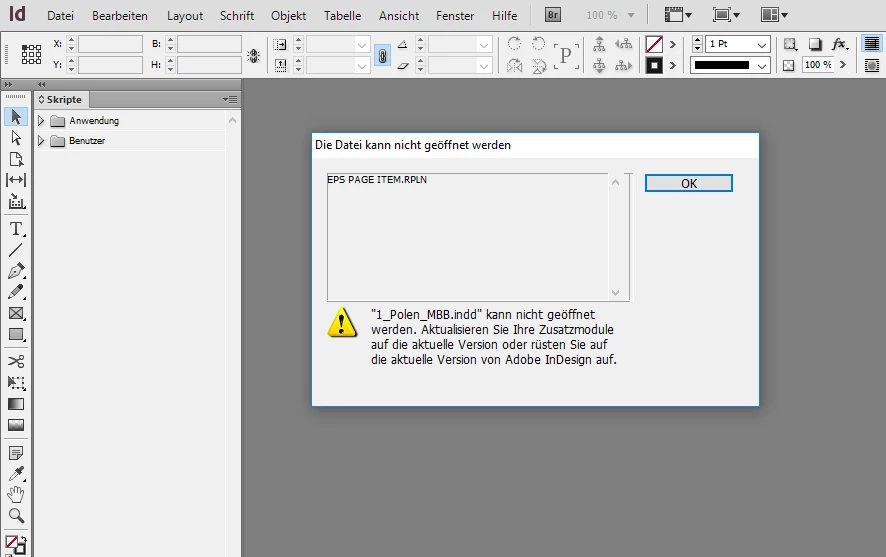
Trying to open a version-2.02-file with for ex. CS5.5 gives the error "EPS PAGE ITEM.RPLN" with the request to update this IND-Version.

Can anyone tell me what to do to convert the files?

Or is there a service provider offering this?

Thank you Tobias
2.8K
Translate
Report
Community guidelines
Be kind and respectful, give credit to the original source of content, and search for duplicates before posting. Learn more
community guidelines

correct answers 1 Correct answer

Community Expert , Dec 14, 2018 Dec 14, 2018

Hi Bob,

same result with my try to open the 2.0 InDesign document with InDesign CS6 on Windows:

ErrorMessage-OpenDocWith-CS6-on-Windows10.PNG

Maybe Markzware's DTP File Recovery Service can do something about this?

https://markzware.com/products/file-recovery-service/

Regards,
Uwe

Translate
Community Expert ,
Dec 13, 2018 Dec 13, 2018

You should be able to open them. I have files from InDesign 1.5 here that open in later versions. Could be corrupt, could be a plugin issue. If you want to post one of the files to Dropbox and provide a link someone will have a look.

Translate
Report
Community guidelines
Be kind and respectful, give credit to the original source of content, and search for duplicates before posting. Learn more
community guidelines
New Here ,
Dec 14, 2018 Dec 14, 2018

Hi Bob,

here is the file:

Dropbox - 1_Polen_MBB.indd

Translate
Report
Community guidelines
Be kind and respectful, give credit to the original source of content, and search for duplicates before posting. Learn more
community guidelines
Community Expert ,
Dec 14, 2018 Dec 14, 2018

Unfortunately, I’m getting the same error. I’ve never that happen and I have a feeling the file may be corrupt.

There’s nothing I can think of that can possibly save it.

Translate
Report
Community guidelines
Be kind and respectful, give credit to the original source of content, and search for duplicates before posting. Learn more
community guidelines
Community Expert ,
Dec 14, 2018 Dec 14, 2018

Hi Bob,

same result with my try to open the 2.0 InDesign document with InDesign CS6 on Windows:

ErrorMessage-OpenDocWith-CS6-on-Windows10.PNG

Maybe Markzware's DTP File Recovery Service can do something about this?

https://markzware.com/products/file-recovery-service/

Regards,
Uwe

Translate
Report
Community guidelines
Be kind and respectful, give credit to the original source of content, and search for duplicates before posting. Learn more
community guidelines
Community Expert ,
Dec 14, 2018 Dec 14, 2018

Trying to open the file with CS4 says something else, though: it says that it was created with a prerelease version of ID 2.0:

That means that you should have instructions for how to open it with "regular" versions, along with the prerelease software.

Translate
Report
Community guidelines
Be kind and respectful, give credit to the original source of content, and search for duplicates before posting. Learn more
community guidelines
Community Expert ,
Dec 14, 2018 Dec 14, 2018
LATEST

Ah, yes. In the olden days you needed a converter to open prerelease files.

No way I can imagine there’s any way to do that anymore.

Translate
Report
Community guidelines
Be kind and respectful, give credit to the original source of content, and search for duplicates before posting. Learn more
community guidelines
Participant ,
Dec 14, 2018 Dec 14, 2018

" I´m trying to transfer old indd files from InDesing version 2.02 to younger versions. I´ve got access to an old PC with this IND-version installed. There I can open the files. But there seems to be no way to make an export to inx. "

what  exactly  do  you  mean  no  way to  export  to  inx?  you  simply  open  the  *.indd  file  inside  indd-2 … go  to  "file-export" … the  interface  offers  you  drop-down-menu  format  of  "indesign-interchange"  which  produces  an  *.inx  file … this  can  then  be  opened  on  even  the  newest  indd-cc  versions.  do  you  not  have  the  option  in  indd-2's  export  "drop-down-menu"?

InDesign_export.jpg

Translate
Report
Community guidelines
Be kind and respectful, give credit to the original source of content, and search for duplicates before posting. Learn more
community guidelines
Community Expert ,
Dec 14, 2018 Dec 14, 2018

Hi boots_n_patches ,

the document is not from InDesign CS2 where inx was an export option.

It's from InDesign 2.0.2. Just the version before InDesign CS came out.

Regards,
Uwe

Translate
Report
Community guidelines
Be kind and respectful, give credit to the original source of content, and search for duplicates before posting. Learn more
community guidelines
Participant ,
Dec 14, 2018 Dec 14, 2018

i  am  also  referencing  indd-2  and  not  indd-cs2 … indd-2  has  export  to  "indesign-interchange"  function.

here's  a  different  screen-cap:

sdfdsf.png

Translate
Report
Community guidelines
Be kind and respectful, give credit to the original source of content, and search for duplicates before posting. Learn more
community guidelines
Community Expert ,
Dec 14, 2018 Dec 14, 2018

CS was the first version with this function. There was supposed to be a plugin for 2.0 that would read the INX files but it was never released.

2.0 had no export function for this, AFAICR.

Translate
Report
Community guidelines
Be kind and respectful, give credit to the original source of content, and search for duplicates before posting. Learn more
community guidelines
Participant ,
Dec 14, 2018 Dec 14, 2018

then  i  wish  to  apologize … thanks.

Translate
Report
Community guidelines
Be kind and respectful, give credit to the original source of content, and search for duplicates before posting. Learn more
community guidelines
Community Expert ,
Dec 14, 2018 Dec 14, 2018

The biggest complaint from the early years of InDesign was the lack of save back ability.

Translate
Report
Community guidelines
Be kind and respectful, give credit to the original source of content, and search for duplicates before posting. Learn more
community guidelines
Community Expert ,
Dec 14, 2018 Dec 14, 2018

Did you even bother to read the post? The OP was very specific about the version of InDesign that the file was created in.

Translate
Report
Community guidelines
Be kind and respectful, give credit to the original source of content, and search for duplicates before posting. Learn more
community guidelines