marlottek54221609
Participant
March 29, 2020
Answered

Placed PDF file into Indesing part of PDF file disappear

  • March 29, 2020
  • 12 replies
  • 2479 views

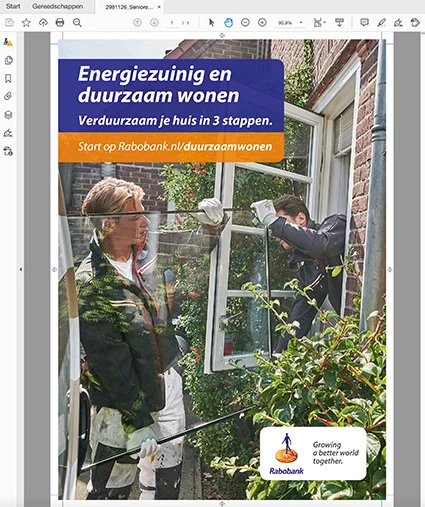
When I place a pdf file into an Indesign document the heading text of the pdf is not visible.

I have a new Imac with Catalina version 10.15.4 and the latest Adobe programs.

On my old Imac with Sierra version 10.12.6 there is no problem.

What is the cause and the solution.
This topic has been closed for replies.
Correct answer vladan saveljic

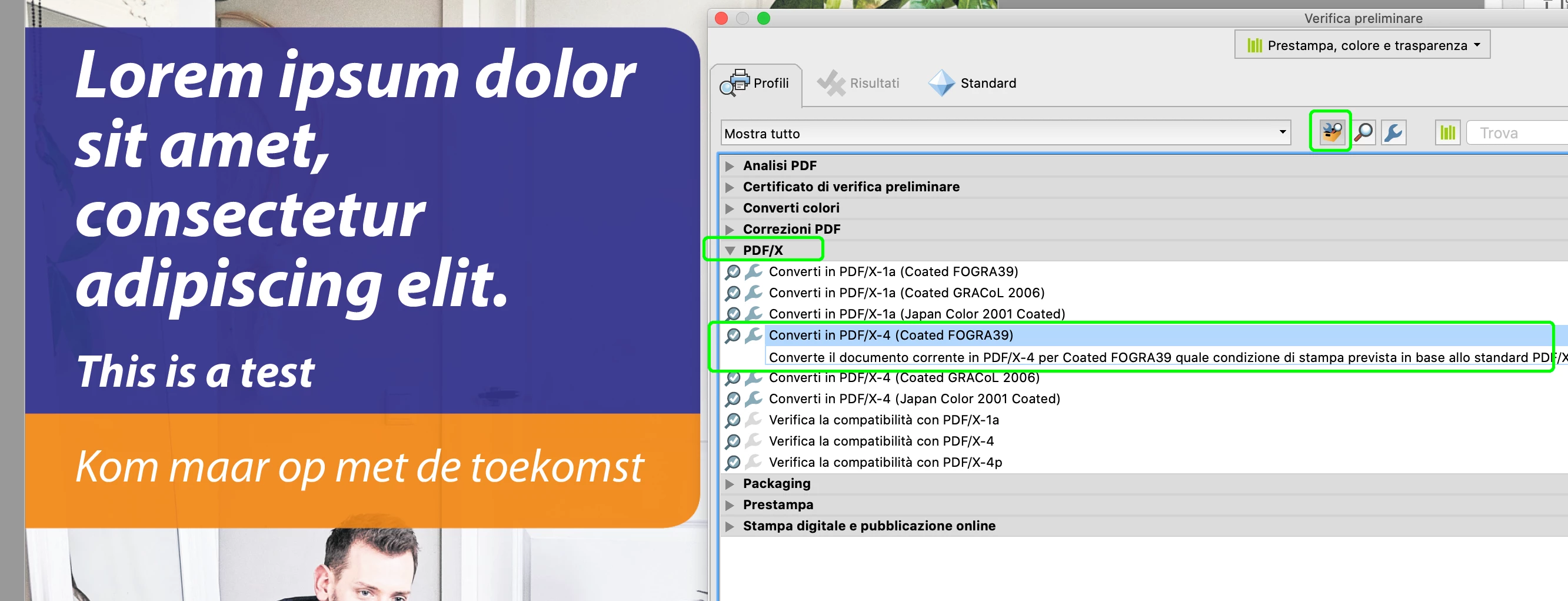
you could fix this problem with Acrobat Preflight

"Fix potential font problems"


after that in indesign 15.1.1 (macOS 10.15.5)

...or, you could fix this issue also with Acrobat preflight > convert to PDF/X-4


12 replies

Community Expert
July 2, 2020

Hi Vladan,

that is simply great! Thank you very much!

Just tested this OK on Windows 10.


The thing that irritates me is that the preflight profile "Fix Potential Font Problems" will not find any problems when running with "Analyze" only:


But it changes some things when run with "Analyze and fix":


And that's the key! Placed in InDesign 2020 the corrected PDF will show the text:


Thank you very much! I will give your reply the "Correct Answer".

Nevertheless, this is a bug with InDesign 2020, PhotoShop 2020, Illustrator 2020 and Bridge 2020 that should be fixed…


Best,
Uwe Laubender

( ACP )

vladan saveljic
Inspiring
July 2, 2020

Hi Uwe, thank you.

I added one minutes ago that the problem could be fix also with Convert to PDF/X-4

vladan saveljic
vladan saveljicCorrect answer
Inspiring
July 2, 2020

you could fix this problem with Acrobat Preflight

"Fix potential font problems"


after that in indesign 15.1.1 (macOS 10.15.5)

...or, you could fix this issue also with Acrobat preflight > convert to PDF/X-4


Community Expert
July 2, 2020

Hi Pete,

of course we see here different methods to circumvent the issue, refrying and convert fonts to outlines. Nothing I would call necessary in a usual workflow. All methods that will "work" in the sense that we can go on in producing a thing.


But I think this case here is very special: A PDF preflight will not show any error. Text is not rendered with InDesign 2020, Illustrator 2020, PhotoShop 2020 and Bridge 2020 without an error message at all. That cries for errant print runs in an auto workflow where small print will not catch the eye of a living person who is able to inspect a page for some seconds. The missing headline here in this is catchy, yes. But imagine some 9 Pt text somewhere that is missing…


So this bug should be resolved as fast as possible.

As already mentioned: Not only InDesign 2020 is affected, also Illustrator 2020, PhotoShop 2020 and Bridge 2020.

So there was a fundamental change made between CC 2019 and 2020 with PDF rendering in all that mentioned apps.

This needs a concert action between perhaps four Adobe developer teams.


Below one example with PhotoShop. CC 2019 vs 2020.


PDF opened as smart object in PhotoShop CC 2019:


Same PDF opened as smart object in PhotoShop 2020 where the text is missing:


This is a very serious bug accross Creative Cloud 2020 apps!


Regards,
Uwe Laubender

( ACP )

Progressive Graphics VB
Inspiring
July 2, 2020

Absolutely agreed, I warned our entire team about this and I'm certainly waiting to see the what can be done to rectify this.

Appreciate all of you folks.

Kind regards

Pete

Community Expert
July 2, 2020

Hi Erik,

thankfully others have tested the issue as well. Especially Jean-Claude Tremblay* who stated that not only InDesign 2020 is showing the issue, but all other relevant products in the CC 2020 series as well like PhotoShop 2020, Illustrator 2020 and Bridge 2020. Not so the versions before in CC 2019.


Thanks,
Uwe Laubender

( ACP )


*https://community.adobe.com/t5/user/viewprofilepage/user-id/7483325

Community Expert
July 1, 2020

So I think, that InDesign 2020 has a problem with the font in the original PDF.

Question: What is the layout software that generated the PDF?


Thanks,
Uwe Laubender

( ACP )

Progressive Graphics VB
Inspiring
July 1, 2020

I am pretty confient in saying this is not an INDD issue, it is the PDF being created by a PDF creator outside Adobe.

I distilled the PDF using Acrobat Distiller 20 and it flattened out the issue immediately. So what was used to originally create the PDF was CFW PDF and it creates a 1.3 version PDF. I took said PDF and saved to PS and distilled the PS to version 1.4 


I would be happy to send up the PDF if needed.

Participating Frequently
July 2, 2020

Hi Pete,


Thanks for your suggestion, but 'refrying a pdf' is discouraged by Adobe, shouldn't be necessary and sure is not a solution in an automized workflow.

It is correct that the PDF is not created with an Adobe product, we use iTextSharp to dynamicly generate PDF files from our online content creation platform.

We have been using that product for years now -with 1000's of pdf's per month- and have never experienced any problems in handling the pdfs (dtp as well as direct print).  It is only the latest update of InDesign that has this problem. 

On top of that, the fact that Enfocus Pitstop Server certifies the PDF to PDF/X-1a:2001 standards and the industry standard Newspaper profile makes me believe that the PDF is generated in a correct manner.


I will however try and get a reaction from 'websupergoo' on this issue, maybe they have some additional insights as well.  

Community Expert
July 1, 2020

Hi Erik,

I had success with an Acrobat Pro Preflight Single Fix action.


Acrobat Pro DC > Print Production > Preflight >

Acrobat Pro DC 2015 Profiles > Select single fix ups

Document > Convert fonts to outlines


You can download my test files together with the fixed PDF from my Dropbox account.

PDF-Placed-BUG-IS-SHOWING-CC-2020-15-1-1-103.zip

https://www.dropbox.com/s/20accioe4s86b00/PDF-Placed-BUG-IS-SHOWING-CC-2020-15-1-1-103.zip?dl=1


Regards,
Uwe Laubender

( ACP )

Community Expert
July 1, 2020

Hi together,

after some tests with earlier versions of InDesign I am very sure that the bug is exclusively with InDesign 2020.

Tested with the latest version 15.1.1.103 on Windows 10.


Cannot see the issue with e.g. InDesign CS6 version 8.1.0 or CC version 9.3.0 or CC 2019 version 14.0.3.433.

Screenshot from my German InDesign CC 2019 version 14.0.3.433 with overprint preview on and separation preview as well:


Screenshot from my German InDesign 2020 version 15.1.1.103 with overprint preview on and separation preview as well:


So my recommendation is not to use InDesign 2020. Instead use CC 2019 until this bug is fixed.

Wow! This bug is really, really scary!


Regards,
Uwe Laubender

( ACP )

Inspiring
July 1, 2020

The job properties says you are you using PDF manager to create the PDF. Im not familiar with this program but would it be worth just exporting out of indesign without this program? Just a thought

Community Expert
July 1, 2020

Hi Erik,

I can confirm the issue with InDesign.

Did not find a cause for this yet, but I will try my best to find a solution.

If it is a bug with InDesign or a bug with Acrobat Pro I cannot tell right now.

I will investigate…


Regards,
Uwe Laubender

( ACP )

Community Expert
June 30, 2020

Hi Erik,

thank you very much for testing with Acrobat Pro and the supplied PDF file.

Will test and come back to you.


Regards,
Uwe Laubender

( ACP )

Community Expert
June 30, 2020

Hi Erik,

and a good test would be to open the PDF with Acrobat Pro DC.

Then go to: Print Production > Output Preview

Make sure that option [x] Simulate Overprinting is checked.


Regards,
Uwe Laubender

( ACP )

Participating Frequently
June 30, 2020

Hi Uwe,


I tried that before, did not find anything wrong: