steinrueckn
Participating Frequently
November 24, 2020
Answered

the never ending issues with font sync

  • November 24, 2020
  • 4 replies
  • 1189 views

The sync icon does not appear in creative cloud. I always have issues with syncing fonts with adobe, especially when I am changing computers. Developers need to develop a button inside of InDesign that allows you to manage fonts. There is an f icon within marketplace tab to the left but this takes you to the web. Please adobe figure out a better system!

This topic has been closed for replies.
Correct answer Steve Werner

You haven't told us about your system: Please tell us what operating system (exactly) you're running. Please tell us (exactly) what InDesign version you're using.


Here are a couple things to try:


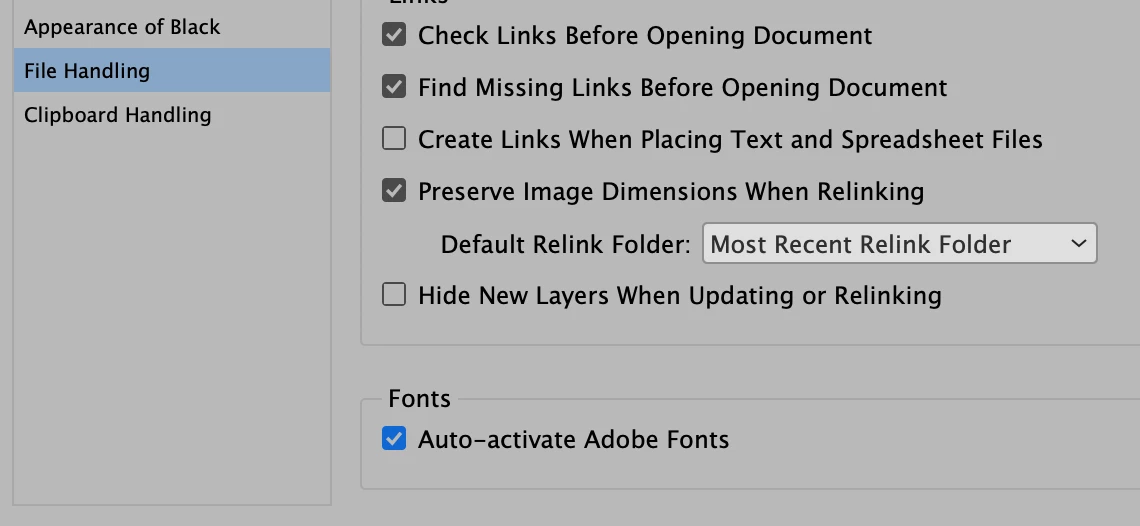
(1) If you're using InDesign 2021 (or the last update of InDesign), you can turn on Preference to have Adobe Fonts auto-activated. That is helpful if you're opening files from other people who have activated Adobe Fonts that you don't have open. It's found in File Handling Preferences:
 

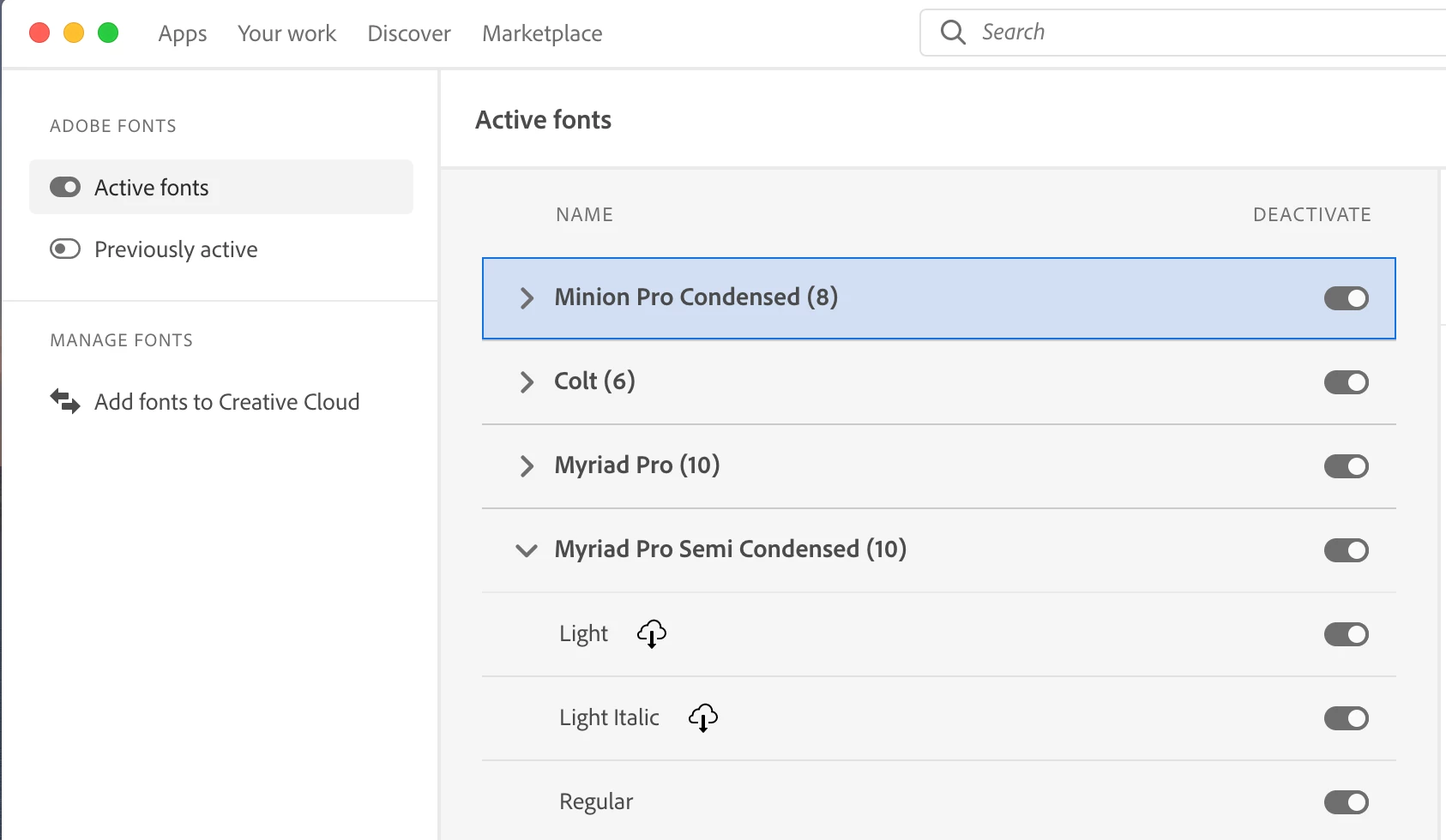
(2) If I'm going to be needing a number of Adobe Fonts available (like a font family or two), I find it easiest to control font opening from the latest version of the Creative Cloud Desktop app.


Look for the Font icon toward the bottom left of the large panel where it says Manage Fonts. When you click it, you can see your current list of activated fonts. You also have a Add fonts to Creative Cloud button which opens fonts.adobe.font where you can search and activate more fonts.


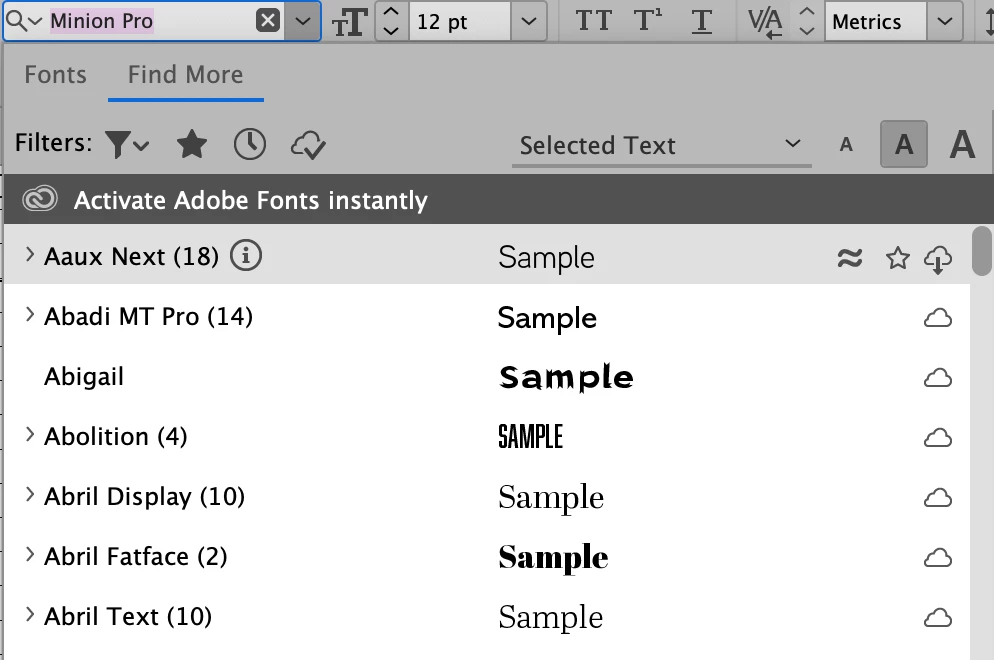
(3) You can add fonts within InDesign but the interface is crowded and confusing. I also don't find it as reliable. You go to the Font menu and click the Find More link which shows you fonts families you can activate.



4 replies

Participant
November 26, 2020

I am using a Dell Laptop with dual screens. It's a 64-bit operating system with an Intel Core i5-10210U CPU @ 1.60GHz 2.11 GHz. 8.00 GB Ram. I am using Adobe InDesign 2021 version 16.0 x64. I have the settings in File Handling set just as you show in the screen shot above. I did close InDesign and reopened it and it look like it worked this time. I dodn't have time to thouroghly check it out. I will tomorrow. 

Community Expert
November 25, 2020

Hi Steve,

yes I will report it over there. Thanks for the link.

Btw.: My CC Desktop App is still trying to gather the loaded Adobe fonts.

For about 4 hours now…


Will restart my machine to end this.


Thanks,
Uwe Laubender

( ACP )

steinrueckn
Participating Frequently
November 25, 2020

Yes, make sure everything is updated, and restart the computer. This is what I was getting at though it always seems to be some issue that takes time to get fonts to sync, for now, this seems to have worked. Thanks for the response Uwe.

Steve Werner
Community Expert
Community Expert
November 25, 2020

I'm very familiar with the issues because I have been teaching InDesign and Illustrator classes where the students are asked to create assignments (they're learning at the Graphic Design program at UC Berkeley Extension). They like to use Adobe Fonts because they are part of their student subscription so I spend a lot of time opening and closing Adobe fonts!


Community Expert
November 25, 2020

Hi steinrueckn and Steve,

don't know if this is an issue tied to a specific region, I'm from Germany and OP steinrueckn perhaps as well.

Currently I can see only this when I like the Creative Cloud Desktop to show all active or installed fonts:


This could go on forever, hours of hours. It's never showing a result.

Have this since a couple of days now. Thankfully I do not rely on Adobe Fonts.

It only came up lately in a lecture I did with my students via Zoom.


The screenshot is from today. The process is still running for a couple of minutes.

Also tried to log out of the Creative Cloud Desktop app and to log in again.


Regards,
Uwe Laubender

( ACP )

Steve Werner
Community Expert
Community Expert
November 25, 2020

Uwe, it always works for me in my US English version of Creative Cloud.


I can't explain that, nor have I heard about it before.  Perhaps you could report about it in the Creative Cloud Services forum:


Creative Cloud Services


It's probably more likely to get the attention of Creative Cloud engineers over there.

Steve Werner
Community Expert
Steve WernerCommunity ExpertCorrect answer
Community Expert
November 24, 2020

You haven't told us about your system: Please tell us what operating system (exactly) you're running. Please tell us (exactly) what InDesign version you're using.


Here are a couple things to try:


(1) If you're using InDesign 2021 (or the last update of InDesign), you can turn on Preference to have Adobe Fonts auto-activated. That is helpful if you're opening files from other people who have activated Adobe Fonts that you don't have open. It's found in File Handling Preferences:


(2) If I'm going to be needing a number of Adobe Fonts available (like a font family or two), I find it easiest to control font opening from the latest version of the Creative Cloud Desktop app.


Look for the Font icon toward the bottom left of the large panel where it says Manage Fonts. When you click it, you can see your current list of activated fonts. You also have a Add fonts to Creative Cloud button which opens fonts.adobe.font where you can search and activate more fonts.


(3) You can add fonts within InDesign but the interface is crowded and confusing. I also don't find it as reliable. You go to the Font menu and click the Find More link which shows you fonts families you can activate.



Participant
November 25, 2020

When I click on Find More in that box,  nothing ever shows up. I click on find more but nothing shows up.

Steve Werner
Community Expert
Community Expert
November 25, 2020

The Find More feature was added, as a recall with InDesign CC 2019 (14.0) in October 2018. I wrote about this in InDesign Magazine in the "What's New with InDesign CC 2019" article. I don't recall people reporting not seeing this feature before. What version of InDesign are you using? What operating system?


Here's an illustration from the article I wrote where you can see the feature: