


kellybellis
Known Participant
January 3, 2018
해결됨

Will the preset PDF/X-4:2008 automatically and adequately convert the Adobe RGB images to CMYK?

  • January 3, 2018
  • 1 답변
  • 10930 조회

Will the preset PDF/X-4:2008  automatically and adequately convert Adobe RGB images to CMYK?

I've asked the kind folks at DiscMakers.com (twice) and wanted to check here, just to be sure before having to re-edit all photos in CMYK.

Thank you for any pointers.
    최고의 답변: BobLevine

    Either I'm misunderstanding the question or you are, Derek.

    1 답변

    Derek Cross
    Community Expert
    Community Expert
    January 3, 2018

    Yes, that's what it's designed to do, so that the PDF is suitable for commercial litho printing, but understand that the gamut (range of colors) of CMYK is much less than that of RGB. So you won't get bright greens and bright oranges.

    kellybellis
    kellybellis작성자
    Known Participant
    January 3, 2018

    Thank you Derek. Good to know. This is more in line with my (fading) memory.

    Is the conversion's success (to CMYK) any better from sRGB?

    rob day
    Community Expert
    Community Expert
    January 3, 2018

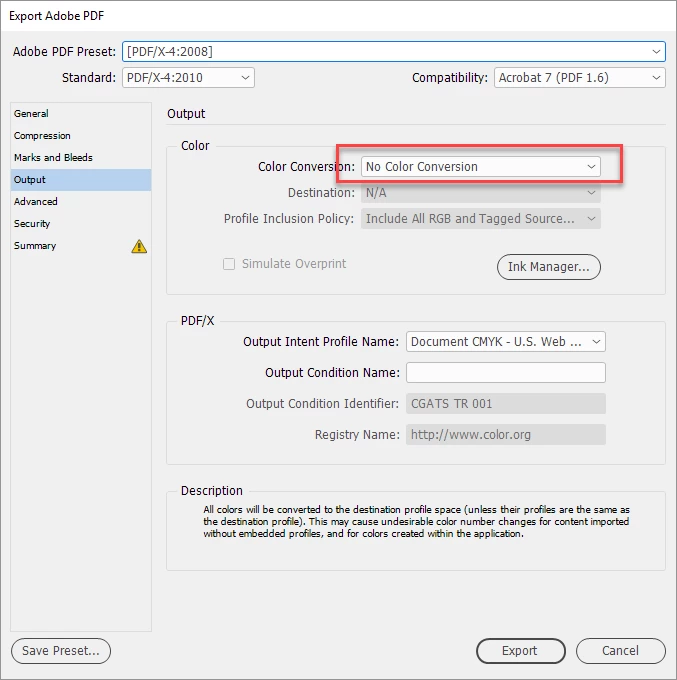
    The default PDF/X-4 preset doesn't make any conversions. If you want an all CMYK PDF you need to change the Output tab settings—choose Convert to Destination with the Destination set to Document CMYK

    Is the conversion's success (to CMYK) any better from sRGB?

    With the above setting placed RGB images will be converted from their embedded RGB profile into the document's assigned CMYK space. If there's no embedded profile the document's assigned RGB profile will be used.

    sRGB has a smaller gamut relative to an RGB space like AdobeRGB or ProPhotoRGB, so it would not improve the conversion. It has a small enough gamut that there are some CMYK colors that are outside of its narrower gamut (i.e. 90-100% cyan). There may be images where you can't get to the full CMYK gamut when the source profile is sRGB.