mark00673
Participating Frequently
February 6, 2021

P: GPU causing preview error within Library, Develop & Export due to Auto Mask

  • February 6, 2021
  • 22 replies
  • 4488 views

I'm currently using LR Classic release 10.1.1, Camera raw 13.1, on an iMac running Big Sur 11.2. and GPU AMD Radeon Pro 580 - 8gb.  I use a Wacom and MIDI2LR with a Behringher X-touch.


This error is extremely similar to the problem where brush work was deleted/modified when spot removal tool was used, with this problem when you exported the error was not exported.


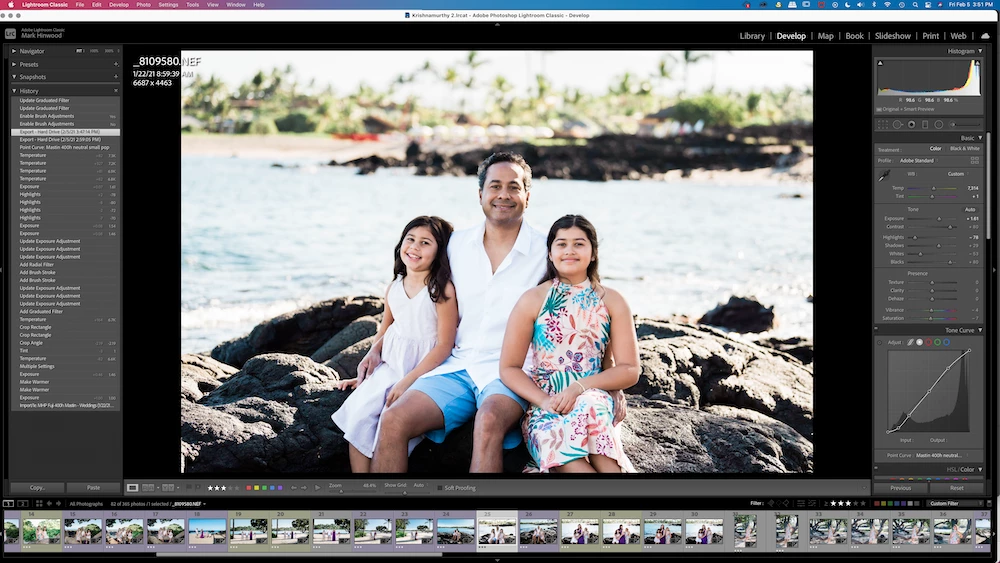
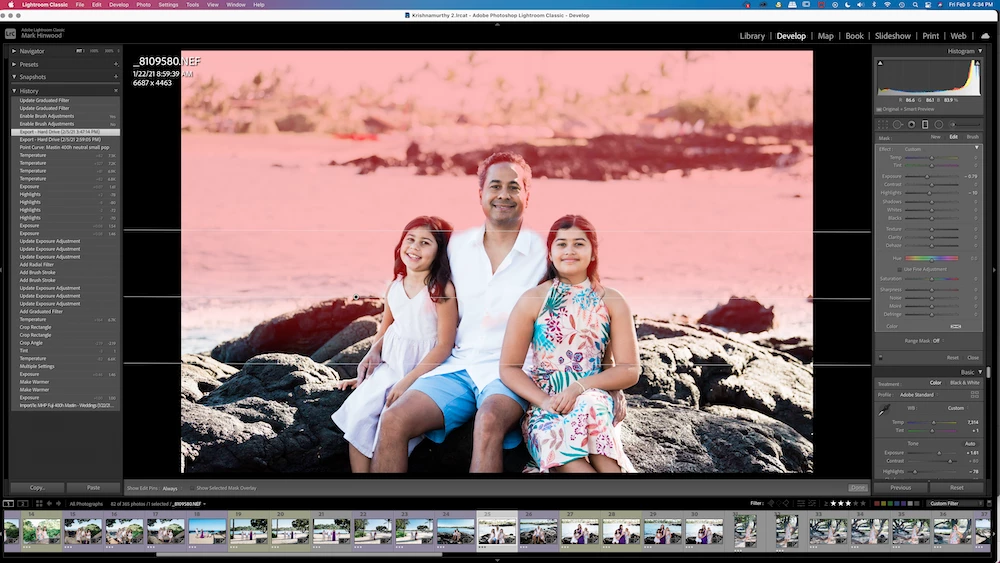
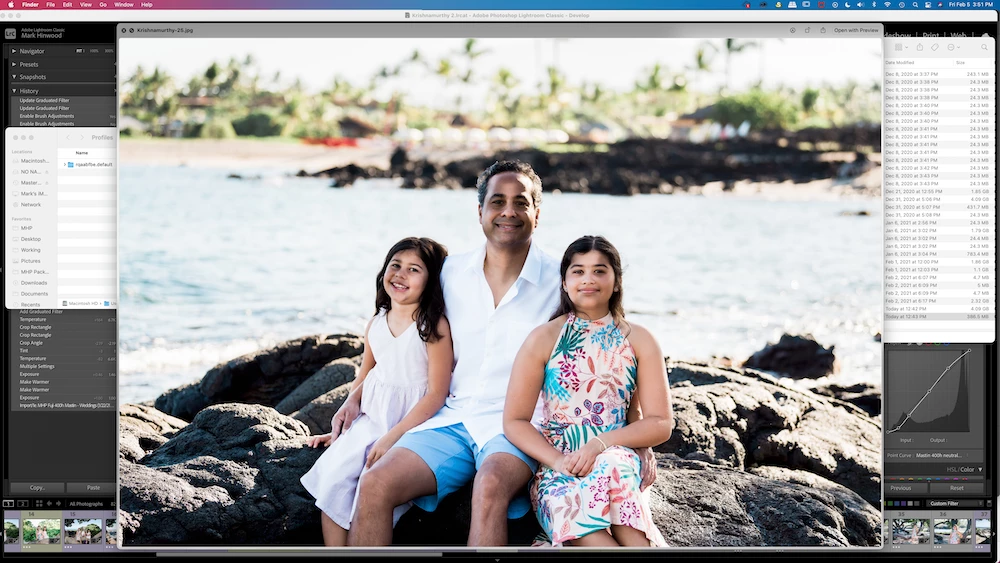
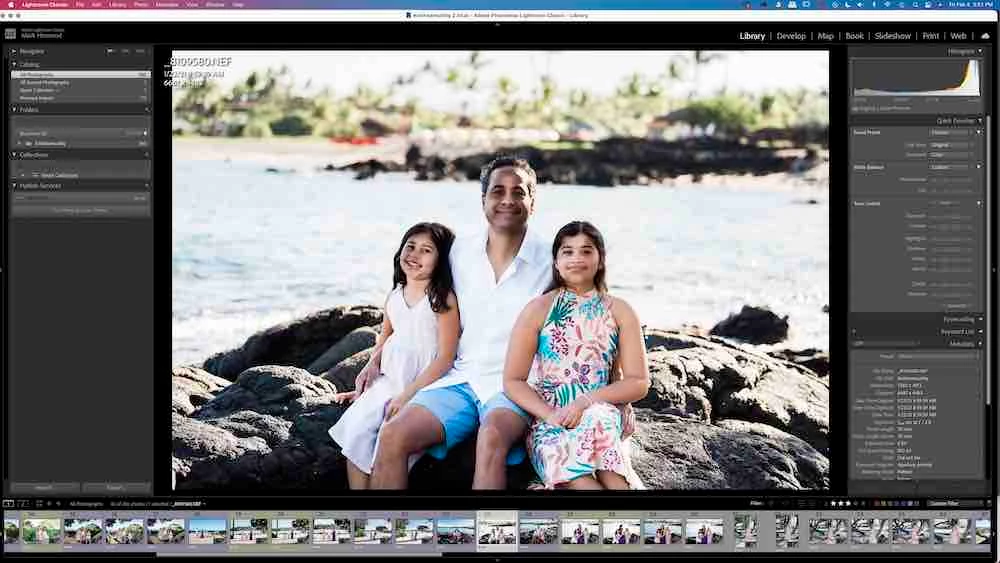
The problem I am experiencing is that in the library panel (and on the film strip when in develop mode) I am seeing the incorrect brushwork on a graduated filter which is being deleted/modified/affected, but not when in develop mode (develop mode is showing the correct edit).  On top of this when I export a full res jpeg I am seeing the problem in the exported jpeg.  You can see the specific problem on their faces in the images below.  I've since worked out that the library version of masking is where my Wacom pen drew, and the develop version shows the auto mask selection.  But when I export I get the library version.


1st image - Library mode with visible brush error on face

2nd image - Develop module with no error

3rd image - Develop module showing grad overlay (notice brush work is different to 1st & 4th)

4th image - screen shot of exported jpeg


Once I deleted the grad filter and then exported again and the problem was no more so this particular error is with the grad filter...


On a side note if I show the overlay when on the specific grad and then close the grad menu the red overlay does not disappear as it should, it stays visible.  If I then select library mode, the red overlay disappears, then select develop mode the red overlay is visible again even though the grad menu is collapsed and not selected.


EDIT:  Within preferences I turn off 'use graphics processor' and the develop module now shows the incorrect edit seen in Library module.  In my circumstance it appears a combination of auto mask and GPU use randomly caused this error.


This topic has been closed for replies.

22 replies

Rikk Flohr_Photography
Community Manager
Community Manager
October 26, 2021

Greetings,


The Max 2021 Photography products updates have been released and include remedies for this topic.  The updates will be rolling out worldwide, October 26 and 27, 2021. If you do not see the updates in your Creative Cloud Desktop app, you can refresh the apps to see if the updates are available in your region.  The keyboard shortcut to refresh is [Cmd/Ctrl] + [Opt/Alt] + [ R ]. 


Note: iOS and Android updates may take up to a week to appear in your App Store.


Thank you for your patience.

Rikk Flohr: Adobe Photography Org
mark00673
mark00673Author
Participating Frequently
July 13, 2021

@8510810 I just downgraded and installed ACR 12.4 and the main image shows the same as the thumbnail.  I did the same with ACR 13.1 and initially both the main image and thumbnail showed the same but after a few seconds the main image shows the 'false' masking, the same as ACR13.3.  So ACR 12.4 shows the file correctly and ACR 13.1/3 shows it incorrectly.

With ACR12.4 & LR v10.3 Lr still shows the false mask.  I presume LR v10.3 comes preloaded with ACR13.3.  I'm guessing the answer is no but is there a way to point LR v10.3 to ACR 12.4 and not to ACR 13.3?

As an update... with the GPU selection on LR 10.3.  If I select 'custom' and then I only select 'Use GPU for display' I have no problem.  But if I select 'use GPU for image processing' I DO get the problem.

So as far as I can tell the combination of using ACR13 & GPU usage is triggering the problem with showing the wrong preview in develop module.

In case this info is of any use:

 Model Identifier: iMac18,3

  Processor Name: Quad-Core Intel Core i7

  Processor Speed: 4.2 GHz

  Number of Processors: 1

  Total Number of Cores: 4

  L2 Cache (per Core): 256 KB

  L3 Cache: 8 MB

  Hyper-Threading Technology: Enabled

  Memory: 48 GB

  System Firmware Version: 429.120.4.0.0

  SMC Version (system): 2.41f2

mark00673
mark00673Author
Participating Frequently
July 13, 2021

Correct, that specific problem happens in all V10’s and not in 9.4.


FYI I think the problem has only happened with Nikon D850 raw files..

Rikk Flohr_Photography
Community Manager
Community Manager
July 13, 2021

I don't have the information to make that call. I can't duplicate the issue on my own without your file. I am waiting on the engineer to review the bug and advise.  Do you know that 9.4 works and that 10.0, 10.1, 10.2, 10.3 do not?

Rikk Flohr: Adobe Photography Org
mark00673
mark00673Author
Participating Frequently
July 13, 2021

Thanks.  So currently the only solution for not me not having this error occur is to revert back to LR v9.4 or not use the GPU? Correct?

Also am Correct in thinking there is no way to convert a LR v10 catalogue to work in LR v9.4.

Thanks

Rikk Flohr_Photography
Community Manager
Community Manager
July 13, 2021

I took a look at your file and see the difference you describe. I also tried it in Camera Raw and it appears there as well - meaning that this isn't a Lightroom issue but rather with the Camera Raw engine. I will be logging a bug for investigation with the Camera RAw team. 

Thanks for the example.

Rikk Flohr: Adobe Photography Org
mark00673
mark00673Author
Participating Frequently
July 13, 2021

@Rikk  Just had the red preview happen again... this was with GPU turned off.  I can move to the next photo and back again and it will continue to show red, if I zoom on the red image then the 100% view will show correctly, and the fit view will also show correctly from there on out...  Typically I always have smart previews & 1:1 previews created.

mark00673
mark00673Author
Participating Frequently
July 13, 2021

Aloha @Rikk ,

Fingers crossed this Drop Box link works, haven't used it in years! https://www.dropbox.com/s/2agos81vyoocegm/ExportError1-1.dng?dl=0

As an FYI a few other strange things that are happening with my system is that I occasionally will see a preview image in library mode (full not grid) and the image space will be completely bright red, the thumbnail at the bottom of the screen will show the correct image.  In past Lr versions I'd occasionally get an inch rectangle of mixed colors but this is the whole image.  I will also occasionally move to the next photo and the full size preview will be blank, ie a black screen, no matter how long I wait a preview does not appear.

The main problem is the auto mask brush work that is being shown incorrectly when GPU is switched ON.

Cheers, Mark

Rikk Flohr_Photography
Community Manager
Community Manager
July 12, 2021

You can share your DNG to a service like Dropbox, Creative Cloud or similar and send me the link. 

Rikk Flohr: Adobe Photography Org
mark00673
mark00673Author
Participating Frequently
July 3, 2021

FYI this is a screen shot of PS Camera RAW with a DNG created from a problem image.  This clearly shows the issue (look at the thumbnail) with the masking within the exported file with GPU turned on.