C.Cella
Inspiring
November 19, 2017

P: Large numbers of brush strokes leads to slowdowns and can cause an image's edits to reset.

  • November 19, 2017
  • 31 답변들
  • 9171 조회

In Lightroom it is impossible to edit a photo as much as we want or need, using Masking regardless of the hardware you have.


EXPLANATION 

Let's say you want to edit a photo with Masking to your heart's content OR because you need to change many aspect of the photo.

Logic tells you "we have Masking so obviously it's possible to do masking safely and as much as I want"

Reality is that in Lightroom Classic there is an "upper limit" of local edits that we can have on a photo: once we reach that "upper limit" the photo will be be reset.

So in Lr it's not possible to sue Masking as much as we want/need.


Usually if you have lots, lots of edits on an image other editing software struggle and get progressively slower and slower (if one has powerful hardware generally slowdowns don't happen or appear later) but in LR a photo can reach a point where it's no longer editable and it will be reset NO MATTER THE HARDWARE YOU HAVE.


All Masking tools (gradients, spot removal, brush, Ai, et...) contribute to reaching this "upper limit" of local edits BUT Brush is the tool that contributes the most because each strokes is made of countless of dab points that are heavy to process.

Here I have attached a preset for everyone to use.
Apply it on one of your photos that already has Masks and your photo will be reset. (Please be sure to undo, or use another another history step or Snapshot to revert back to your safely edited photo)

This "Reset Bug" is a huge problem/limitation AND as long as it exists we users will never, ever be able to use Masking as much as needed/wanted in Lr.

For the record this issue is not present in Adobe Camera Raw or other non Adobe softwares: it is totally unique to Lr.

As far as I have tested we can have "infinite" number of local edits in ACR...logically with many, many mask ACR becomes progressively slower but there is no photo reset.


Best Practice When Working in ACR and LrC using Masking


If you are doing Masking in ACR and import the photo in LrC (or import settings form disk if the photo is in the LrC catalog) then the photo will either be slower to edit OR be reset in LrC.


If a photo is resetting in LrC then you must go one step back beore the reset after that you can finish editing it in ACR but unfortunately you can't safely open/import that photo in LrC again as the edits will be unusable by LrC


Keep a Virtual Copy in LrC before you edit in ACR or import form ACR.

That Virtual Copy will be always usable in LrC.


Best Practice with Brush Tool


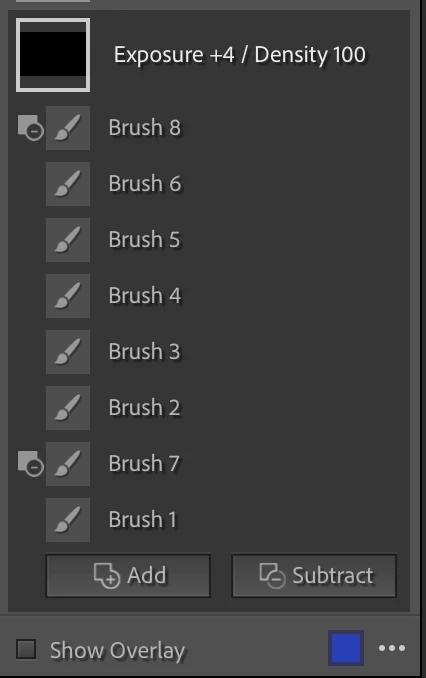
  1. Create a new Brush Mask for every single stroke you do. This way you can delete the stroke(s) that you don't like, redo them better and go back to an editable photo when the reset happens.
  2. I recommend to ONLY use Subtract as and never user Erase Brush that adds dab point but are not visible in the overlay. Subtractions are always visible in the overlay and can be deleted.
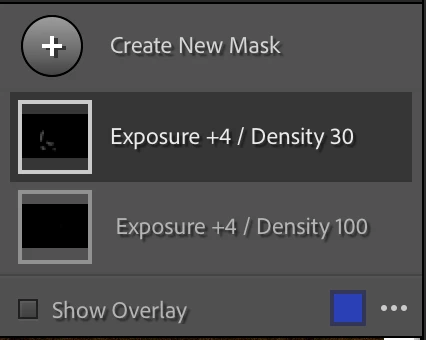
  3. If you are working with Brush Density I recommend to ALWAYS keep the same Brush Density in the same Correction and ideally write it in the Correction's name. On the same correction a new brush with different Density will overwrite the previous stokes adding more dab points above the ones created but in the overlay it looks like you did fewer. It you find a that a brush at the current density is not giving you what you want then: create a new correction > use the same settings AND use Brush with a different Density in that correction.

I personally work with very low flow and keep always Density at 100 for all my corrections. When is see that a brush is not enough or too much and is not giving me the result I want I: delete it > create a different Correction with  higher/lower different settings and brush there but the Density is always at 100.


P.S.
I was the first to discover and report this back in 2017 in this thread. (The username is different but it's me)
I bring it back as a full fledged Bug Report upon request of the Adobe team so please moderators do not merge this with existing Bug reports as this needs to be traceable as a standalone.


31 답변

C.Cella
C.Cella작성자
Inspiring
December 25, 2023

@Redauser 

You can edit the images in ACR or even LrCC local mode.

If there are no slowdowns then you will have confirmation/proof that the issue is only with LrC.


Before editing the images in ACR or LrCC create a Virtual Copy in LrC as I detailed in my OP.


.

Participant
December 23, 2023

I am having the same problem, I have a pretty good PC (AMD 5900X, 64GB RAM, 2TB M2 and a 3080ti), and when I work with ~10 masks, the whole program becomes an unusable mess.

If I monitor the performance, it's using 20GB of RAM, 5% CPI , and 10/20% GPU.

The resources are definitively enough, I also granted 40GB RAM to the program, so it should have more than enough.

However, only when I work the masks it slows down. In all other settings, it works flawlessly. It also happened that I was trying to add further brush strokes and LrC didn't add them. I had to restart the program to continue.

Cheers

Participant
August 3, 2023

Je crois en effet qu'il s'agit du même cas.
Il est donc regrétable que ce dernier n'ait pas été pris en considération...

Participant
August 3, 2023

Bonjour,

J'ai une photo qui au-delà d'un certain nombre de modifications dans le menu développement perd toute trace de ses modifications et revient au format NEF d'origine sans aucune modification. Les modifications de la même photo enregistrée par caméra raw via photoshop fonctionnent.
J'ai désinstallé puis réinstallé LRC sans que cela change quoi que ce soit.

Rikk Flohr_Photography
August 3, 2023

Can you be more specific about the changes? For example: is it Brush Strokes?

Rikk Flohr: Adobe Photography Org
Participant
August 3, 2023

Les modifications ont été faites par masquage et pinceau


C.Cella
C.Cella작성자
Inspiring
April 11, 2023

@peterp98441593 


You can use Adobe Camera Raw to finish your editing as ACR doens't have the "edits table" limit that LrC has.


As I said in my OP bear in mind you will NOT be able to load/see/use ACR edits done in LrC so you must finish the job in ACR and export a final TIFF with the edits.


Rather than switch to Capture One stick to the Adobe family when problems arise.


My hope is that the LrC team will fix this bug and bring performance parity with ACR.

Add your vote to increase the chance for a fix to be prioritized.


.


C.Cella
C.Cella작성자
Inspiring
February 27, 2023

@Rikk Flohr: Photography I have added two sections in my OP to help users with this issue.


C.Cella
C.Cella작성자
Inspiring
February 27, 2023

@Alexandru28604841zz1v 


I have added in my OP a series of recommendations and steps to follow to work with Brush. This will help deal with the Reset Bug and in general allows to see every edits we did and control them.

Participant
February 27, 2023

I'm having the same issue. Spent two days working on a photo trying to adjust the object auto select with the brush substract and there you go... image ressets all the mask. I can ho back one step in history and see the last brush and all the masks but I can not edit any further. This is horrible, makes  the brush function useless 

C.Cella
C.Cella작성자
Inspiring
November 7, 2022

@richardplondon 


The "upper limit of edits" is totally arbitrary.

It's not (anymore) a physical/hardware limitation.


It's a "speed limit" set a decade ago in the code (to make a rough analogy)


To put this in context my most edited photo(s) has around 200-300mb of local edits data in total.


We have machines that can process 100 times more data than that nowadays.


I have 64 GB of unified memory and 400gb/s bandwidth but apparently 300mb is too much for LrC.


 It boggles the mind!


.Edit


ACR can handle the data.

Same hardware, same photo, different code.


There is no real reason for LrC to be unable to handle our edits.


.

Participating Frequently
November 7, 2022

I understand that it's an escape, but I have a client that doesn't want to wait for years or decades to get his photo, so if there's a workaround, I will use it. It's still up to Adobe to fix the problem, because if some company decides to release software that does manage this, and is able to provide the same quality as LR then I will happily jump ship. It's not just in our interest to get it fixed, but also in their interest. If they decide not to fix it, that's their call. I will make my own call with my wallet 🙂