Todd Shaner
Brainiac
July 27, 2020

P: Library Preview Zoom Interpolation Changed

  • July 27, 2020
  • 22 replies
  • 1041 views

Lightroom Classic  9.3 Library Preview Zoom interpolation type has been changed to nearest neighbor. Nearest neighbor interpolation uses a simpler and faster algorithm that can create "jaggies" and other artifacts in the image. Presumably this was done to reduce preview building time, but don't know. I checked LR Classic 8.4 and Camera Raw 12.3 (most current) and they
both appear to use bicubic or bilinear interpolation, which does not exhibit the artifacts seen with nearest neighbor interpolation.

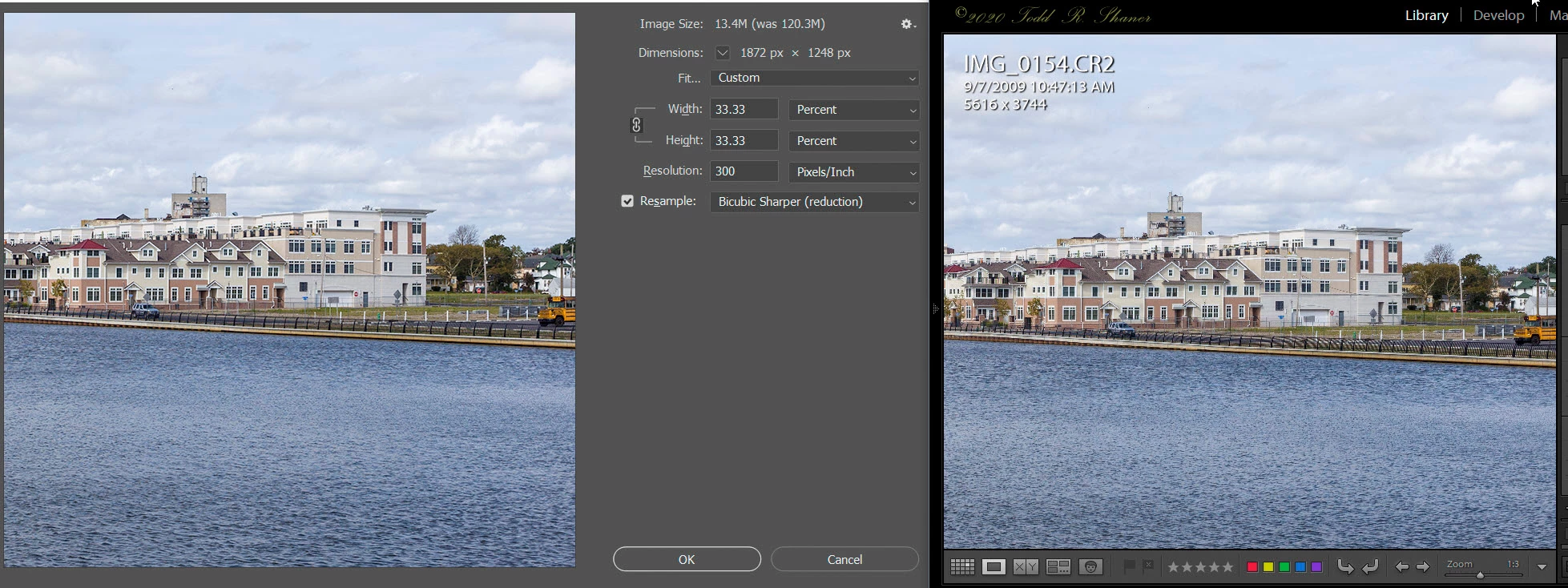
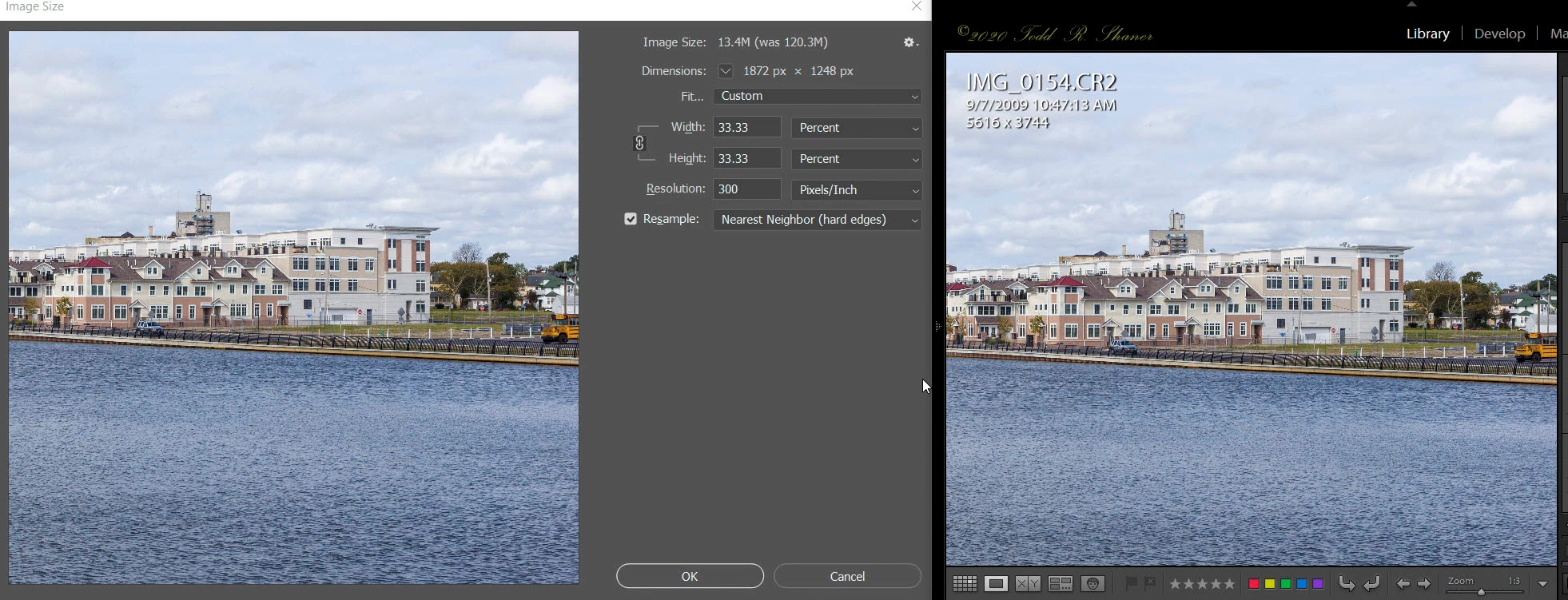
What this means is that the ALL of the Library Zoom view settings less than 1:1 may exhibit artifacts with certain image files that appear as edge "jaggies' or moire' patterns. This makes them less useful for evaluating the image detail at Zoom settings of resized export and print output. Here are examples using Lightroom Classic 9.3 showing PS Image Size panel with 33.33% (1:3 Zoom) image resizing using Nearest Neighbor (top screenshot) and Bicubic Sharper (bottom screenshot) Resample algorithms.

Observe the moire' pattern artifacts in the black fence at the center of the below picture when using nearest neighbor resizing. The bicubic sharper resizing in the 2nd screenshot does not exhibit these artifacts. I also checked PS Image Size Bilinear Resample and it does not exhibit the artifacts. LR Classic 9.3 Develop module doesn't exhibit these artifacts indicating it may  have been changed to bilinear Zoom resizing.
 
Summary
Adobe should at the very least use bilinear Zoom resizing in the Library module or return to the original bicubic resample interpolation, which provides the most accurate rendering.

(right-click on images to see full-size)


This topic has been closed for replies.

22 replies

Rikk Flohr_Photography
Community Manager
Community Manager
November 26, 2021

Setting Status

Rikk Flohr: Adobe Photography Org
TheDigitalDog
Inspiring
October 22, 2020

Lightroom Classic  9.3 Library Preview Zoom interpolation type has been changed to nearest neighbor.

Since this forum post has been referenced in a newer one started today, I think it's important to point out, that may not at all be true.

Something is going on here, for some users, perhaps only on Windows, perhaps not, but the statement above hasn't been vetted! When enough actual hard data is provided directly from Adobe, it is possible this can be put to bed. But at this point, it's not a known-known-trust by verify. 

https://feedback.photoshop.com/conversations/lightroom-classic/horrible-noise-in-library-module/5f91ccdb6880ca65525984be?commentId=5f92095248339326c8f6d124

Author “Color Management for Photographers" & "Photoshop CC Color Management/pluralsight"
TheDigitalDog
Inspiring
August 24, 2020
The same misunderstanding of the differences in previews in the modules.
Author “Color Management for Photographers" & "Photoshop CC Color Management/pluralsight"
Todd Shaner
Brainiac
August 24, 2020
Todd Shaner
Brainiac
August 14, 2020
1:1 previews are not used in Develop but in Library for quick zooming.
Correct, and the Develop module needs to build its previews real-time to display the effect of editing changes. Because of this it uses the faster and less accurate bilinear interpolation to prevent control lag.

The primary purpose of the Library Preview database is to provide more accurate preview rendering of the currently applied Develop settings. If this were not the case Adobe could have simply used bilinear interpolation for Zoom View and only build a thumbnail database like Bridge for the Grid view.

I tested this on two Windows 10 systems with LR Classic 9.3 and they both exhibit the issue. Also two other users have confirmed they see it on their Windows 10 systems. Having the ability to view and compare image files at less than 1:1 Zoom View is very useful with higher megapixel (50+) images to determine what they will look like when resized for screen viewing or print. It's also useful with high ISO image files to evaluate the effect of Sharpening and Noise Reduction at reduced image sizes that are close to the pyramid Zoom View settings. Currently the Zoom settings 1:16 through 1:3 are very inaccurate.

Here's the same raw file I used in the above screenshots shot at ISO 100 with no visible noise in the image. I set Sharpening Amount to 100 in the below screenshots showing the Develop and Library module previews at 1:3 Zoom View. Scary looking and useless for any purpose!
(click on image to see full-size)
TheDigitalDog
Inspiring
August 14, 2020
Unless something has changed recently.....

1:1 previews are not used in Develop but in Library for quick zooming. 
Standard size previews are also used in Library but not Develop (very briefly then not; that's where the cache comes in).
The size of Standard size previews varies based on preferences. It is indeed a pyramid like preview structure of JPEGs in Adobe RGB (1998). But 1:1 are full sized JPEGs in the same color space. Then there are the newer Smart Previews which are partially processed raw data, always at a fixed size regardless of the original raw.

The preview quality setting defines amount of compression applied to the JPEG files making up the preview pyramid for each image. Typically, you will
have 5 to 7 individual previews of different pixel dimensions making up this
pyramid. When you create a Virtual Copy another pyramid is created, and so
on. 
Author “Color Management for Photographers" & "Photoshop CC Color Management/pluralsight"
Todd Shaner
Brainiac
August 14, 2020
It's my understanding that the Lightroom .lrprev preview files contain an image pyramid with all of the Zoom Views from 1:1 through 1:16 and a thumbnail image. These are all prebuilt during Preview Building and only need to be interpolated when using Fit or Fill Zoom View setting, which uses a second interpolation to resize the image onscreen.

Interestingly the Fit and Fill screen previews don't exhibit the artifacts with GPU On or Off, even though they do need to be re-interpolated. When viewing image files using 1:16 through 1:1 Zoom View settings no further interpolation is required, but they exhibit nearest neighbor interpolation artifacts. Clearly something is wrong and it shouldn't be difficult to fix.
BTW- I'm a system design engineer with 50 years of experience in mainframe computer, minicomputer, and embedded Intel systems experience. I helped design the computer systems used in the Space Shuttle simulator in Houston, TX and in the Bloomberg Trading facility in New York City. I've also been using Photoshop since 1994.
Stepping down off of soapbox....
TheDigitalDog
Inspiring
August 13, 2020
In LR 5.7.1 and earlier versions the previews did NOT exhibit jaggies and moire' artifacts at 1:3 Zoom and smaller in the Library module. It's only present in LR 6 and later versions on Windows 10 systems when the GPU Is enabled as below. 
Well lots of functionality is being moved TO the GPU for speed and that's going to continue. Meaning that:

1. Such a change should not be assumed to be a change in interpolation algorithms for previews. Might be but that you don't see this with GPU off indicates point 2. 
2. GPU is problematic for many users (sorry to say and according to Adobe, mostly on Windows), there's a reason why you have the ability to turn OFF GPU. 
Author “Color Management for Photographers" & "Photoshop CC Color Management/pluralsight"
TheDigitalDog
Inspiring
August 13, 2020
Andrew the topic of this report is that something has "changed" in the way LR Classic builds it's previews.  Whether or not it's accurate is not the issue
Sure it does. If something is new that greatly speeds up Library, while the new and old are both inaccurate in previewing the actual data, it doesn't matter (at least to me) there was a change. 

There are differing ways to build previews in LR; they may not appear identically as such outside Develop. Nothing new here. 

No, I have no access to a Windows machine. 
Author “Color Management for Photographers" & "Photoshop CC Color Management/pluralsight"
Todd Shaner
Brainiac
August 13, 2020
It doesn't matter what interpolation algorithm is used for PREVIEWING in Library. It's not accurate and never was. It's built for speed, not precision of viewing the data.
Andrew the topic of this report is that something has "changed" in the way LR Classic builds it's previews.  Whether or not it's accurate is not the issue. I'm just requesting to have it work the same as previous with the GPU enabled as in the bottom screenshot below.

In LR 5.7.1 and earlier versions the previews did NOT exhibit jaggies and moire' artifacts at 1:3 Zoom and smaller in the Library module. It's only present in LR 6 and later versions on Windows 10 systems when the GPU Is enabled as below. So clearly there's a problem and that's what I'm reporting. Something in the GPU display path rendering is not working properly.

If you have access to a Windows 10 system try it for yourself and report back here with your results. Thank you.

Lightroom 9.3 on Windows 10
Top GPU Enabled: Moire' visible in the black fence
Bottom GPU Set to Off and LR Restarted: No artifacts visible.