
New Participant
June 26, 2022

P: (Polish Language) Navigator Panel is obscured in Library/Develop

  • June 26, 2022
  • 7 replies
  • 2397 views

hi
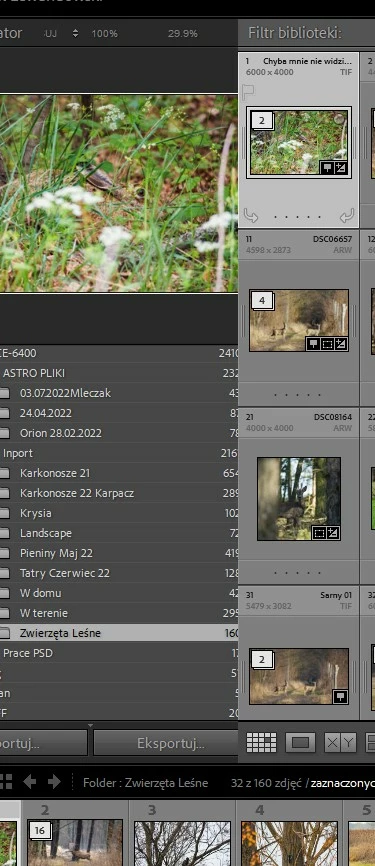
I have a problem after the last update, the sidebar with the navigator does not work, it is partially obscured. the new installation did not help, resetting the preferences does not help, I also tried to change the panel display options, nothing helps. While the English language is set, everything is fine, I am asking for advice

and possible help.    


This topic has been closed for replies.

7 replies

New Participant
August 19, 2022

Cześć.

Możesz sam to naprawić. Idź do pliku C:\Program Files\Adobe\Adobe Lightroom Classic\Resources\pl\TranslatedStrings_Lr_pl_PL. Edytuj go w notepade++ i w wierszu 7949 zmień wartość z 18 na 8, a w wierszu 7950 z 4 na 7

Rikk Flohr_Photography
Community Manager
Community Manager
August 17, 2022

Greetings, 


Updates for Adobe Photography products began rolling out Tuesday night, August 16th,  The updates contain a fix for this issue. 

If you do not see the update in your Creative Cloud Application, you can refresh it by hitting [Ctrl/Cmd]+[Alt/Opt]+[ R ].

Note: It may take up to 24 hours for your update to be available in your Creative Cloud app.


Thank you for your patience. 

Rikk Flohr: Adobe Photography Org
New Participant
July 19, 2022

I've upgraded Lightroom to a newest version and after that there is some issue in a main interface. Middle part of the panel cover Navigator panel. I'm attaching file with print scrn. I don't know how to fix it.Please help 🙂

Rikk Flohr_Photography
Community Manager
Community Manager
July 11, 2022

Setting status and adding bug number

Rikk Flohr: Adobe Photography Org
johnrellis
Brainiac
July 6, 2022

[This post contains formatting and embedded images that don't appear in email. View the post in your Web browser.]


I observe the same bug when my LR 11.4.1 / Windows 10 is set to Polish and Windows display scaling is 100%. It isn't possible to adjust the size of the left column in Library, and the counts in the Folders and Collections panels are obscured:


johnrellis
Brainiac
July 6, 2022

Moderators, @Rikk Flohr: Photography, please move to Bugs.

GoldingD
Brainiac
July 5, 2022

What language does it fail in?

New Participant
July 5, 2022

My language is Polish, I have the default installation language set to Polish.

New Participant
June 26, 2022

Hello !


I have a problem / bug. The navigation panel is hidden under the Library and Develop. There is no way I can change its size or make it on top.

When I go to Map, Book, Slideshow, Print or Web, the Navigation panel is working normally.

This issue only affects on version 11.4. I am using Windows 11 Pro.


Please help.

New Participant
June 26, 2022

I have discovered that the problem occurs when my native language is set in the program, which is Polish. When I switched to English everything works fine.