



P: Preview Header doesn't update when image is moved
PROBLEM
In Preview thumbnail grid, I've used View Options to set Folder as one of the headers for Expanded Cells. It shows the correct folder. When I drag an image from the grid to a different folder, that Folder name does not update. It updates in the right-hand panel's Metadata section, but not in the grid.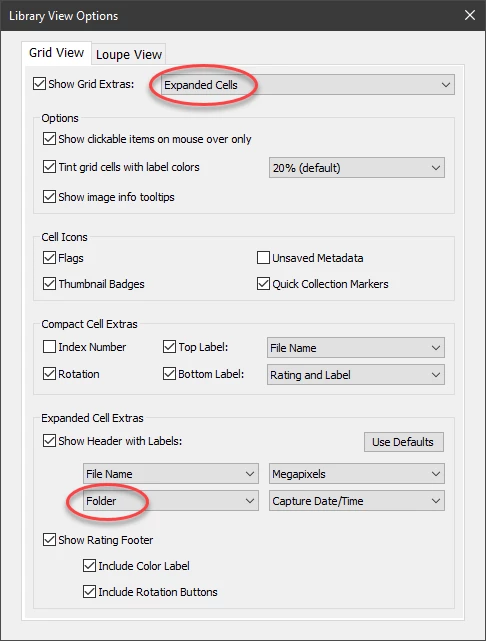
ABOVE: View Options settings are: Expanded Cells, Show Header with Labels and Folder is the third header to be shown.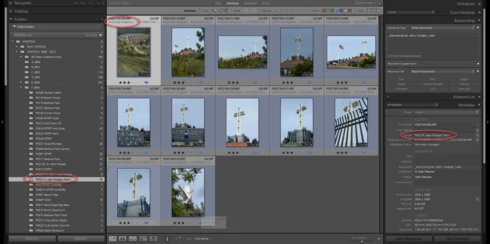
ABOVE: File moved but incorrect folder displayed in preview/thumbnail cell. The correct folder name is shown on the right in the Metadata panel.
WORKAROUND
There are only two ways to force it to update:
- Open View Options and change "Folder" to something else, such as "None." Then change it back to "Folder." the Folder name shown in the thumbnail is immediately updated.
- Or, close Lightroom and re-open it. Folder names will then be shown correctly.
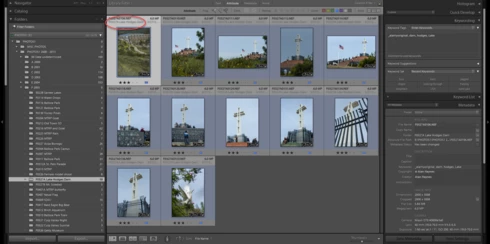
ABOVE: After updating the View Option settings, correct folder name is displayed.
OTHER INFORMATION
I'm running the latest version of Lightroom Classic (9.2) on a new Windows 10 Pro computer. I'm using Jeffrey Friedl's "Metadata Presets" plugin to show the customized metadata fields in the Metadata panel.
This seems to be a bug. I have not noticed it before. Anyone else?
 AdChoices