



P: SDK: photo:applyDevelopSettings() truncates the HDR region of tone curves
The SDK method photo:applyDevelopSettings() truncates the HDR region of tone curves stored in the setting ExtendedToneCurvePV2012. This affects my Copy Settings, Any Crop, and Export LUT plugins, and I'm sure there are many others affected.
1. Download this catalog, which includes two test pics:
2. From the catalog folder, install "extendedtonecurve-bug.lua" in the Scripts folder.
3. Open the catalog in LR.
4. Do Scripts > extendedtonecurve-bug, which uses photo:getDevelopSettings() and :applyDevelopSettings() to copy all settings from 1.CR2 to 2.NEF.
5. Observe that the tone curve of 1.CR2 is:
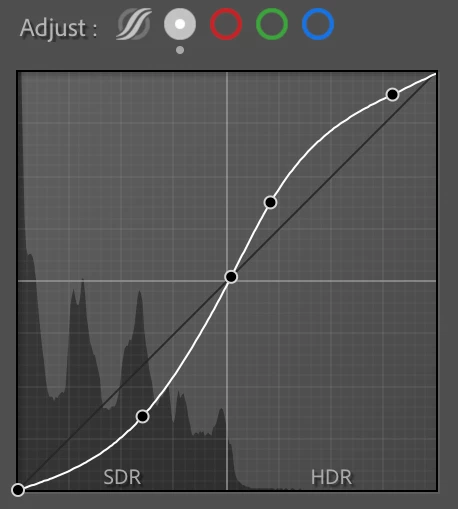
while the tone curve of 2.NEF is truncated in the HDR region:
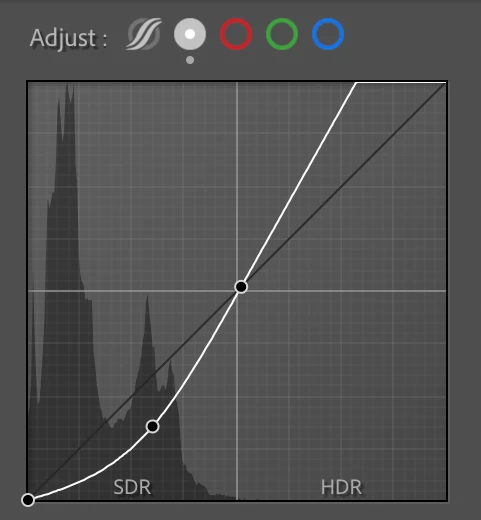
6. Use the Show Catalog Metadata plugin to see that the ExtendedToneCurvePV2012 setting of 1.CR2 has been truncated in 2.NEF:
1.CR2:
    ExtendedToneCurvePV2012 = {--table: 2
        [1] = 0,
        [2] = 0,
        [3] = 149,
        [4] = 88,
        [5] = 255,
        [6] = 255,
        [7] = 302,
        [8] = 344,
        [9] = 448,
        [10] = 473},
2.NEF:
    ExtendedToneCurvePV2012 = {--table: 2
        [1] = 0,
        [2] = 0,
        [3] = 149,
        [4] = 88,
        [5] = 255,
        [6] = 255},
 AdChoices