



johnrellis
Legend
February 3, 2022

P: Smart-collection criterion "Rating is greater than <no stars>" matches photos with no stars

  • February 3, 2022
  • 4 replies
  • 2807 views

[This post contains formatting and embedded images that don't appear in email. View the post in your Web browser.]


In some circumstances, the smart-collection criterion "Rating is greater than <no stars>" matches photos with no stars. 


Tested on LR 11.1 / Mac OS 11.6.2.


To reproduce:


1. Make a new catalog and import two photos.


2. Set the rating of one photo to 1 star; leave the other photo with no stars.


3. Create a smart collection with two criteria, "Keywords contains <blank>" and "Rating is greater than <no stars>", in that order. When you add the Rating criterion, be sure not to click any of the stars:
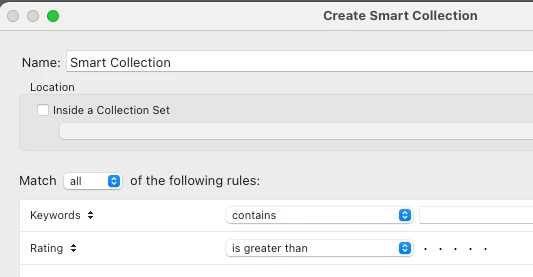
 

4. Note that both photos are matched by the smart collection. But only the photo with 1 star should be matched.


5. Right-click the collection and do Export Smart Collection Settings.   Observe that the exported text file incorrectly contains these lines:


		{
			criteria = "rating",
			operation = ">",
		},


There should be a third line, "value = 0".


6. Edit the smart collection and click one star, then click that star again so that no stars are selected.


7. Observe that only the 1-star photo is now correctly matched by the smart collection.


8. Right-click the collection and do Export Smart Collection Settings.   Observe that the exported text file now correctly contains these lines:


		{
			criteria = "rating",
			operation = ">",
			value = 0,
		},


This topic has been closed for replies.

4 replies

johnrellis
Legend
December 13, 2022

Both recipes above now work correctly, good.

Rikk Flohr_Photography
Community Manager
Community Manager
December 13, 2022

Greetings all, 


Updates for Adobe Photography products began rolling out Monday night, December 12th,  The updates contain a fix for this issue. 

If you do not see the update in your Creative Cloud Application, you can refresh it by hitting [Ctrl/Cmd]+[Alt/Opt]+[ R ].

Note: It may take up to 24 hours for your update to be available in your Creative Cloud app.


Thank you for your patience. 

Rikk Flohr: Adobe Photography Org
johnrellis
Legend
February 6, 2022

LR isn't correctly executing the smart collection below.  The smart collection comes from the following user reporting somewhat different symptoms:

https://www.lightroomqueen.com/community/threads/smart-collection-show-wrong-number.44650/#post-1296193 


To reproduce the bug:


0. Download the attachment "bug.lrsmcol.txt" and rename it to "bug.lrsmcol".


1. Make a new catalog and import a photo.


2. Set the photo's capture date to 1/3/2022, set its rating to 3 stars, and set the pick flag.


3. Right-click an existing smart collection, do Import Smart Collections Settings, and select "bug.lrsmcol" (attached).


4. Observe that the smart collection "bug" incorrectly shows 0 matching photos.


5. Edit "bug" and change the criterion "Rating is greater than 2 stars" to "Rating is greater than 1 star".  


6. Observe that the smart collection 'bug" correctly shows 1 matching photo.


7. Edit "bug" and change the criterion "Rating is greater than 1 star" to "Rating is greater than 2 stars".  


8. Observe that the smart collection "bug" incorrectly shows 0 matching photos.


9. Edit "bug" and delete the last criterion, "Label Color is not blue".


10. Observe that the smart collection "bug" now correctly shows 1 matching photo.


Tested on LR 11.1 / Mac OS 11.6.2.


johnrellis
Legend
February 6, 2022

Moderator, @Rikk Flohr: Photography, this should have been posted to Bugs.

Rikk Flohr_Photography
Community Manager
Community Manager
February 3, 2022

I can reproduce this John. I am logging a bug

Rikk Flohr: Adobe Photography Org