Participant
May 30, 2025

P: Tone curve compressed to 3 quadrants when using Adaptive Color/B&W profiles

  • May 30, 2025
  • 4 replies
  • 740 views

Lightroom 14.3.1/Camera Raw 17.3.1

Windows 11 Version 24H2


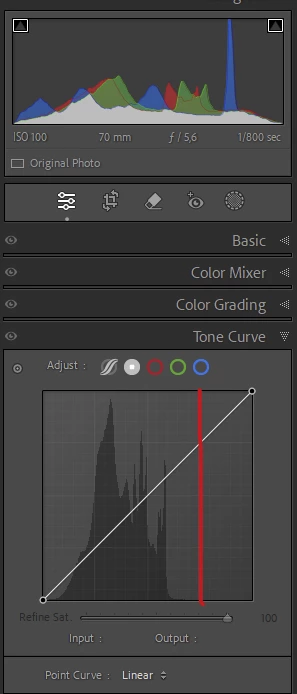
For all non-adaptive profiles the histogram in the develop module's Histogram widget and the histogram displayed behind the Tone Curve widget match in shape and the tone curve works correctly (c.f. first screenshot).


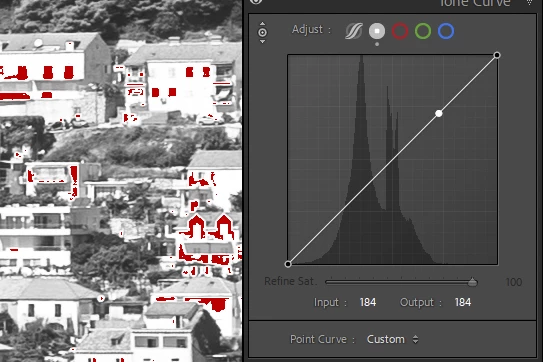
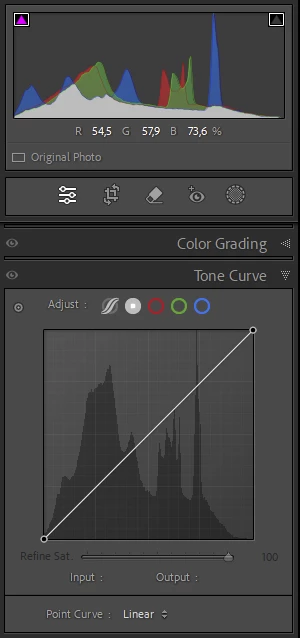
As soon as an adaptive profile is applied the tone curve seems to be compressed to the first 3 quadrants and reacts overly sensitive. (c.f. second screenshot) Also when adjusting the tone curve picking the brightness values directly from the image even whites/blown out hightlights are not mapped to 250+ values but rather to 180+ (c.f. third screenshot).


Steps to reproduce:

1. Select a raw file (Canon .cr3 from a R6 II in my case)

2. Go to develop module

3. In the Basic widget switch to one of the adaptive profiles e.g. Adaptive Color

4. Go to the Tone Curve widget and check the histogram; the histogram only use the 3 leftmost quadrants

5. Now switch to a non-adaptive profile e.g. Adobe Color

6. Select the Tone Curve widget again and compare the histogram to the result of step 4.
4 replies

Sameer K
Community Manager
Community Manager
October 28, 2025

Hello everyone,


An update for Adobe Photography products has been released as part of the MAX cycle. This update addresses the reported issue.


If you don’t see the update in your Creative Cloud app, refresh it using [Ctrl/Cmd] + [Alt/Opt] + [R].

Please note: It may take up to 24 hours for the update to appear.


Thank you for your continued patience.

Rikk Flohr_Photography
Community Manager
Community Manager
August 13, 2025

Greetings all, 


A new update for the Adobe Photography products has been released.  The August update contains an update regarding this issue. 

If you do not see the update in your Creative Cloud Application, you can refresh it by pressing  [Ctrl/Cmd]+[Alt/Opt]+[ R ].

Note: It may take up to 24 hours for your update to be available in your Creative Cloud app.


Thank you for being so patient. 

Rikk Flohr: Adobe Photography Org
Community Manager
June 2, 2025

I was able to replicate this in both Lightroom Classic and Lightroom Desktop, and have opened respective tickets to investigate. 

When there is an update, this thread will be notified. 

Legend
May 31, 2025

@Andreas Höfer 


Looks like a bug to me.