
Exit
  • Global community
    • Language:
      • Deutsch
      • English
      • Español
      • Français
      • Português
  • 日本語コミュニティ
  • 한국 커뮤니티
15

P: v14.5 Lightroom has encountered problems reading this photo | Round circle ‘!’ warning on Images

Engaged ,
Aug 21, 2025 Aug 21, 2025

OS: Windows 11
LrC VERSION: 14.5

A couple of days ago I upgrade to v14.5.
As for every update, I regurlay empty cache, optimise catalog, remove all previews and generate new standard ones (also, I wanted to test how was was the new option to use GPU for generating previews).
Never had a problem with this workflow.
After previews generation process was completed (1h 30m for 29.000 files, 23.000 jpegs and 6.000 raws) I got an error: for 21 RAWs the preview could not be generated. Looking in the catalog at those files, I realised they have an exclamation mark on a dark circle: this is not the missing photo mark. If I click on the exclamation mark, I see error "Lightroom has encountered problems reading this photo, you are not allowed to edit this image. "

Yet, I can still enter develop module and edit the photos without any problem: the editing history is there, I can zoom in at 100% (generating the 1:1 preview), I can change sliders, export... Everything... (PS: I do not use smart previews).


The 21 problematic photos are in different folders and have different dates.
The files can be opened by any other program, including Fast raw Viewer.

For a couple of problematic photos, I tried deleting the photos from file explorer, and the square light missing photo question mark replaced the round dark question mark.
I restored the files from three sources:
1- the original file
2- a backup from a second HD
3- a backup from Amazon Photos


In all three cases above the black round exclamation mark came back: this should prove that it's not a problem of corrupted files, I instead believe it's an issue in LrC.
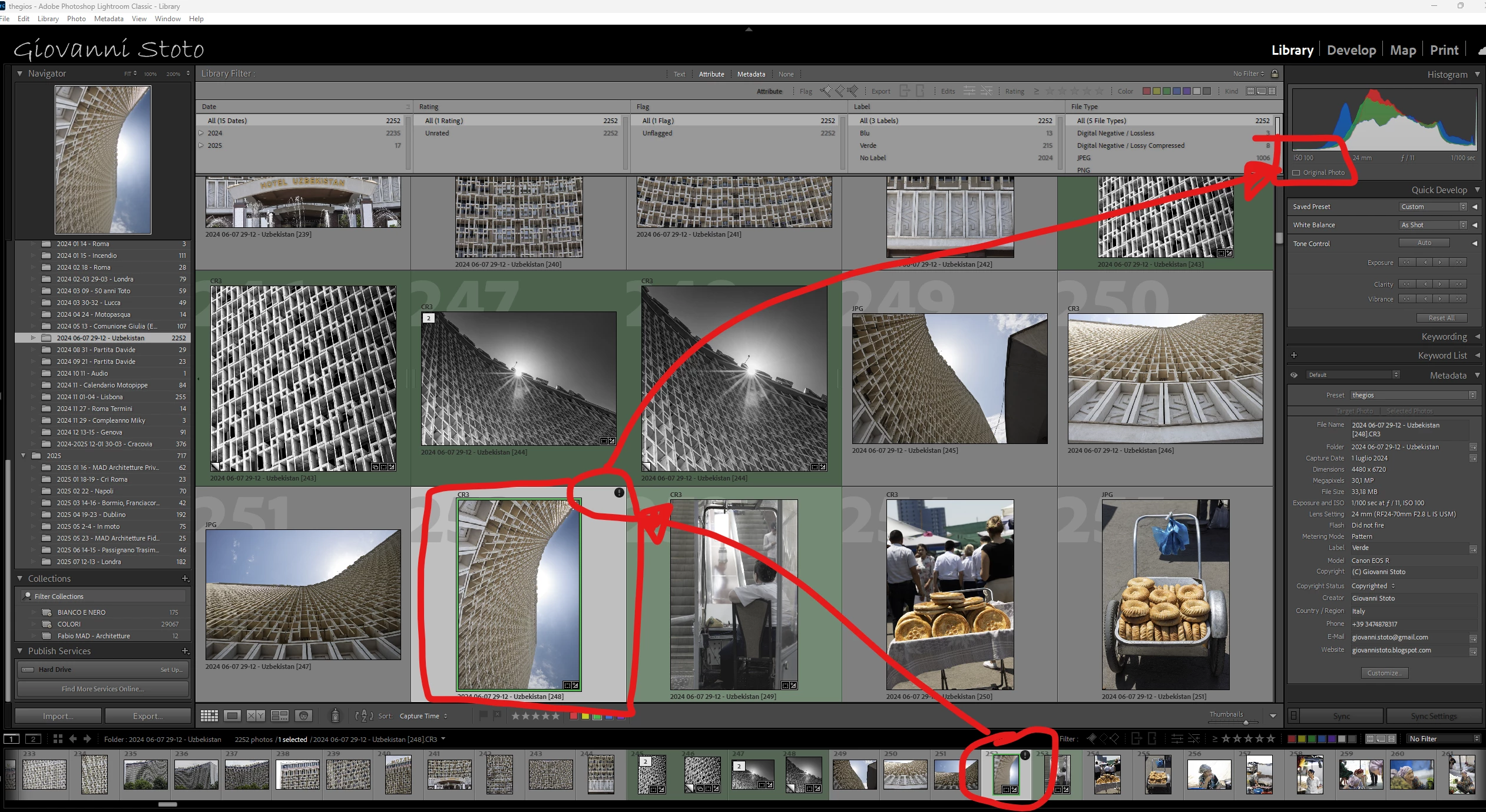
a.png

Bug Fixed
TOPICS
Windows
9.8K
Translate
Report
Community guidelines
Be kind and respectful, give credit to the original source of content, and search for duplicates before posting. Learn more
community guidelines

correct answers 1 Correct answer

Adobe Employee , Oct 28, 2025 Oct 28, 2025

Hello everyone,


An update for Adobe Photography products has been released as part of the MAX cycle. This update addresses the reported issue.


If you don’t see the update in your Creative Cloud app, refresh it using [Ctrl/Cmd] + [Alt/Opt] + [R].

Please note: It may take up to 24 hours for the update to appear.


Thank you for your continued patience.

Status Fixed
Translate
replies 132 Replies 132
132 Comments
Explorer ,
Nov 15, 2025 Nov 15, 2025
Yes the issue is still present in vs. 15 <>
Translate
Report
New Here ,
Nov 28, 2025 Nov 28, 2025

I have updated and am encourtering the same problem.  This is making me crazy. I need to get galleries out to my clients. Is there anything I can do in the meantime?

Translate
Report
Explorer ,
Nov 28, 2025 Nov 28, 2025
The problem still exists in 15.0. I was hopeful it would be fixed in 15.01
but still not fixed and error message popping up all over the place.

Please adobe can you address and correct this issue. It has been over 3
months now!!!

<>
Virus-free.www.avg.com
<>
<#DAB4FAD8-2DD7-40BB-A1B8-4E2AA1F9FDF2>
Translate
Report
New Here ,
Nov 30, 2025 Nov 30, 2025

Experiencing the same problem.  I updated to 15.01 and the bug is still there.

Translate
Report
Participant ,
Dec 16, 2025 Dec 16, 2025

Hi All,

Still does not focus on this issue at 15.1 ?

Is it sepalated issue as fixed 'Black mark at first imported image' ?

Anyway, I was disappointed.

Translate
Report
Engaged ,
Dec 16, 2025 Dec 16, 2025

I do not hav this problem any longer

Translate
Report
New Here ,
Jan 05, 2026 Jan 05, 2026
LATEST

Lightroom Classic 15.1, just encountered this exact error on about a quarter of my images (thousands of them). Nothing, absolutely nothing helped; reinstalled LRc three times, cleared every bit of cache, deleted catalogs, imported from scratch... Error reappears immediately on the exact same files (from 5DmkIV, CR2 files without any special feature, no double pixels, no XMP, no low/half-res RAW), and also in Adobe CameraRAW (so I can't even replace LRc with Bridge+ACR+Photoshop).

Translate
Report