shikamu
Known Participant
July 19, 2019
Question

Book module: photo captions with year

  • July 19, 2019
  • 2 replies
  • 1426 views

I have made several photo books using LR for several years.  In the past I have sometimes had LR do an Auto Layout and pull photo captions from the IPTC caption field.  That works.  I am now working on a new book and I want to do something very slightly different.  I want Auto Layout to pull out the caption and the year taken from the IPTC.  I have set up a custom photo text named caption, year like this:
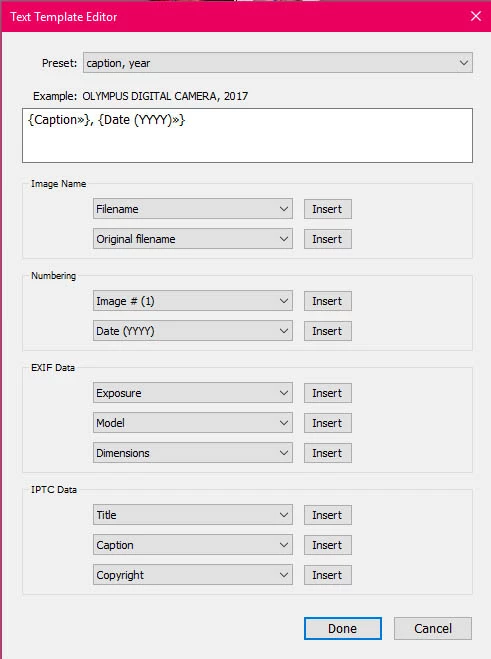
But, in the Book Preferences caption, year does not appear in the dropdown menu.  Only Caption metadata appears so I cannot select caption, year:
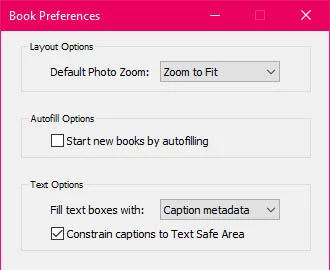
Therefore when I use Auto Layout the photos only have the caption instead of caption and year.  If I go to individual pages, select the caption, I can then go to the right side of the screen and select caption, year and it will fill in the caption and the year.  I, of course, want Auto Layout to do it.  Clearly I have missed a step that is necessary to make this happen.  Anyone know what I need to do?  Thank you!

This topic has been closed for replies.

2 replies

shikamu
shikamuAuthor
Known Participant
August 4, 2019

Last week I bought a new computer and installed LR Classic/PS CC on it along with my backed up LR catalog.  All has been fine for the last week, but today I started work on a new photo book.  I discovered that the 4 custom page templates that took me a couple of weeks of hard work, pain, trial and error, and help from here have disappeared.  I had used them for the book I just finished a week ago.  Everything else in my catalog is intact, but the custom page templates have disappeared.  I also opened up the book I just finished recently using these page templates and although the book is there the custom templates are gone.  I still have my older computer and I opened LR up on it a few minutes ago.  The custom templates are there.  Why did they disappear when I backed up the LR catalog and put it on my new computer?  Can I get them back?  For the last week I have been using LR on this new computer and have imported new photos, assigned keywords, edited photos, selected photos for my next book, etc. so I do not want to lose all that work.  Most of it I couldn't recreate since I don't have a list of everything done.

Rob_Cullen
Community Expert
Community Expert
August 4, 2019

A catalog does not contain the page templates. They are saved into a "Layout Templates" folder within the "Lightroom" folder, along with many other Presets.

My Windows-10 location is this-

C:\Users\{YourName}\AppData\Roaming\Adobe\Lightroom\Layout Templates

You need to simply copy these folders from your old computer and paste into the same location of your new computer, along with lots of other 'User' presets, then restart Lightroom.

https://www.lightroomqueen.com/lightroom-classic-file-locations/

https://www.lightroomqueen.com/how-move-lightroom-to-new-computer/

Regards. My System: Windows-11, Lightroom-Classic 15.1.1, Photoshop 27.3.1, ACR 18.1.1, Lightroom 9.0, Lr-iOS 10.4.0, Bridge 16.0.2 .
shikamu
shikamuAuthor
Known Participant
August 5, 2019

Thank you very much for that info!  You are a prince (or princess).

For years I have been backing up my catalog and thought I had everything.  Now I discover that there is other essential stuff that must be backed up too.  And it is hidden away by Lightroom.  In my case, it wasn't until recent weeks that I ever had any of these presets though.  If all of them had been stored either in the catalog or in the Lightroom folder which contains the catalog then I and most people would have figured out there was other stuff that needed to be backed up too.  I see in the first article that there is a Store presets with this catalog option and I have it checked now.  Why this isn't the default is a head scratcher though.  I also note that Adobe's documentation for backing up makes no mention of all these other files that must be backed up also:

https://helpx.adobe.com/lightroom-classic/help/back-catalog.html

Thanks again!

Bob Somrak
Legend
July 19, 2019

Try leaving the comma out of the preset name.  This is just a guess as I am not near a computer to try it.

M4 Pro Mac Mini. 48GB
shikamu
shikamuAuthor
Known Participant
July 19, 2019

Bob, thanks for replying.  I just now removed the comma so the preset is now named caption year.  It still does not appear in the Book Preferences dropdown menu though.  I still cannot figure out a way to get Auto Layout to use it.

Rob_Cullen
Community Expert
Community Expert
July 20, 2019

99jon, yes it seems that you have done it.  Unfortunately, you didn't mention what step or steps I am missing because when I try to create a new Auto Layout preset using the Auto Layout Preset Editor it does not list my custom caption year photo text in the Use Text Style Preset dropdown menu.  Clearly there are one or more steps that I have missed.  I would appreciate it very much if you would list them because after hours of trying many things and searching on the internet for answers I feel like pulling my hair out.


The reply from 99jon​ has the instructions, but if I can expand his words-

1. Design a single book page,

2. Select a Photo Cell,

3. In the 'Text' panel, Check the [Photo Text] box

4. [Edit...] the Photo Text from the Drop-down menu, (include a dash between the caption and date)

5. Save the whole page as a "Custom Page" by a [Right-Click]  (Unfortunately I do not believe you can name Custom pages)

6. In the Auto Layout tab choose [Edit...] and select the new custom page layout also selecting the left page to be identical to the right,

7. Save the Auto Layout under a new name.

Regards. My System: Windows-11, Lightroom-Classic 15.1.1, Photoshop 27.3.1, ACR 18.1.1, Lightroom 9.0, Lr-iOS 10.4.0, Bridge 16.0.2 .