
Participant
May 28, 2023
Question

Can Sony's ARW (their version of RAW) be processed using Denoise? If not now, when??

  • May 28, 2023
  • 5 replies
  • 751 views

Can Sony's ARW (their version of RAW) be processed using Denoise? If not now, when??

I would assume (hopefully) that .ARW is included with all the Sony A7 cameras out here. 
Maybe I am doing something wrong but it works when I use an older .RAW file.  The error I get is 
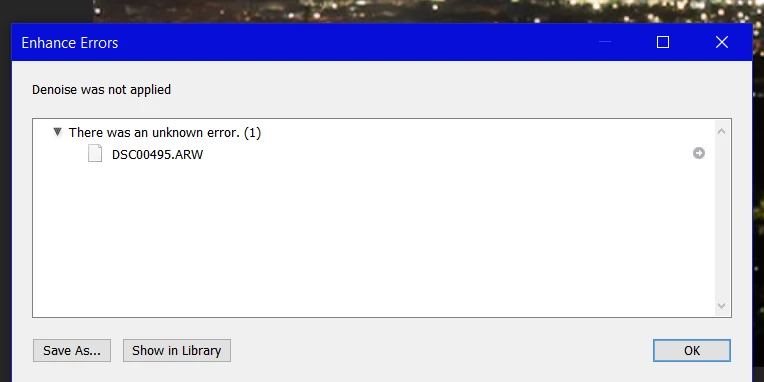
 

This topic has been closed for replies.

5 replies

Participant
August 3, 2023

Any update on this?

I am currently can't apply it on A1 and 7RV files.

Any suggestions?

D Fosse
Community Expert
Community Expert
August 3, 2023

Ah - here's the explanation. I made a test file with compressed M on an a7r V:


The file is demosaiced in-camera. Denoise doesn't work on demosaiced data.


So what you're waiting for is Denoise to work on demosaiced files. That's officially on the roadmap, but will probably take a while.

Ian Lyons
Community Expert
Community Expert
August 3, 2023

@D Fosse 


We need to be careful not to raise expectations.


Eric Chan wrote the following when 'Denoise' was first released.


"Denoise is our third Enhance feature. We’re proud of what it can do today, but we’re already looking ahead to make it even better. For instance, we have some ideas on how to use additional training data to improve resolution. We’d like to support additional file formats and combine Denoise with Super Resolution. We’re even looking into ways to speed up the workflow by not needing to make a new DNG file. It’s a very exciting time, and you can expect us to continue making big strides forward in AI-powered'


Note the absence of the phrase  'Road Map', and Eric only writes 'We’d like to support additional file formats...' 


Full text of Eric's Blog Post at https://blog.adobe.com/en/publish/2023/04/18/denoise-demystified


DdeGannes
Community Expert
Community Expert
May 28, 2023

@Larry_P , See the following link to an article by Eric Chan of Adobe which explains the Denoise  feature recent released. It explains its current features and plans for the future.

https://blog.adobe.com/en/publish/2023/04/18/denoise-demystified

Explore the current features and there is also possible to submit new features request in this forum.


Regards, Denis: iMac 27” mid-2015, macOS 11.7.10 Big Sur; 2TB SSD, 24 GB Ram, GPU 2 GB; LrC 12.5,; Lr 6.5, PS 24.7,; ACR 15.5,; (also Laptop Win 11, ver 24H2, LrC 15.0.1, PS 27.0; ) Camera Oly OM-D E-M1.
D Fosse
Community Expert
Community Expert
May 28, 2023

That's right, I've tried the different .arw varieties from a7r v.


Uncompressed works.

Compressed L, full resolution, works.

Compressed M and S, reduced resolution, don't work.

Ian Lyons
Community Expert
Community Expert
May 28, 2023

Denoise doesn't currently support Sony's 'S' or 'M' raw fomats. Are your files in either of these formats?

Known Participant
May 28, 2023

I can run Denoise on my Sony RX100M3 files.  So there must be some other issue.  Maybe if you had a way with sharing a link to one of your raw files we can help you narrow down the cause.


Known Participant
May 28, 2023