

Spiketrain
Inspiring
June 8, 2023
Question

Can't Import Photos - at all!

  • June 8, 2023
  • 1 reply
  • 27512 views

Hi,

My Lightroom Classic has been behaving reasonably well until today. 

Now I can't import photos - at all.

When I select File/Import Photos and Video it just does nothing at all. No splash screen, no dialogue box... nothing. Here's what I've tried before I came to you guys:

1. I restarted the computer

2. I created a new Catalog with no photos from scratch... I did at least get this error when I did this:
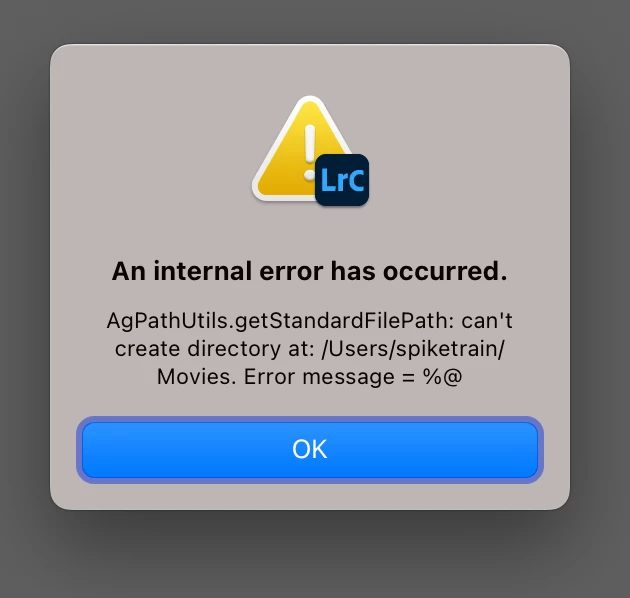
 

So at least there was that.

I then went into the library folder and checked all permissions for all operators on this machine... IE me! - and I checked they were all set to read/write.

I restarted again and - just nothing.

I can't drag images into the thumbnail grid view from Finder.... and I can't.... well do anything else!

Everything else currently seems to work ok.


No new photos in my catalog... or any catalog for me!


1 reply

TheDigitalDog
Inspiring
June 8, 2023

Try resetting your Lightroom preferences:

https://helpx.adobe.com/lightroom-classic/help/setting-preferences-lightroom.html

Also see: https://community.adobe.com/t5/lightroom-classic-discussions/important-steps-for-manually-resetting-preferences-omitted-from-help-article/td-p/12972518


Quit Lightroom Classic.

macOS: Press and hold the Shift + Option keys.

Windows: Press and hold the Shift + Alt keys.

While holding down the keys, launch Lightroom Classic. 

When asked, select "Yes".  

Author “Color Management for Photographers" & "Photoshop CC Color Management/pluralsight"
Spiketrain
Inspiring
June 8, 2023

Thank you so much for replying. I have done this and it achieved nothing.

I can not import a single photo anywhere - the option is completely greyed out.


Ian Lyons
Community Expert
Community Expert
June 16, 2023

Well.... it seems as though everyone has left me! - I could really do with someone with a bit more internal knowledge of weird system hiccups like this. 
I'm not overly excited about the kind of solutions that suggest things like 'wipe everything you've ever seen from your machine then start entering raw code into it using deep programming language! - I actually just need the import photos button to work! 


At present, I'm as stumped as others. That being said, @johnrellis asked that you provide a copy of your System Info. Can you provide this as John described below?


1. Do the LR menu command Help > System Info and copy/paste the entire contents here so we can see exactly which versions of hardware and software LR thinks you're running.