


InsomniakMedia
Participating Frequently
February 27, 2019
해결됨

Can't update to the newest Lightroom Classic

  • February 27, 2019
  • 4 답변들
  • 5530 조회

I don't use LR that much but there are times that it is useful, but after I got the Nikon Z6 LR wouldn't read the files. My lightroom says its VR 7.5 but i know there is a newer version but my ACC app won't let me update it. I try all the methods I know and it just says its up to date. Can anyone help please?
이 주제는 답변이 닫혔습니다.
최고의 답변: Rob_Cullen

everything else I have is up to date so why Lr isn't stumps me.

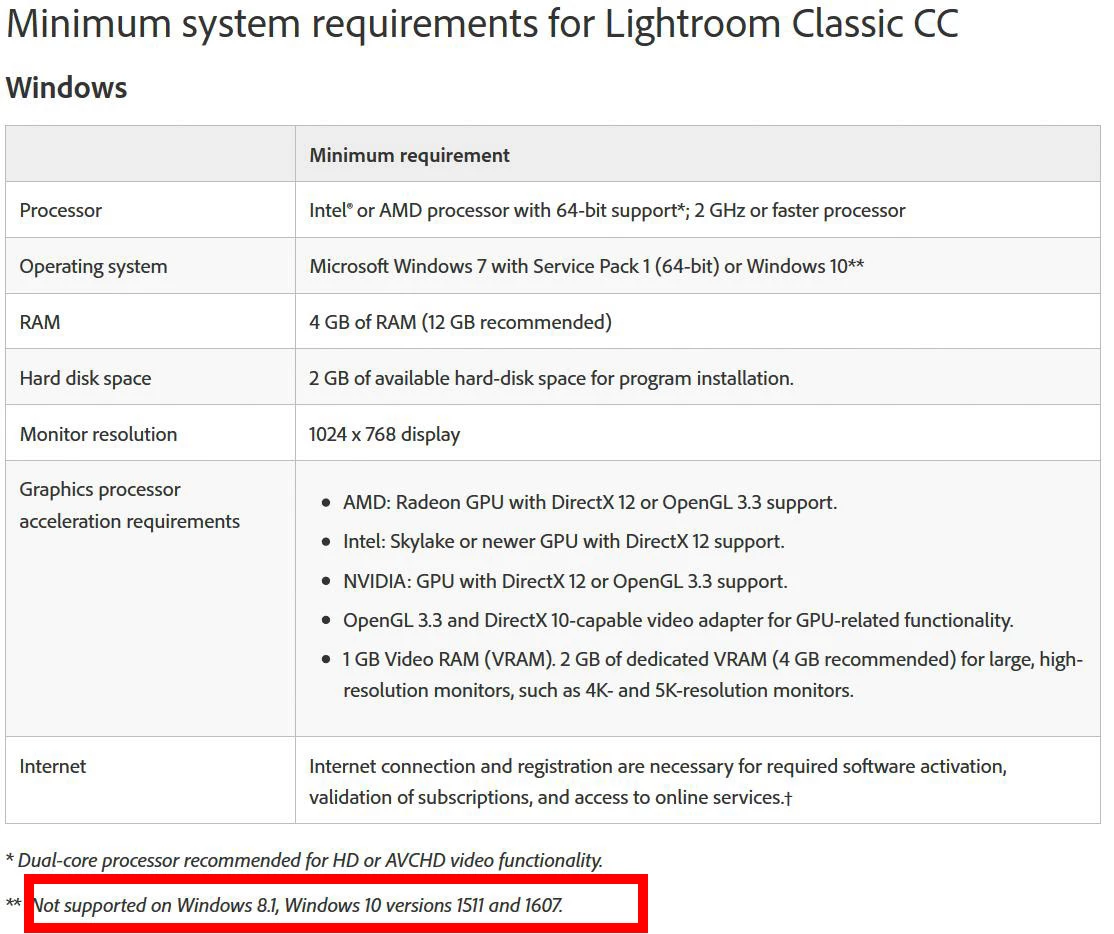
Windows 1607 just will not run Lightroom-Classic v8 and later!  Lightroom Classic CC system requirements

4 답변

GoldingD
Legend
February 28, 2019

And for you ACCD app, version?

JohanElzenga
Community Expert
Community Expert
February 27, 2019

InsomniakMedia  wrote

I try all the methods I know and it just says its up to date.

Did you know all of these methods? Available updates not listed for Adobe Creative Cloud applications

-- Johan W. Elzenga
InsomniakMedia
Participating Frequently
February 27, 2019

I've done all the basics from manual updating to restarting apps to uninstalling and reinstalling. Nothing gives. Im pretty sure ive tried method 4 but I can do it again to make sure

GoldingD
Legend
February 27, 2019

Well, actually accomplish solution 5, but just the Adobe Creative Cloud Desktop application. A version or so back, it had issues. current version is 4.8.0.421

Uninstall the Adobe Creative Cloud desktop application

GoldingD
Legend
February 27, 2019

If signing out the signing in the ACC app does not help, then try uninstalling the ACC app (only the one app) downloading a fresh new copy, and reinstalling it.

dj_paige
Legend
February 27, 2019

What is the exact version NUMBER of your operating system? We need the version NUMBER and not words like "up-to-date" or "current".

Please try signing out of the Adobe Creative Cloud Application, and then signing back in. Does that make the update available?

InsomniakMedia
Participating Frequently
February 27, 2019

I'll have to double check when I can but I do have enterprise windows 10. I can't remember what it's called but my friend who works in IT installed it for me.

I've done all the basics from manual updating to restarting apps to uninstalling and reinstalling. Nothing gives

AxelMatt
Community Expert
Community Expert
February 27, 2019

To say more we need the exact Windows version.

Take a look here: How to Find Out Which Build and Version of Windows 10 You Have

My System: Intel i7-8700K - 64GB RAM - NVidia Geforce RTX 3060 - Windows 11 Pro 25H2 -- LR-Classic 15 - Photoshop 27 - Nik Collection 8 - PureRAW 6 - Topaz Photo AI