Inspiring
December 30, 2017
Answered

Cannot print 4x6 photos on Lr Classic CC

  • December 30, 2017
  • 3 replies
  • 3780 views

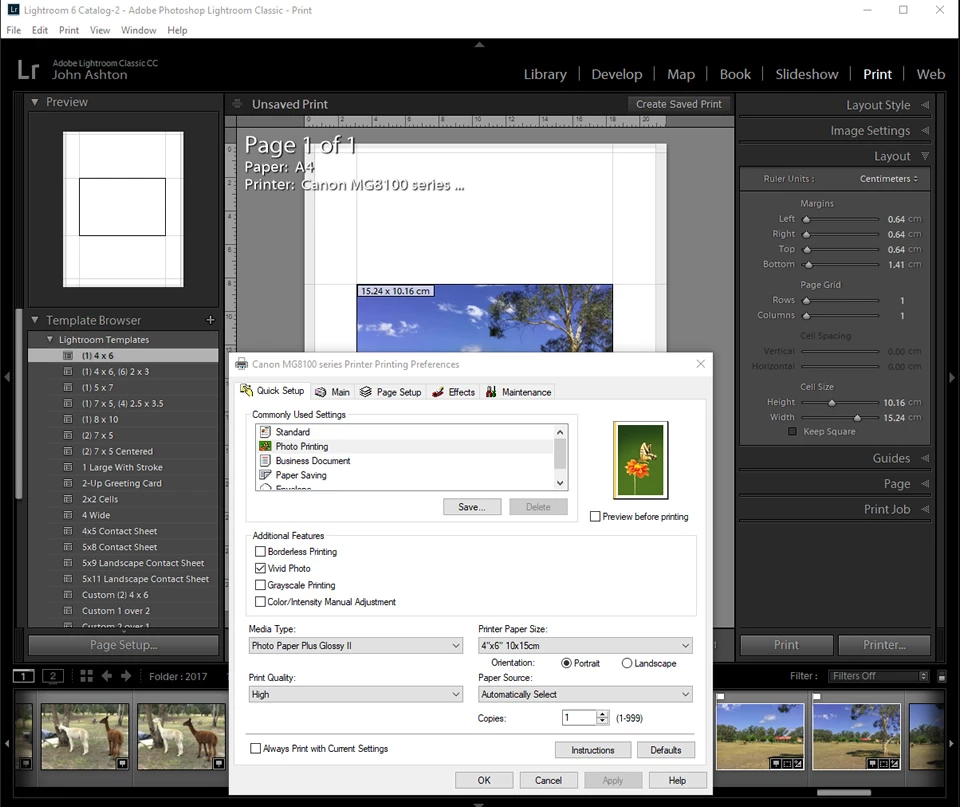
For some reason I am not able to setup a 4x6 print in Lr Classic CC 7.1. (Winsows 10) The screenshot shows that I have the printer driver settings correct and that I have selected the 4x6 print template. However, the Print module's Layout settings always remain as shown which appear to be for A4 (or is it 8x10??). This is the first time I have attempted to print a 4x6 print since updating to the current version. In the past I have been able to print 4x6 OK.

I am wondering if anyone else has experienced this...
This topic has been closed for replies.
Correct answer Rob_Cullen

My answer is to totally ignore the default Lightroom templates- close them down!- they are all defined for A4 or 'Letter' sized paper.

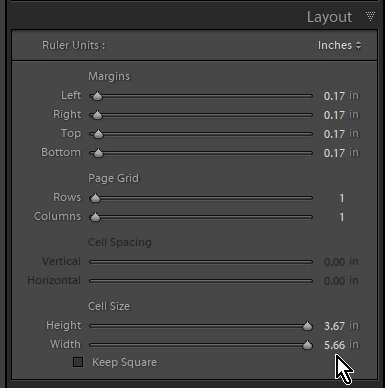
You MUST use the Page Setup and your printer dialog to select your paper size (6x4inch) and then continue with the Layout adjustments in the panels on the right of screen. The Layout Style panel is [Single Image / Contact Sheet] and in Layout panel - 1 row, 1 column, Cell Sizes at Maximum, Margins at Minimum

When you have achieved the 6x4 on 6x4 paper- Save your own User Template for future use.

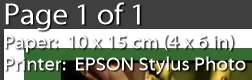
And Info will show the paper size-

3 replies

Participant
October 13, 2023

Did you ever find a solution? I've tried all of these methods, and I still can't get it to work. I'm so frustrated, and I've been thinking of moving to Capture One anyway. This might push me over the edge to make the change. 


Rikk Flohr_Photography
Community Manager
October 13, 2023

Aside: I print 4x6 almost daily with no issues. See the advice below about posting a new thread with complete details. 

You’ve posted to an ancient thread. It is highly unlikely that the issue described in this thread, though not impossible, is the same one you are currently experiencing. Rather than resurrect an old thread that is seemingly similar, you are better off posting to a new thread with fresh, complete information, including system information, a complete description of the problem, and step-by-step instructions for reproduction. 


If the issue is the same, we will merge you back into the appropriate location. 


Thank you!


Rikk Flohr: Adobe Photography Org
ikoniqozAuthor
Inspiring
December 31, 2017

wobertc   Many thanks for your time in providing your solution. Seriously appreciated.

Neox99
Legend
December 30, 2017

Make sure Layout Style is set to Single Page

Then try using the Printer dialog box (the one you are showing) Page Setup (center tab) and see if there is a setting not right there.

ikoniqozAuthor
Inspiring
December 30, 2017

@Neox99 - Thanks for the tip. I should have mentioned that Lr/Print setting for the print job is set to Single Image / Contact Sheet.

So, still no closer to resolving this. Pretty sure that the last time I printed 6x4 it was not like this as it is now. ...weird...

Also, the Page Setup tab in the Printer driver does not have provision for Single page - however there is an option for Fit to Page. Didnt see anything change with the Lr/Print  Layout settings dialog box..

Rob_Cullen
Community Expert
Rob_CullenCommunity ExpertCorrect answer
Community Expert
December 30, 2017

My answer is to totally ignore the default Lightroom templates- close them down!- they are all defined for A4 or 'Letter' sized paper.

You MUST use the Page Setup and your printer dialog to select your paper size (6x4inch) and then continue with the Layout adjustments in the panels on the right of screen. The Layout Style panel is [Single Image / Contact Sheet] and in Layout panel - 1 row, 1 column, Cell Sizes at Maximum, Margins at Minimum

When you have achieved the 6x4 on 6x4 paper- Save your own User Template for future use.

And Info will show the paper size-

Regards. My System: Windows-11, Lightroom-Classic 15.1.1, Photoshop 27.3.1, ACR 18.1.1, Lightroom 9.0, Lr-iOS 10.4.0, Bridge 16.0.2 .