Participant
June 7, 2018
Answered

CANT APPLY PRESETS

  • June 7, 2018
  • 1 reply
  • 8724 views

Hi, I can't apply presets on my photo in Lightroom CC, When I run over through the mouse on the presets column I could see photos with presets on left top corner, But when I click on the Photo It won't apply to the photo. Please Help

Thanks in advance!

    This topic has been closed for replies.
    Correct answer Rob_Cullen

    I have the same issue. I am using desktop version -
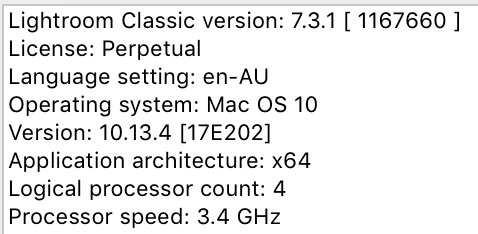
    I was able to apply them and now they only show in the navigator. I edit in raw and the presets I am trying to use are adobe default and one I created. 


    Your license "Perpetual"  does not permit you to use any version of Lr-7.  All Lr-7 (and above eg. 7.3.1) versions are only available by subscription.

    It appears you have been caught out by the bug in the Adobe update software that 'wrongly' allowed many to upgrade from a Version 6 (Perpetual) to a Version 7 (Subscribed).

    You have two choices-

    1) Subscribe to the Creative Cloud Photography Plan (paying monthly or yearly)

    2) Uninstall Lr-7.3.1 and return to using v6.14. 

    If you already subscribe you need to contact Adobe to fix your subscription details.

    If you do not subscribe, you need to return to Version 6 and there are two things to do-

    1) While you have Version 7 running, select all photos you have imported since the upgrade from v6 and "save metadata" [Ctrl+S]. this will preserve most of your editing done on these photos (with limitations).

    2) Find the v6 Catalog (copy or from a backup) that was created when you upgraded. As this is the only catalog that v6 will open. (Catalogs are not backward compatible with earlier versions of Lightroom)

    1 reply

    Rob_Cullen
    Community Expert
    Community Expert
    June 7, 2018
    But when I click on the Photo It won't apply to the photo

    If not a mis-type in your post-

    You need to click on the PRESET name in the Preset Panel to apply it to the photo.

    Regards. My System: Windows-11, Lightroom-Classic 15.1.1, Photoshop 27.3.1, ACR 18.1.1, Lightroom 9.0, Lr-iOS 10.4.0, Bridge 16.0.2 .
    Participant
    June 7, 2018

    Still No!

    FritzGulke
    Participant
    December 5, 2018

    FritzGulke  wrote

    Actually in this version of LR (with bug upgrade), presets do not work, but you can set a preset to apply when importing photos (apply on import) and then it works. Interesting, right? The conclusion is that presets work well, but it is not possible to apply them in develop.

    Which Version are you referring to?

    "Interesting, right?- Yes, but be prepared for more (possibly catastrophic?) catalog failures if you are trying to run v7 or higher without a subscription.


    WobertC  napisał(-a)

    Which Version are you referring to?

    6.14 + upgrade 7.31

    I described it only as a curiosity. Of course, I do not encourage anyone to apply presets in this way, because it would just be terribly uncomfortable :-)  and may cause other errors.

    I discovered this, wondering why presets do not want to apply after this unfortunate upgrade to 7.31. Then I returned to version 6.14 (thankfully I had a copy of the catalog).