
Participant
December 23, 2016
Answered

Change Lightroom app workspace color

  • December 23, 2016
  • 4 replies
  • 11389 views

How do i change the workspace color in the Lightroom app? It comes set to unusable black text on almost black background. I want to make the background white so i can actually see the menus and other text.
    This topic has been closed for replies.
    Correct answer DdeGannes

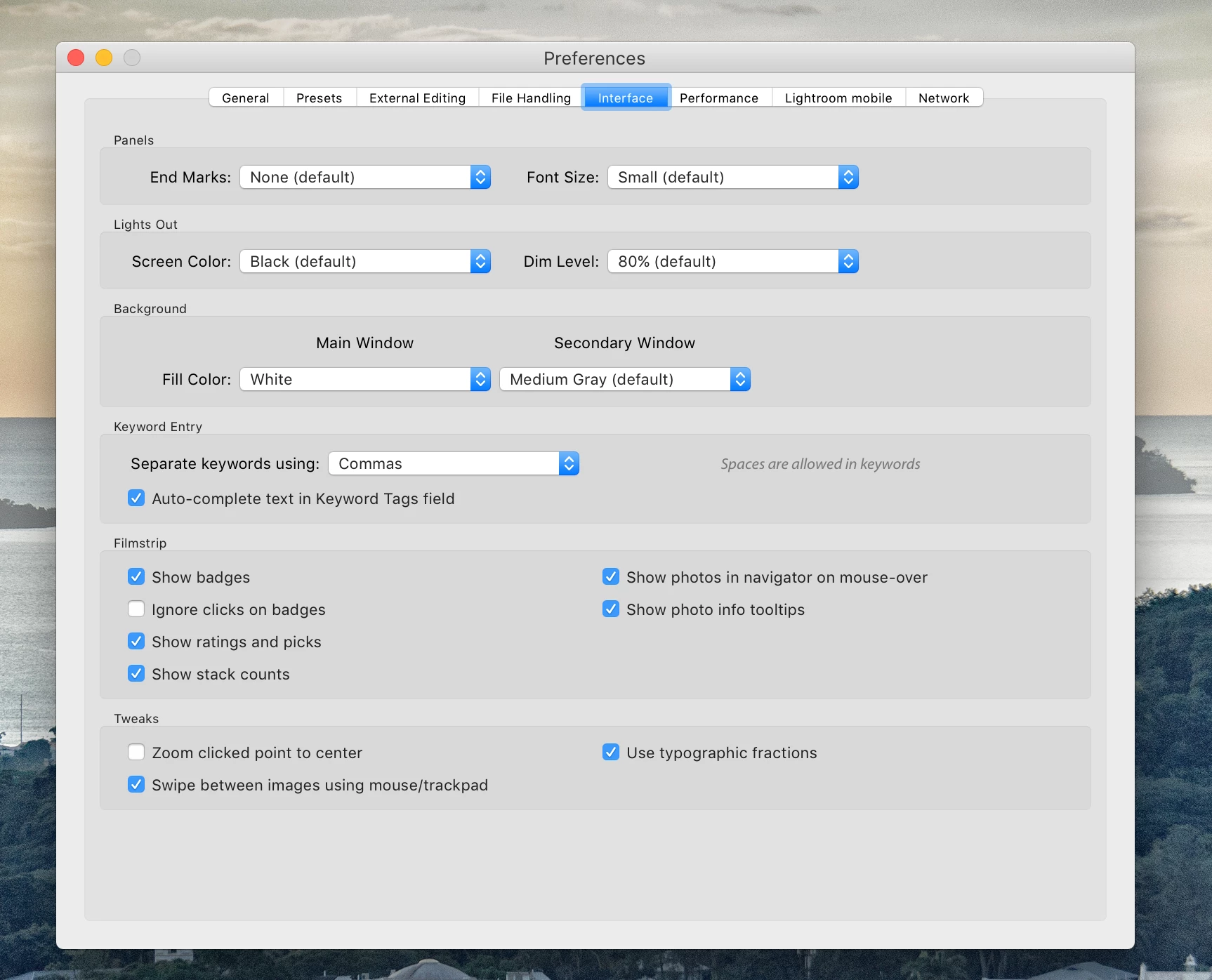
    In the main Lightroom menu bar go to Lightroom Preferences and select the interface tab. You can make changes there.

    See the screen capture.

    4 replies

    Community Expert
    September 5, 2022

    If you have trouble distinguishing the menus in the desktop app, your screen calibration is off and you need to recalibrate. If you have trouble reading the menus on a phone and it is an iPhone, the culprit is likely two settings that are on by default on iPhones that severely degrade the image display and they need to be turned off: True tone and night shift. They are in Settings->Display & Brightness. They are supposed to correct for the light in the room and to shift to warmer colors in the evening but in practice they severely degrade the color accuracy and can cause inconsistent contrast. Also make sure the screen is at reasonable brightness there for the room brightness you are in.

    Participant
    September 5, 2022

    Actualy the recomended answer to the question is wrong as it only changes the background of where the image is displayed and not colours on the user interface. 


    I have been looking fo this answer also.

    dj_paige
    Legend
    September 5, 2022

    You cannot change the color of the user interface.

    cliquot22Author
    Participant
    December 28, 2016

    The instructions are for the laptop/PC version of Lightroom.  My question is about changing the color of the app on my phone.  There don't appear to be any settings for the phone app.  DdeGannes

    selondon
    Community Expert
    Community Expert
    December 28, 2016

    Hi,

    Unfortunately it is not possible, on iOS at least

    DdeGannes
    Community Expert
    DdeGannesCommunity ExpertCorrect answer
    Community Expert
    December 23, 2016

    In the main Lightroom menu bar go to Lightroom Preferences and select the interface tab. You can make changes there.

    See the screen capture.

    Regards, Denis: iMac 27” mid-2015, macOS 11.7.10 Big Sur; 2TB SSD, 24 GB Ram, GPU 2 GB; LrC 12.5,; Lr 6.5, PS 24.7,; ACR 15.5,; (also Laptop Win 11, ver 24H2, LrC 15.0.1, PS 27.0; ) Camera Oly OM-D E-M1.
    Participant
    September 22, 2021

    I'm using ios laptop yet when I gp tp preferences the menu bar doesnt appear as showen in the picture. I really need to change app background color to light color. Because working on dark colored background doesnt help me to make edits for all white websites. 

    DdeGannes
    Community Expert
    Community Expert
    September 22, 2021

    The screen capture you posted shows you are using the new Lightroom (cloud-based) application, this is the Lightroom Classic forum.

    Please post your question in the Lightroom ecosystem cloud-based forum.


    Regards, Denis: iMac 27” mid-2015, macOS 11.7.10 Big Sur; 2TB SSD, 24 GB Ram, GPU 2 GB; LrC 12.5,; Lr 6.5, PS 24.7,; ACR 15.5,; (also Laptop Win 11, ver 24H2, LrC 15.0.1, PS 27.0; ) Camera Oly OM-D E-M1.