


- Home
- Lightroom Classic
- Discussions
- Re: DeNoise works on Samsung S22 DNGs, but not on ...
- Re: DeNoise works on Samsung S22 DNGs, but not on ...

Copy link to clipboard
Copied
Lightroom Classic 12.3
Windows 11
NVidia GeForce GTX 1650 (driver version 531.61) (Also doesn't work with driver 528.49)
I have a number of DNGs shot on my Samsung Galaxy S23, and others DNGs shot on my Samsung Galaxy S22. The DeNoise feature works on the S22 DNGs, but I can't use it on the S23 DNGs as the DeNoise button never becomes active. I am thinking there may be a camera setting that may influence this, or somehow this is a bug in Adobe DeNoise, or somehow Samsung has changed their DNGs with the S23. I don't really have a clue how to figure this out. Any explanation or suggestions?
DeNoise works properly on NEF files from my Nikon cameras
I have placed two sample DNGs on Dropbox.
S22: https://www.dropbox.com/s/1uxg6d93if5gav0/S22_20220705_184931%20%281%29.dng?dl=0
S23: https://www.dropbox.com/s/a5rcdt13jz8s4gv/S23_0230423_174343.dng?dl=0


 1 Correct answer

Did you take that sample with Samsung's Expert Raw app or LR Mobile's camera?
I can't download your samples (they've been deleted), but this Samsung article says that Expert Raw app saves "raw" photos in linear DNG format (i.e. demosaiced):
Denoise can't handle linear-DNG photos (but maybe well in the future).
You can easily see if your DNGs are linear: In Library, select a DNG and look
...
 33
Replies
33
33
Replies
33


Copy link to clipboard
Copied
Copy link to clipboard
Copied
By now they also don't work with the S22, at least if you don't have a firmware before 02/2023.

Copy link to clipboard
Copied
RAW files generated using Google Camera Port (gcam)
work with denoise (all lenses, s24u):
1. install app: "AGC9.2.14_V8.0_samsung.apk"
2. load configs "MAZAR AGC9.2 X6 S24u"
3. enable RAW+jpg saving
...disappointed with samsung. my RAW files from s21FE used to work with denoise
Copy link to clipboard
Copied
Most of us know that, yet third party apps with all their limitations are no solution, Samsung needs to fix their stock app. Btw. I prefer ProShot.
Copy link to clipboard
Copied
I can confirm that with my Samsung S23 Expert Raw DNGs, the new Lightroom 14.0 can indeed use AI Denoise on these photos. It allows you to use any of the camera modes (Telephoto, Ultra-Wide or Wide) and you still can run AI Denoise. I can also confirm that the linear DNG from Samsung's Pro mode (which is not Expert RAW) will run through LrC 14.0 AI Denoise.
My problem continues to be that I simply don't like the photos created by Expert RAW. I find the pixels are "smeared" and the colors are just awful in low light (which is where I need AI Denoise). At least in direct comparisons with the Lightroom Mobile app, using only the Wide mode in Expert Raw, the LR Mobile app produces sharper photos with better colors.
The RAW (DNG) photos from Pro Mode aren't as good as the LR Mobile app either, even after AI DeNoise, but IMHO better than Expert RAW. The 50 MP RAW is just awful in low light.
Copy link to clipboard
Copied
Just because Adobe found an Ai De-noise algorithm for jpg does not mean Samsung does not have to fix their Pro Mode raw.
I suppose raw based de-noise might look better?
Copy link to clipboard
Copied
Just because Adobe found an Ai De-noise algorithm for jpg does not mean Samsung does not have to fix their Pro Mode raw.
By @Wurstkrapfen

Adobe does not yet have the capability to run AI DeNoise on JPGs. These are DNGs from Expert RAW that I am referring to.
I suppose raw based de-noise might look better?
By @Wurstkrapfen
I still don't like the low light DNGs from Samsung's Pro Mode or Expert RAW. I updated my post from a few minutes ago.
Copy link to clipboard
Copied
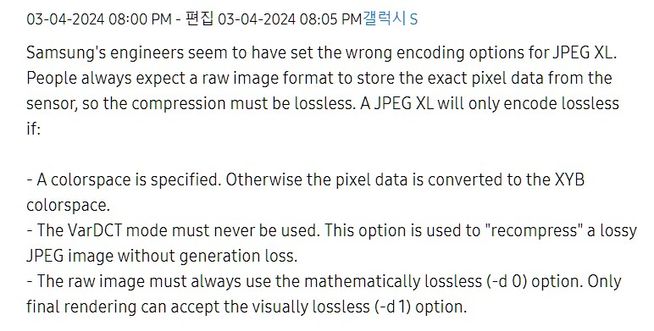
Well those Samsung DNGs just contain a jpgXL. Would be an interesting comparison to shoot the same subject with real raw from a thirdparty app and one with ProMode and see what looks best.
Copy link to clipboard
Copied
Well those Samsung DNGs just contain a jpgXL. Would be an interesting comparison to shoot the same subject with real raw from a thirdparty app and one with ProMode and see what looks best.
By @Wurstkrapfen
I did that. I compare Samsung Pro Mode and Samsung Expert Raw with the LR Mobile App camera. The Lr Mobile App camera wins every single time.

-
- 1
- 2

Find more inspiration, events, and resources on the new Adobe Community
Explore Now
 AdChoices