
vossinc
Known Participant
October 10, 2024
Question

Exported JPGs from Lightroom (both classic and new) look dull

  • October 10, 2024
  • 2 replies
  • 1152 views

Hi friends, 

I've gone through all forums looking for an answer and I can't find any solution, so I apologize if I am being reduntant by asking this question again.

I spent hours editing images in Lightroom thinking I could just export JPGs but the exported images are coming out flat and dull. Basically the bright whites are not being saved. 
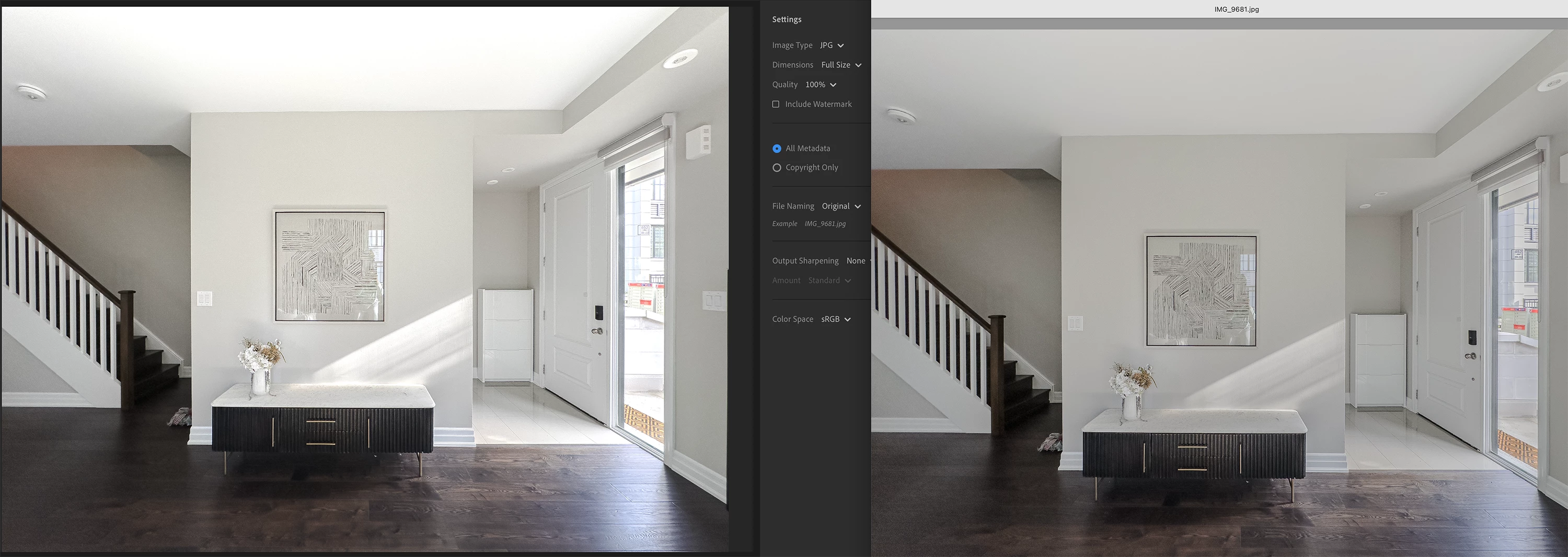


• I am exporting in sRGB. Also tried other profiles like Display P3, Adobe RGB, Prophoto RGB

• My monitor is set to the right settings. I am a graphic designer and use my machine daily for creative work.

• I tried toggling off User Graphic Processor. It makes things look flat in Lightroom (just like the exported JPGs) but not sure what to do with this information. 

• I have cleared my Lightroom cache

• I tried opening in Photoshop either from Lightroom or by opening the DNG and its still looking flat. 


I am in urgent need of these photos so my only solution at the moment is to screenshot the edited images from Lightroom. This is a terrible workaround. 


Please help!

This topic has been closed for replies.

2 replies

JohanElzenga
Community Expert
Community Expert
October 10, 2024

Are you editing with HDR enabled? Most viewers do not support this, and exporting in JPEG does not work because JPEG does not support it.


-- Johan W. Elzenga
vossinc
vossincAuthor
Known Participant
October 10, 2024

Hi Johan, thanks for your speedy reply.

Yes I had used HDR for most of the photos. If this is the culprit, may I ask what is the point of having this option in Lightroom if I am unable to actally use the image when I export it? 

And now that I have spent hours using HDR, what is the quickest way to solve this issue aside from screenshoting every photo from Lightroom?

JohanElzenga
Community Expert
Community Expert
October 10, 2024

HDR is in the early stages. You can export it, but not as regular JPEG because regular JPEG does not support it. JPEG XL does support it, or you can add a 'gain map' to JPEG, and there are some other file formats, but of course the viewing app must support it too. So either export in an appropriate format, or use the SDR Rendering part that you get when you enable HDR editing. https://helpx.adobe.com/lightroom-classic/help/hdr-output.html


-- Johan W. Elzenga
vossinc
vossincAuthor
Known Participant
October 10, 2024

Hi friends, 

Cross posting from Lightroom Classic community.
I've gone through all forums looking for an answer and I can't find any solution, so I apologize if I am being reduntant by asking this question again.

I spent hours editing images in Lightroom thinking I could just export JPGs but the exported images are coming out flat and dull. Basically the bright whites are not being saved. 


• I am exporting in sRGB. Also tried other profiles like Display P3, Adobe RGB, Prophoto RGB

• My monitor is set to the right settings. I am a graphic designer and use my machine daily for creative work.

• I tried toggling off User Graphic Processor. It makes things look flat in Lightroom (just like the exported JPGs) but not sure what to do with this information. 

• I have cleared my Lightroom cache

• I tried opening in Photoshop either from Lightroom or by opening the DNG and its still looking flat. 


I am in urgent need of these photos so my only solution at the moment is to screenshot the edited images from Lightroom. This is a terrible workaround. 


Please help!

vossinc
vossincAuthor
Known Participant
October 11, 2024

Solution found here!

Participating Frequently
October 11, 2024

It's great that you have found the solution in your community forum from our experts. Since both posts are the same, I am merging this thread with the existing thread. 


Thanks, 


Shivani