
Answered
How do I set a standard color profile in Lightroom?
Hi,
I'm fairly new to Lightroom (bought it about a week ago), yet I've already learned a lot about it functions.
One thing that is bothering me though is that I cannot seem to find out how to set a stock color profile.
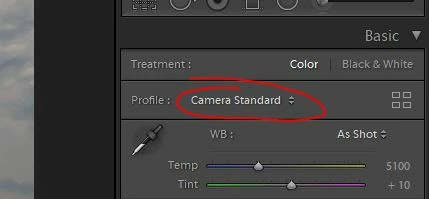
Obviously I'm not talking about the color space you choose when exporting a RAW file as JPEG, but about the color profile that is the very first option in
the Basic-tab in the Develop-section (I've attached a image in case I'm not clear enough).
It is always set to Adobe Color, but I want I want it to be my camera's standard-setting on every picture, without having to manually do that every time.
Does anybody know if and how I can fix that?
Thanks in advance!


 AdChoices