joeh87907460
Inspiring
May 3, 2020
해결됨

How to export image sequence from lightroom classic in format 001.jpg 002.jpg 003.jpg ~ 999.jpg

  • May 3, 2020
  • 1 답변
  • 4564 조회

How do you set Lightroom's export so that the exported images are in the sequence 001.jpg, 002.jpg, 003.jpg ~ 999.jpg? I don't want a filename or anything else in front of the 001.jpg or any of the rest of them, just the number sequence. I had it set that way, and I can't remmeber how I did it. Lighroom updated or something because I was using it one day and everything was fine, the the next day I opened it and adobe had 'updated' it and every thing was reset. And I can't figure out how I did that before. 


Now all exports start with 001.jpg then go to 001-1.jpg, 001-2.jpg, 001-3.jpg ~ on up to 001-999.jpg. I don't want that crap! All of the settings include putting a "custom" file name of some sort, and if I delete that, it inserts an underscore before the number like _1.jpg, or if I don't delete it but don't put a filename, it exports them like untitled-001.jpg. 


ADOBE, STOP CHANGING SETTINGS JUST LEAVE THEM THE HECK ALONE. IF YOU CAN'T DO AN UPDATE WITHOUT CHANGING SOMETHING, THEN DON"T DO THE DAMNED UPDATE! JUST STOP CHANGING PEOPLES STUFF. 
이 주제는 답변이 닫혔습니다.
최고의 답변: Rob_Cullen

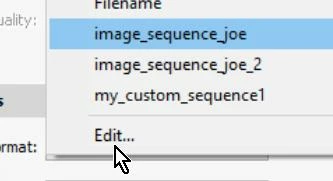
"Not there"?  It will be when you create it.

Just click on Edit.... 

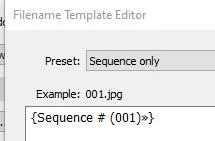
Design the Preset as I indicated in the Template Editor.

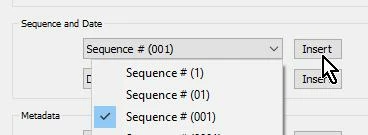
You need to delete everything from the Editor large box then [Insert] one of the options in the drop-down menus. You do not type any number like 001, or add anything else.


And SAVE this preset.

Saving a Preset can be tricky! You have to click on the drop-down menu in the Preset: box where you will see- "Save Current Settings as  new Preset". and you name it what you want. (My name for this preset is "Sequence only" )

https://photographylife.com/using-filename-template-editor-in-lightroom

https://havecamerawilltravel.com/lightroom/how-to-batch-rename-photo-filenames-in-lightroom/

https://lightroomkillertips.com/photo-renaming-options-lightroom/


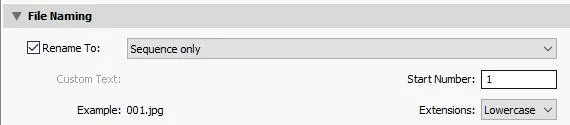
In your Export dialog you select the Filename Preset that YOU saved.

And note that you can then also enter the 'Start' Number- (but Lightroom will always start at 001 unless YOU enter a new number)


1 답변

Rob_Cullen
Community Expert
Community Expert
May 3, 2020

Make a 'Rename' preset in the Filename template Editor-

Use this Preset in your Export dialog.


"STOP CHANGING SETTINGS"-  Make Presets! they never change unless YOU change them!


Regards. My System: Windows-11, Lightroom-Classic 15.1.1, Photoshop 27.3.1, ACR 18.1.1, Lightroom 9.0, Lr-iOS 10.4.0, Bridge 16.0.2 .
joeh87907460
joeh87907460작성자
Inspiring
May 3, 2020

Thank you for trying to help, I appreciate it. But that option is not in my copy of Lightroom Classic, and I have the latest update. Here is a screenshot to that effect. I have created 3 of my own and none of them do what I want.


I did however solve the problem with information gleaned from this web page:  https://www.lightroomqueen.com/community/threads/exporting-with-1st-number-starting-at-01-or-001-and-not-1.20134/

Rob_Cullen
Community Expert
Community Expert
May 3, 2020

"Not there"?  It will be when you create it.

Just click on Edit.... 

Design the Preset as I indicated in the Template Editor.

You need to delete everything from the Editor large box then [Insert] one of the options in the drop-down menus. You do not type any number like 001, or add anything else.


And SAVE this preset.

Saving a Preset can be tricky! You have to click on the drop-down menu in the Preset: box where you will see- "Save Current Settings as  new Preset". and you name it what you want. (My name for this preset is "Sequence only" )

https://photographylife.com/using-filename-template-editor-in-lightroom

https://havecamerawilltravel.com/lightroom/how-to-batch-rename-photo-filenames-in-lightroom/

https://lightroomkillertips.com/photo-renaming-options-lightroom/


In your Export dialog you select the Filename Preset that YOU saved.

And note that you can then also enter the 'Start' Number- (but Lightroom will always start at 001 unless YOU enter a new number)


Regards. My System: Windows-11, Lightroom-Classic 15.1.1, Photoshop 27.3.1, ACR 18.1.1, Lightroom 9.0, Lr-iOS 10.4.0, Bridge 16.0.2 .