


Participant
January 7, 2022
해결됨

Issue migrating to LrC 11 from LR6 catalog that had JPG+CR3 (metadata only on JPG)

  • January 7, 2022
  • 1 답변
  • 370 조회

I have been using Lightroom 6 for a while and have a large catalog (70k pictures). I got a new camera a few months ago which shoots CR3 which Lightroom 6 could not handle (I didn't realize that at first). I continued using LR6 and have many folders (~35) which have the CR3+JPGs, and my edits and metadata (keywords, flags, etc) are associated just with those JPG files (LR6 just ignored the CR3s)


Now I would like to move to LrC 11, but have a problem with those already created folders that contain the CR3+JPGs after I have converted the catalog and am using LrC11. If I Synchronize those existing folders, LrC 11 says the JPG files are "missing" and the raw CR3 files are "new", so all the metadata is lost:
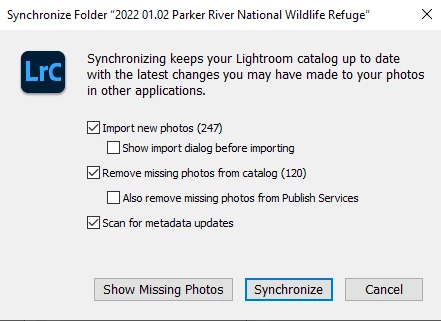
I could just "not touch" those folders ever (I do not want to lose/redo that metadata) but I would really rather have the option to make changes and still keep that metadata. 


If I have to Synchronize one of these folders, is there any way I can make this work? ie combine JPG+CR3 but keep the metadata from the JPGs from LR6

이 주제는 답변이 닫혔습니다.
최고의 답변: Rob_Cullen

My Suggestions-

Do NOT synchronize the Folder. Instead use the regular [IMPORT] dialog and set the source as the required Folder. The Import dialog must be set to [ADD] and [Dont Import suspected duplicates]

Now you will have both JPGs and RAWs together in the one folder.

Use John Beardsworth's "Syncomatic" plugin if you want to transfer metadata from JPGs to RAWs.

Syncomatic – Lightroom Solutions


1 답변

Rob_Cullen
Community Expert
Community Expert
January 7, 2022

My Suggestions-

Do NOT synchronize the Folder. Instead use the regular [IMPORT] dialog and set the source as the required Folder. The Import dialog must be set to [ADD] and [Dont Import suspected duplicates]

Now you will have both JPGs and RAWs together in the one folder.

Use John Beardsworth's "Syncomatic" plugin if you want to transfer metadata from JPGs to RAWs.

Syncomatic – Lightroom Solutions


Regards. My System: Windows-11, Lightroom-Classic 15.1.1, Photoshop 27.3.1, ACR 18.1.1, Lightroom 9.0, Lr-iOS 10.4.0, Bridge 16.0.2 .
mothra9999작성자
Participant
January 8, 2022

Thanks Rob! The alternate Import option combined with the plugin worked. Requires a bit of manual effort to now remove the JPGs from the library now that the raws are detected, but that is manageable.