


Participant
April 15, 2019
해결됨

Issues with copy/synch of localized adjustment with mask - LR5

  • April 15, 2019
  • 2 답변들
  • 1269 조회

Hi all!

I have two copies of the identical photo.  The only difference is that one copy has had some photoshop changes and is a .TIF file, and the other is a raw file with a few lightroom adjustments.  No changes to the crop, rotation, angle, etc. have been done that might skew a localized adjustment mask.  I am using Lightroom 5.0 on a PC.

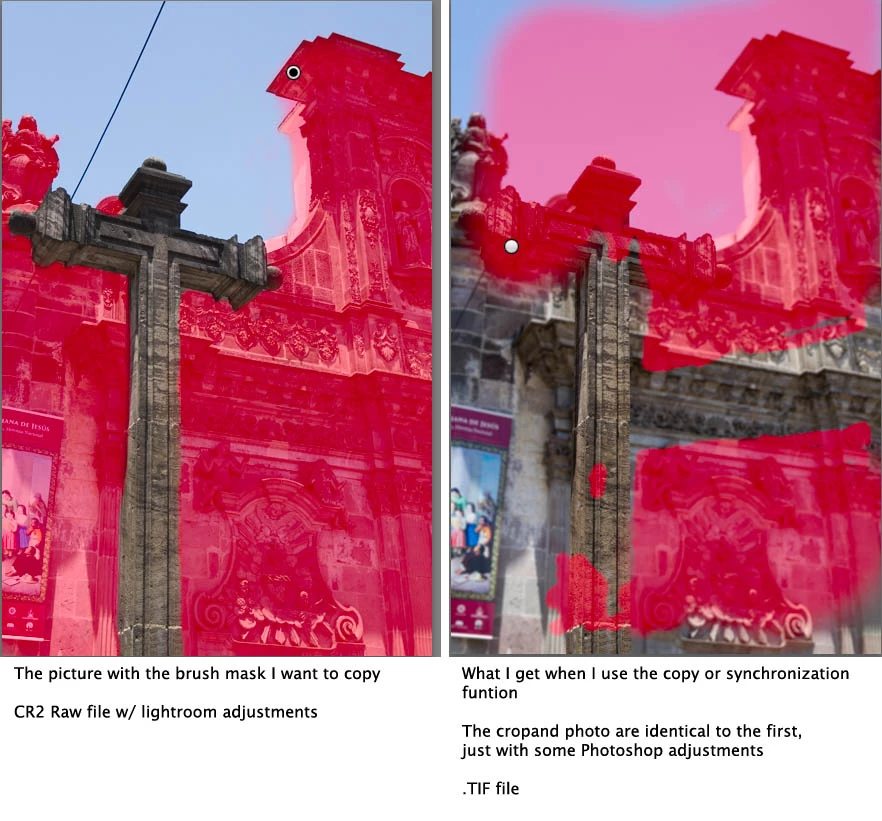
I have an adjustment brush mask on my raw file that I would like to copy over to the .tif file.  I've tried both the copy settings/paste way of doing it, as well as the synchronize way of doing it (both times ensuring that all 'Local Adjustments' options and 'Process Version' were selected and nothing else).  Both approaches have the same result, and in both cases the result is way off.  (I've attached a photo to show what I mean).  What am I doing wrong?  It's not even close enough to warrant slight adjustments on my part.  I even exited Lightroom and re-booted it.

As you can see, not only is the mask way off, but the pin for the adjustment isn't even in the same place.  Any advice?

Thanks!
    최고의 답변: Sean McCormack

    I'm guessing this is a portrait orientation? I'm also guessing that Lightroom is reading the in camera orientation and applying it with metadata. When you save back from Photoshop, it has a new vertical orientation, not an internal one from metadata, so Lightroom is copying the mask sideways.

    This happens with the Grad filter or used to happen and was a pain for making presets.

    2 답변

    Inspiring
    November 18, 2025

    I have this issue fairly often on RAW files. I photograph a lot of paintings. I usually have lights on the left and right and need to adjust the exposure  with gradients as the left and right sides are often brighter than the middle. Oftentimes I shoot landscape oriented ones vertically because of space, but when I rotate the image in LRC, the adjustments don't rotate as well. I have a feeling this has something to do with metadata stored in the xmp sidecars. I use PhotoMechanical initially to rotate and name and add metadatat to my raw files before importing them into LRC usually with a preset which may have the gradient adjustments built in on left and right. In previous versions of LRC I never had an issue with the orientation of the synched adjustment layers, but in the last few updates it has appeared. It's very frustrating, because I have to rotate the gradients manually, even though they should be applied in the exact same place from image to image.

    Sean McCormack
    Community Expert
    Community Expert
    April 15, 2019

    I'm guessing this is a portrait orientation? I'm also guessing that Lightroom is reading the in camera orientation and applying it with metadata. When you save back from Photoshop, it has a new vertical orientation, not an internal one from metadata, so Lightroom is copying the mask sideways.

    This happens with the Grad filter or used to happen and was a pain for making presets.

    Sean McCormack. Author of 'Essential Development 3'. Magazine Writer. Former Official Fuji X-Photographer.
    superducki작성자
    Participant
    April 16, 2019

    That would make sense as the cause of the problem.  I tried bringing the .tif back into photoshop, rotating it onto its side, bringing it BACK into lightroom, rotating it back to vertical, and THEN applying the mask.  And it was definitely closer to what I'd expect, though not perfect.  Because apparently, the edits I did in lightroom before the original export to photoshop (which had the edits embedded into the new image) were not taken into consideration when copying the mask?  It seems really weird that the adjustment mask is being copied as if on an original photo and doesn't take into any consideration the orientation or adjustments already made to said photo.

    Do you know if there's a work around or an option to copy settings as-is-now and not as-before? 

    Thanks so much for your help!

    johnrellis
    Legend
    April 16, 2019

    I understand that.  But I'm more baffled by LR being unable to copy an adjustment mask on a vertical oriented photo without flipping the adjustment mask 90 degrees counter clockwise.  I guess my question wasn't clear, but I was just asking if there was a work around to get LR to copy/paste the mask exactly as it's shown.  To not being able to accurately copy location-specific settings just because it's not a landscape-oriented image seems like a design flaw. 

    Right now the only workaround I've found is importing photos in photoshop, rotating them, re-saving them, and re-importing them on their sides, pasting the mask, and then re-rotating them back to their original portrait-mode orientation.  Just wondering if there is a more efficient way.

    Thanks!


    To not being able to accurately copy location-specific settings just because it's not a landscape-oriented image seems like a design flaw.

    It's a long-standing bug with a straightforward fix that Adobe has decided not to implement.  See this bug report in the official Adobe feedback forum: Lightroom CC: Crops and local adjustments don't copy properly on rotated pics | Photoshop Family Customer Community . Please add your constructive opinion and click Me Too and Follow in the upper-right corner of the bug report. That will make it a little more likely Adobe might fix it before the next ice age.  Since only four people have me-too'ed the bug in the last three years, I think Adobe has decided it affects only a relatively small number of people.

    The problem strikes crops as well as local adjustments.  An Adobe engineer posted an incorrect analysis of the bug. I tried to correct that and offered to send the small number of source lines from my Any Crop plugin that show how to do it correctly, but I never heard back.