This time it worked from your link - thanks a lot for helping. Mut be I had an older installer.
This time it worked from your link - thanks a lot for helping. Mut be I had an older installer.
By @sigo
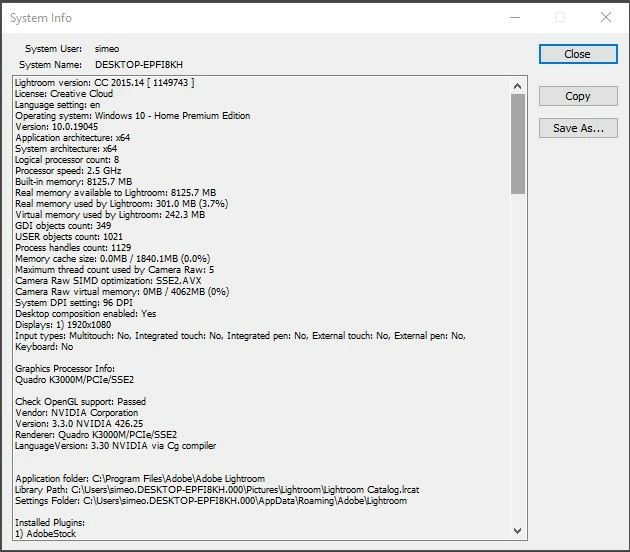
This seems not from the links that @Per Berntsen and I posted. In the posted links are installation files for the latest version of the perpetual Lightroom 6 version (6.14).
I don't know which link you've used, you installed a subscription based version, as @Rob_Cullen wrote.
Do you ask for an upgrading your catalog file after you start Lightroom?
The only way to fix it is a complete clean reinstallation of Lightroom 6. But beaware and deactivate your recent installation. Lightroom (Legacy v6.14) does not work if you have the Creative Cloud Desktop App installed. The desktop App converts Lr6 to Lr CC1025 which requires a paid subscription.
I can only suggest the following clena reinstallation without the CC client
This is now the only way known to install, activate and use Lr6.14
Check in your Adobe account if you have a subscription; login with your Adobe ID. If there's a subscription listed you must cancel it. Please take a look here:
https://helpx.adobe.com/manage-account/using/cancel-subscription.html
and here:
https://helpx.adobe.com/manage-account/using/creative-cloud-subscription-terms.html
If this isn't help, try to enable popups and cookies in your browser or use another browser.


 AdChoices